

Pawl: App Blocker With a Key
JASON EVAN PAGE Productivity iPhoneiPadiPod touch
Pawl: App Blocker With a Key is a free Productivity app for iPhone and iPad by JASON EVAN PAGE. Rated 5.0/5 from 1 ratings. Requires iOS 18.0.
- Rating
- 5.0
- 1 ratings
- Price
- Free
- on the App Store
- Size
- 3 MB
- Age 4+
- Updated
- Oct 21
- 2026 · v2.3
Screenshots


About Pawl: App Blocker With a Key
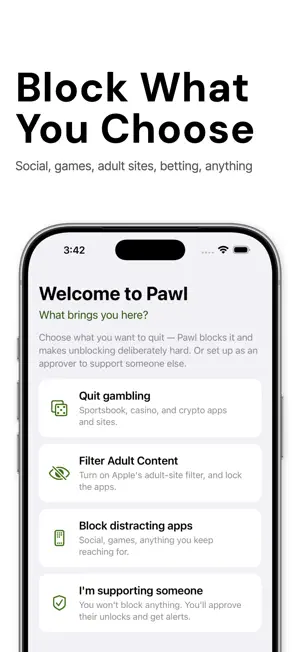
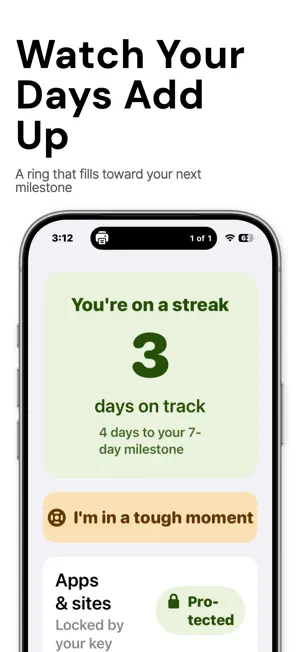
Most blockers can be turned off by the same person who set them up, in about thirty seconds, at the exact moment they most want to. Pawl is built for that moment. Pawl blocks the apps and websites you choose. Social feeds, games, shopping, news, adult sites, betting, anything. It uses Apple's Screen Time. The block screen has no unlock button. To open anything, you need your key. HOW IT WORKS - Pick what to block. Choose apps in Apple's own Screen Time picker, type in websites, or turn on a website category. - Pair a security key. Plug in a physical FIDO2 security key once. Then put it somewhere hard to reach. - To unblock, you need the key. Then you wait 15 minutes before anything opens. After that, the block comes back on by itself. - You can make the wait longer at any time. Making it shorter is delayed too. YOUR KEY IS YOUR ACCOUNTABILITY Whoever holds your key decides when Pawl can open. Give it to a sister or friend across town, put it in a time lock box, a bank safe deposit box, or your desk at work. They don't need to install anything. A real example: it is 1am and you open the app you told yourself you were done with. You see Pawl's block screen. Your key is at your sister's place across town. By the time you could get it and wait out the 15 minutes, the urge has usually passed. That is the whole idea. FOR THE HARD MOMENTS - An "I'm tempted" button: a ten-minute wait, your own notes from past moments, how many times you have resisted, and a one-tap call to someone you trust. It never leads to an unblock. - A streak that survives deleting the app. It lives in your iCloud. - A private log. Slips are part of changing a habit, and nothing in Pawl scolds you for one. WHILE PAWL IS PROTECTING YOU - Pawl turns on Screen Time's block on deleting apps, so deleting Pawl is not a quick way out. - Pawl asks Screen Time to require automatic date and time, which is meant to stop you from moving the clock ahead to skip the wait. PAWL PRO - Scheduled sets: a Work set that blocks social apps 9 to 5 on weekdays, or an Evenings set for after 8pm. When a set's hours end, its apps open on their own. Up to ten sets. Making a set block less needs your key and the wait. - The weekly report: the days Pawl was on, hours back, blocked attempts, urges resisted, the time of day that was hardest, and your own words from the week. It never scores or grades you. HONEST ABOUT THE LIMITS Pawl adds friction. It is not a cage. - iOS lets the owner of a phone turn Screen Time off. No app can stop that. Pawl notices the next time it runs and says so. For a firmer lock, ask someone you trust to set your Screen Time passcode in person and keep it. - No blocklist is complete. The optional gambling list has 167 sites, and new ones appear all the time. - Someone set on it can still use another phone or a computer. Pawl makes the 1am version slow, not impossible. PRIVACY Pawl collects no data. There is no account and no Pawl server. Screen Time gives Pawl only anonymous tokens, so Pawl never learns which apps you picked. Your streak, your sets, your typed sites and your logs stay on your phone and in your own iCloud. No ads. No tracking. OPEN SOURCE Pawl's code is public under the Mozilla Public License 2.0, so anyone can read how the key check and the block work: github.com/jasonepage/Pawl. No independent security audit has been done yet. FREE CORE, OPTIONAL PRO Blocking, the key unlock, the 15-minute wait, your streak, the "I'm tempted" tools and the private log are all free. Pawl Pro adds new scheduled sets and the weekly report. Sets you made before Pro keep working for free. Pro costs $29.99 a year with a 7-day free trial, or $3.99 a month, and renews until you cancel. WHAT YOU NEED An iPhone or iPad on iOS 18 or later, and a FIDO2 security key. Any standard security key with a USB-C plug works. Terms of Use: https://www.apple.com/legal/internet-services/itunes/dev/stdeula/ Privacy Policy: https://getpawl.com/privacy
What’s new
Version 2.3 · Updated October 21, 2026
Your key is your accountability now. - The ally feature and Pawl's server are gone. Whoever holds your key decides when Pawl can open. Give it to someone across town, or put it in a time lock box or a bank safe deposit box. - No sign-in, no account, no notifications. Pawl now collects no data. Everything stays on your phone and in your own iCloud. - If you had an ally linked, unlocking and removing a block now need only your key and the wait. A clearer Home - "This week" shows each day as a dot, with a number for the urges you resisted that day. - With Pawl Pro, it also shows hours back, blocked attempts, the time of day that was hardest, and your own words from the week. - What's blocked shows simple chips, and Recent is shorter. Press and hold an entry to remove it. Simpler Settings - Four plain groups: what's blocked, unlocking, when you're tempted, and Pawl. Every row says what it is and how it's set right now. - Website categories are switches. Scheduled sets are one tap away. Also new - Setup suggests places to keep your key. - The gambling site list is built into the app (167 sites). - Plainer words throughout: "I'm tempted," "Resisted," and "Log a slip." Pawl Pro Pro now covers making new scheduled sets and the weekly report. Sets you already made keep working without Pro. If you subscribed for the ally feature and no longer want Pro, you can cancel in Settings, then your name, then Subscriptions.
App privacy
The developer, JASON EVAN PAGE, reported these privacy practices to Apple.
Data Not Collected
The developer does not collect any data from this app.
Alternatives to Pawl: App Blocker With a Key
Looking for apps like Pawl: App Blocker With a Key? Here are 6 similar apps on the App Store. The highest rated is Hedgy: Screen Time & App Block (4.5/5), and all 6 are free to download.
-
 SFirewall
-
 BrainGuard: Cut Screentime
-
 Restrix
3.7
Restrix
3.7
-
 Hush - Reduce Screen Time
-
 Hedgy: Screen Time & App Block
4.5
Hedgy: Screen Time & App Block
4.5
-
 Comelit WiFree
| App | Rating | Price | Last updated | Compare |
|---|---|---|---|---|
| Pawl: App Blocker With a Key | 5.0 / 5 (1 rating) | Free | October 21, 2026 | |
| SFirewall | – | Free | Oct 2, 2026 | Compare |
| BrainGuard: Cut Screentime | – | Free | Apr 29, 2026 | Compare |
| Restrix | 3.7 / 5 (3) | Free | Jul 31, 2025 | Compare |
| Hush - Reduce Screen Time | – | Free | Dec 11, 2025 | Compare |
| Hedgy: Screen Time & App Block | 4.5 / 5 (6) | Free | May 5, 2026 | Compare |
| Comelit WiFree | – | Free | Nov 20, 2024 | Compare |