

See Also: Wikipedia Reader
Brayden Toulouse Reference iPhoneiPadiPod touch
See Also: Wikipedia Reader is a paid Reference app for iPhone and iPad by Brayden Toulouse. Rated 5.0/5 from 1 ratings. Requires iOS 18.0.
- Rating
- 5.0
- 1 ratings
- Price
- 4.99 USD
- on the App Store
- Size
- 9 MB
- Age 12+
- Updated
- Jul 22
- 2026 · v1.3.0
Screenshots

About See Also: Wikipedia Reader
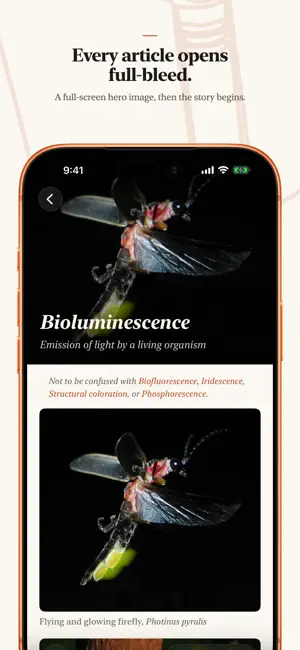
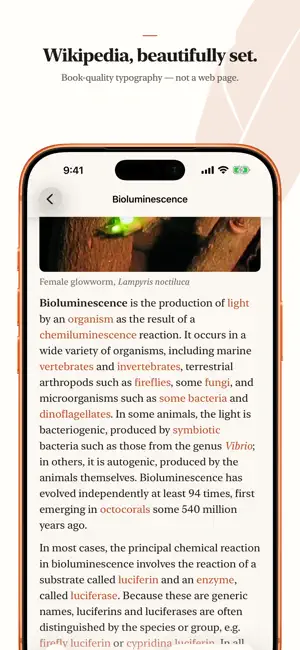
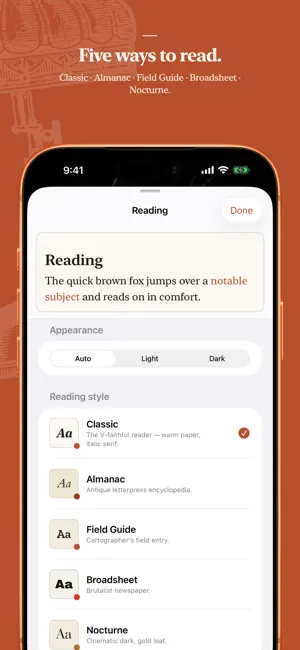
See Also is the typography-first Wikipedia reader in the spirit of V for Wikipedia. It's built for one thing: the quiet pleasure of reading the world's largest encyclopedia, beautifully. Most encyclopedia apps treat articles like web pages. See Also treats them like something worth reading. It features real typography, generous margins, and a layout that gets out of the way so the writing can do its work. TYPOGRAPHY THAT RESPECTS THE TEXT • Five hand-crafted reading styles: Classic, Almanac, Field Guide, Broadsheet, and Nocturne. Switch between them with a live preview as you choose. • Book-style first-line indents, balanced measure, and considered line spacing. • Light, Dark, or automatic appearance for any time of day. • Dynamic Type and accessibility support throughout. READING, NOT BROWSING • A clean article view, not a wrapped mobile website. • Collapsible "Quick facts" and data tables that stay out of your way until you want them. • A full-screen photo viewer with pinch-to-zoom, pan, and swipe-to-dismiss. • Bookmark anything; your saved articles keep their images for offline reading. A MAP OF WHAT'S AROUND YOU • Discover articles about the places near you on an interactive map. • Wander a city and read its history where it happened. YOURS, AND ONLY YOURS • No account. No ads. No tracking. No analytics. • See Also has no servers and never phones home; it talks directly to the encyclopedia's public API and nothing else. • Your bookmarks, history, and preferences live only on your device. · · · Article content is from Wikipedia, available under the Creative Commons Attribution-ShareAlike license (CC BY-SA). See Also is an independent app and is not affiliated with, endorsed by, or sponsored by the Wikimedia Foundation or Wikipedia. "Wikipedia" is a trademark of the Wikimedia Foundation. Privacy: https://seealso.app/privacy Support: https://seealso.app
What’s new
Version 1.3.0 · Updated July 22, 2026
A major update for readers who care about type. New Typography panel. Tune each reading style to taste: line spacing, letter spacing, and on iPad reading width, all with a live preview. Star your favorite styles so the quick menu shows only the ones you use. Sharper on iPad. The Today, Search, Saved, and Settings screens no longer stretch across the display, and Most Read now flows into multiple columns. A refreshed welcome guide, with its images built in so it opens instantly, even offline. Back to start. When you are deep in a chain of links, one tap returns you to where the rabbit hole began. Smaller text sizes, plus a wider and better balanced size range.
App privacy
The developer, Brayden Toulouse, reported these privacy practices to Apple.
Data Not Collected
The developer does not collect any data from this app.
Alternatives to See Also: Wikipedia Reader
Looking for apps like See Also: Wikipedia Reader? Here are 6 similar apps on the App Store. The highest rated is QuickyWiki - Short Daily Reads (5.0/5), and 4 of the 6 are free to download.
-
 Classroom PDF
4.5
Classroom PDF
4.5
-
 QuickyWiki - Short Daily Reads
5.0
QuickyWiki - Short Daily Reads
5.0
-
 Lore: Reader for Wikipedia
5.0
Lore: Reader for Wikipedia
5.0
-
 Nearest interesting places
4.3
Nearest interesting places
4.3
-
 DeepSwipe: Knowledge Feed
4.8
DeepSwipe: Knowledge Feed
4.8
-
 Marathon Kids Connect
4.0
Marathon Kids Connect
4.0
| App | Rating | Price | Last updated | Compare |
|---|---|---|---|---|
| See Also: Wikipedia Reader | 5.0 / 5 (1 rating) | 4.99 USD | July 22, 2026 | |
| Classroom PDF | 4.5 / 5 (16) | 9.99 USD | Jan 14, 2025 | Compare |
| QuickyWiki - Short Daily Reads | 5.0 / 5 (1) | Free | Sep 16, 2026 | Compare |
| Lore: Reader for Wikipedia | 5.0 / 5 (3) | Free | Oct 4, 2026 | Compare |
| Nearest interesting places | 4.3 / 5 (3) | 0.99 USD | Sep 23, 2024 | Compare |
| DeepSwipe: Knowledge Feed | 4.8 / 5 (5) | Free | Sep 11, 2026 | Compare |
| Marathon Kids Connect | 4.0 / 5 (16) | Free | Sep 22, 2026 | Compare |