

Focus Gate: Block Screen Time
KINGMAKERAPPS LTD Productivity iPhoneiPadiPod touch
Focus Gate: Block Screen Time is a free Productivity app for iPhone and iPad by KINGMAKERAPPS LTD. Requires iOS 16.4. Updated August 10, 2026.
- Price
- Free
- on the App Store
- Size
- 8 MB
- Age 4+
- Updated
- Aug 10
- 2026 · v1.2
Screenshots
About Focus Gate: Block Screen Time
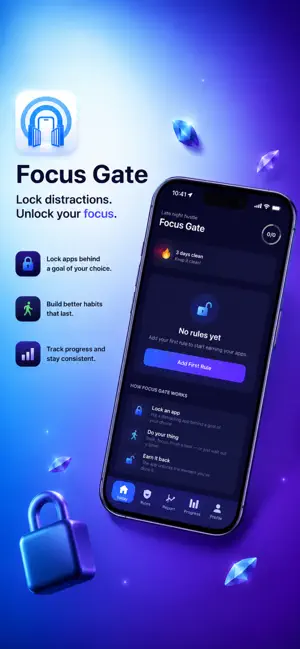
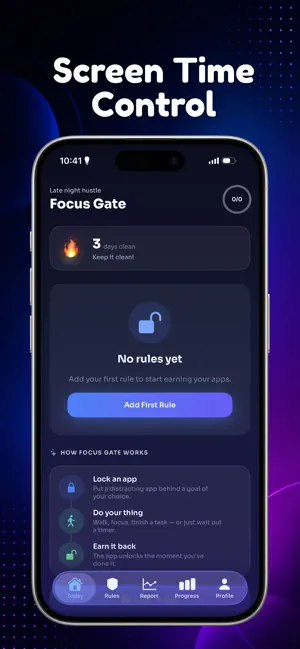
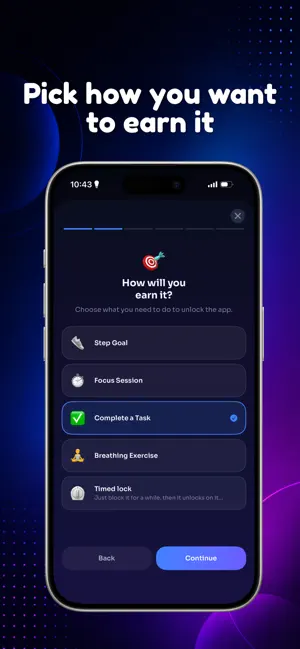
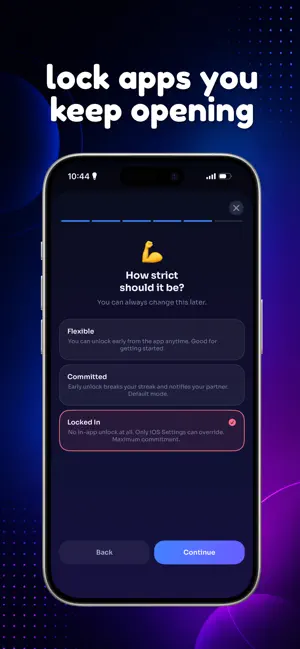
Your phone fights for your attention all day. Focus Gate helps you win — by locking your most distracting apps until you earn them back. Most blockers just say "no." Focus Gate is different: you unlock your apps by doing something good for you — walking toward a step goal, completing a focus session, or finishing a real task. Screen time becomes something you earn, not something you waste. WHY FOCUS GATE • Earn-to-unlock — walk, focus, finish a task, or take a breathing break to open a blocked app • Timed Lock — or skip the earning and lock an app for a set time, no conditions attached • Real blocking — powered by Apple Screen Time; apps stay shut until you follow through • Streaks & rewards — daily streaks, freezes, and achievements keep you going • Commitment levels — from Flexible to Locked In for when you really mean it • Smart schedules — auto-block during work hours and bedtime • Honest insights — your focus score, streaks, and how often distractions call • Home-screen widgets — see your streak and progress at a glance HOW IT WORKS 1. Pick the apps that steal your time — Instagram, TikTok, games, your choice 2. Choose how to earn them back: steps, a focus session, a task, or a breathing exercise — or set a simple timed lock instead 3. Try to open a blocked app and Focus Gate reminds you what to do first 4. Follow through, the app unlocks for a set time, and your streak grows FREE TO USE Every feature is free with daily limits. Go Pro to remove all limits and ads: • Unlimited rules, sessions, and unlocks • No ads • Full 90-day insights Choose Weekly, Monthly, Yearly, or a one-time Lifetime unlock. Built for adults managing their own screen time. Your screen-time activity stays on your device. Start earning your focus today. Focus Gate Pro is an auto-renewable subscription. Your Apple ID is charged at purchase confirmation. Subscriptions renew automatically unless cancelled at least 24 hours before the period ends. Manage or cancel anytime in your App Store account settings. A one-time Lifetime option is also available. Privacy Policy: https://www.kingmakerapps.com.ng/privacy Terms of Use (EULA): https://www.apple.com/legal/internet-services/itunes/dev/stdeula/
What’s new
Version 1.2 · Updated August 10, 2026
• Fixed setup screens that could be skipped by swiping • Clearer instructions for starting a focus session • Timed Lock is now the first unlock option • Bug fixes and improvements
App privacy
The developer, KINGMAKERAPPS LTD, reported these privacy practices to Apple.
Data Used to Track You
The following data may be used to track you across apps and websites owned by other companies:
- Identifiers: Device ID
- Usage Data: Product Interaction, Advertising Data
Data Linked to You
The following data, which may be collected and linked to your identity, may be used for the following purposes:
- Identifiers: Device ID
- Usage Data: Product Interaction, Advertising Data
Used for: Third-Party Advertising
Alternatives to Focus Gate: Block Screen Time
Looking for apps like Focus Gate: Block Screen Time? Here are 6 similar apps on the App Store. The highest rated is MyRecordKeeper Vault (5.0/5), and all 6 are free to download.
-
 PDF Desk: Merge & Organize
-
 Crux: Screen time control
-
 Home Inventory: Warranty Vault
-
 Cala: App Blocker, Screen Time
-
 MyRecordKeeper Vault
5.0
MyRecordKeeper Vault
5.0
-
 Just One Thing: App Blocker
| App | Rating | Price | Last updated | Compare |
|---|---|---|---|---|
| Focus Gate: Block Screen Time | – | Free | August 10, 2026 | |
| PDF Desk: Merge & Organize | – | Free | Jul 21, 2026 | Compare |
| Crux: Screen time control | – | Free | Sep 11, 2026 | Compare |
| Home Inventory: Warranty Vault | – | Free | Apr 28, 2026 | Compare |
| Cala: App Blocker, Screen Time | – | Free | Sep 17, 2026 | Compare |
| MyRecordKeeper Vault | 5.0 / 5 (2) | Free | Oct 4, 2026 | Compare |
| Just One Thing: App Blocker | – | Free | Jun 7, 2026 | Compare |