

FocusPocus - Timer
Estefania Tarantini Productivity iPhoneiPadiPod touch
FocusPocus - Timer is a free Productivity app for iPhone and iPad by Estefania Tarantini. Rated 5.0/5 from 1 ratings. Requires iOS 15.0.
- Rating
- 5.0
- 1 ratings
- Price
- Free
- on the App Store
- Size
- 13 MB
- Age 4+
- Updated
- Jul 17
- 2026 · v1.3
Screenshots


About FocusPocus - Timer
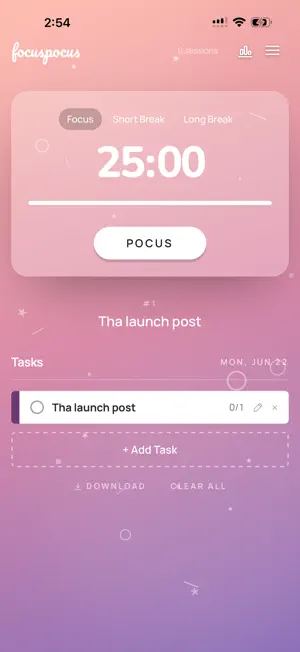
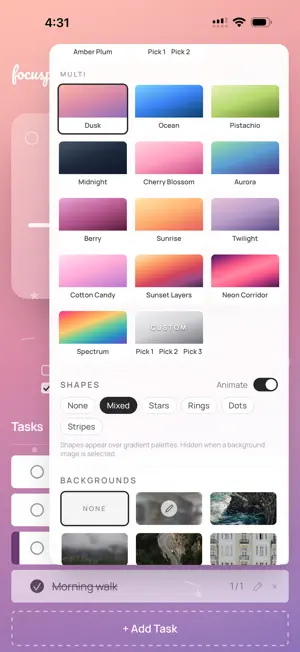
A quiet pomodoro timer. Focus for 25 minutes, then take a real break. FocusPocus runs on your iPhone with no account, no tracking, your tasks stay on your device. The technique is older than you think. Francesco Cirillo wrote it down in the late '80s using a tomato-shaped kitchen timer. The math hasn't changed: focus for 25, break for 5, repeat four times, take a longer break. FocusPocus handles the timing so you can do the focusing. What's inside: — Three modes (pomodoro, short break, long break) with sounds you can mute — A tappable task list. Add what you're working on, mark them done as you go. — Pomodoro count per task — estimate how many sessions you'll need and watch the count — Notes per task with checkable sub-items — Eight color palettes plus a custom picker — pick a mood for your focus — Native iOS Live Activity. Your timer lives on the Dynamic Island and lock screen so you never lose track. Pause and skip from the Dynamic Island without unlocking. — "Yesterday" page-flip: tap the date to start a new day. Unfinished tasks carry forward, completed ones drop. — Session history with stats — focused minutes per day, weekly trends, top tasks. What's not inside: — No account — No tracking — No ads — No upsells Made by one person who needed it. If it helps you focus, you've already gotten what it was made for.
What’s new
Version 1.3 · Updated July 17, 2026
Drag to reorder tasks. grab the little handle on the left of any task and drop it wherever fits — no more re-adding to change the order. A fresh moleskine dotted-paper background in the palette picker. the hamburger menu, back links, and page titles now speak all 8 languages. If the app helped you focus, the app store may quietly ask you to leave a review. one tap, no leaving the app.
App privacy
The developer, Estefania Tarantini, reported these privacy practices to Apple.
Data Not Linked to You
The following data, which may be collected but is not linked to your identity, may be used for the following purposes:
- Usage Data: Product Interaction
Used for: Analytics
Alternatives to FocusPocus - Timer
Looking for apps like FocusPocus - Timer? Here are 6 similar apps on the App Store. The highest rated is El Manual de los 20s (5.0/5), and all 6 are free to download.
-
 Flowty: Focus-Break Timer
-
 Dreamie Planner v2
-
 Do Next - Simple Task Manager
4.8
Do Next - Simple Task Manager
4.8
-
 Focus App Blocker: StrictBlock
4.0
Focus App Blocker: StrictBlock
4.0
-
 El Manual de los 20s
5.0
El Manual de los 20s
5.0
-
 Week Plan: Weekly Tasks, Goals
4.3
Week Plan: Weekly Tasks, Goals
4.3
| App | Rating | Price | Last updated | Compare |
|---|---|---|---|---|
| FocusPocus - Timer | 5.0 / 5 (1 rating) | Free | July 17, 2026 | |
| Flowty: Focus-Break Timer | – | Free | Sep 7, 2026 | Compare |
| Dreamie Planner v2 | – | Free | Sep 15, 2026 | Compare |
| Do Next - Simple Task Manager | 4.8 / 5 (22) | Free | May 18, 2026 | Compare |
| Focus App Blocker: StrictBlock | 4.0 / 5 (1) | Free | Sep 21, 2026 | Compare |
| El Manual de los 20s | 5.0 / 5 (1) | Free | Sep 23, 2026 | Compare |
| Week Plan: Weekly Tasks, Goals | 4.3 / 5 (374) | Free | Jul 25, 2026 | Compare |
Compare FocusPocus - Timer with the top alternatives: ratings, updates, ASO score and keyword gaps →