

Focus App Blocker: StrictBlock
Paul Contreras Productivity iPhoneiPadiPod touch
Focus App Blocker: StrictBlock is a free Productivity app for iPhone and iPad by Paul Contreras. Rated 4.0/5 from 1 ratings. Requires iOS 17.0.
- Rating
- 4.0
- 1 ratings
- Price
- Free
- on the App Store
- Size
- 36 MB
- Age 4+
- Updated
- Oct 26
- 2026 · v2.6.1
Screenshots


About Focus App Blocker: StrictBlock
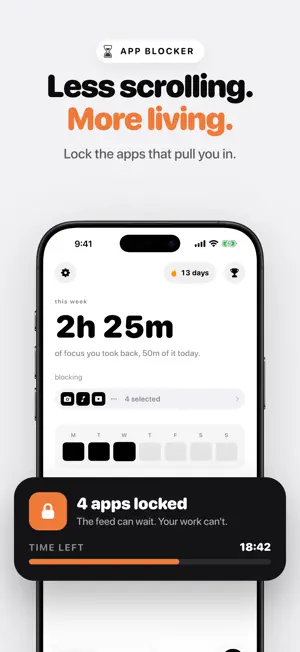
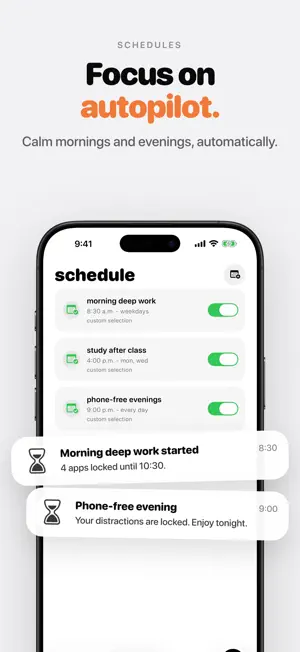
Your phone is built to keep you scrolling. StrictBlock is built to help you stop. Pick the apps that pull you in, start a focus block, and they stay locked until you're done. No willpower contests, no "just one more minute". It's the dopamine detox that turns your iPhone into a dumb phone when you need it, and back again when you don't. WHY PEOPLE USE STRICTBLOCK • Block distracting apps with Apple's Screen Time, so blocks are hard to skip • Schedule focus time for mornings, study sessions or phone-free evenings • Pomodoro-style focus blocks with a goal for each one • Streaks that build a real habit, and trophies you can share • See the hours you take back, every week • Home screen widgets for your streak and today's focus BUILT FOR Students cramming for exams. People doing deep work. Anyone trying to quit doomscrolling, cut social media, or simply be present with the people around them. PRIVATE BY DESIGN No ads. No account needed. No data sold. FAIR PRICING Start free. Pro is available monthly, yearly or as a one-time lifetime purchase, for a fraction of what other app blockers charge. Eligible new subscribers can try Pro free for 7 days. Local prices and offer eligibility are shown before purchase. Subscriptions renew automatically unless cancelled at least 24 hours before the end of the period. Manage or cancel in your App Store account settings. Lifetime is a one-time purchase. LEARN MORE Tips, guides and the story behind StrictBlock: https://www.strictblock.app Terms: https://www.apple.com/legal/internet-services/itunes/dev/stdeula/ Privacy: https://www.strictblock.app/privacy Support: https://www.strictblock.app/support
What’s new
Version 2.6.1 · Updated October 26, 2026
A fix for anyone who couldn't get their first block started. • Picking more than 5 apps on the free plan no longer quietly undoes your selection. StrictBlock now explains the limit and lets you edit your picks. • New: send feedback from Settings, and it comes straight to me. Enjoying StrictBlock? A quick rating helps more people find it.
App privacy
The developer, Paul Contreras, reported these privacy practices to Apple.
Data Not Linked to You
The following data, which may be collected but is not linked to your identity, may be used for the following purposes:
- Purchases: Purchase History
- Usage Data: Product Interaction, Other Usage Data
Used for: Analytics, Product Personalization, App Functionality
Alternatives to Focus App Blocker: StrictBlock
Looking for apps like Focus App Blocker: StrictBlock? Here are 6 similar apps on the App Store. The highest rated is Core Time: Cold Turkey Blocker (5.0/5), and all 6 are free to download.
-
 Downtime: Focus App Blocker
4.5
Downtime: Focus App Blocker
4.5
-
 App/Website Blocker: LockChest
4.6
App/Website Blocker: LockChest
4.6
-
 Core Time: Cold Turkey Blocker
5.0
Core Time: Cold Turkey Blocker
5.0
-
 67: Strict Screen Time Blocker
4.4
67: Strict Screen Time Blocker
4.4
-
 BlockerPro: Block Site & Apps
4.7
BlockerPro: Block Site & Apps
4.7
-
 Timeout: App Blocker
5.0
Timeout: App Blocker
5.0
| App | Rating | Price | Last updated | Compare |
|---|---|---|---|---|
| Focus App Blocker: StrictBlock | 4.0 / 5 (1 rating) | Free | October 26, 2026 | |
| Downtime: Focus App Blocker | 4.5 / 5 (2) | Free | Oct 16, 2026 | Compare |
| App/Website Blocker: LockChest | 4.6 / 5 (26) | Free | Oct 28, 2026 | Compare |
| Core Time: Cold Turkey Blocker | 5.0 / 5 (4) | Free | Oct 21, 2026 | Compare |
| 67: Strict Screen Time Blocker | 4.4 / 5 (81) | Free | Oct 14, 2026 | Compare |
| BlockerPro: Block Site & Apps | 4.7 / 5 (14) | Free | Oct 12, 2026 | Compare |
| Timeout: App Blocker | 5.0 / 5 (7) | Free | Mar 17, 2025 | Compare |