

Downtime: Focus App Blocker
Ari Aparikyan Productivity iPhoneiPadiPod touch
Downtime: Focus App Blocker is a free Productivity app for iPhone and iPad by Ari Aparikyan. Rated 4.5/5 from 2 ratings. Requires iOS 16.0.
- Rating
- 4.5
- 2 ratings
- Price
- Free
- on the App Store
- Size
- 12 MB
- Age 4+
- Updated
- Oct 6
- 2026 · v2.2.0
Screenshots

About Downtime: Focus App Blocker
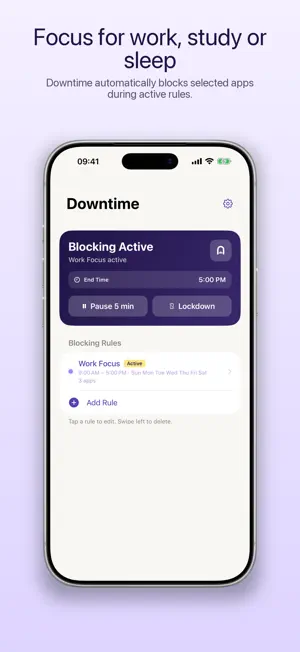
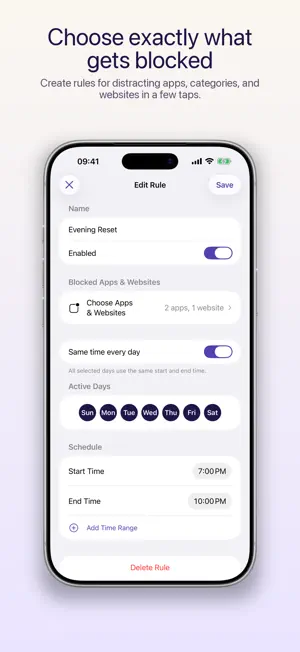
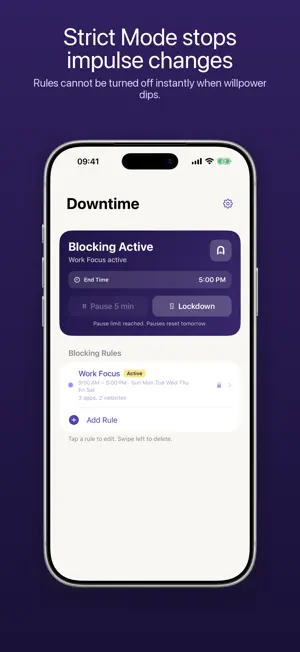
Block distracting apps and websites automatically when it's time to focus, study, work, or sleep. Downtime is a focus app blocker built around your schedule. Choose what gets blocked, decide when each rule runs, and let Downtime shield distractions automatically—even when the app is closed. Use Downtime as an app lock during study sessions, a website blocker for focused work, or a screen time blocker for evenings and bedtime. Turn on Strict Mode when you need an extra barrier against impulsive changes. HOW IT WORKS 1. Create a rule and choose its days, start time, and end time. 2. Select apps, app categories, and websites using Apple's built-in picker. 3. Enable the rule and let Downtime handle blocking automatically. FOR WORK, STUDY, AND BEDTIME - Protect deep-work sessions from distracting apps and websites - Create study periods for revision, reading, or learning a new skill - Reduce social media use during evenings and bedtime - Build different schedules for weekdays, weekends, and overnight routines KEY FEATURES - Scheduled blocking: Set start and end times for every focus period - Choose what to block: Pick specific apps, whole categories, or websites - Per-day rules: Decide which days of the week each schedule runs - Overnight support: Create schedules that span midnight, such as 10 PM to 6 AM - Automatic enforcement: Blocking starts and ends on schedule without keeping Downtime open - Strict Mode: Prevent active rules from being switched off immediately - Essentials Mode: Keep only your chosen apps available for a simpler, distraction-free phone - Shield screens: Show a customizable shield instead of opening a blocked app STRICT MODE Strict Mode adds a cooling-off period when willpower dips. Active rules cannot be disabled immediately. If you decide to turn Strict Mode off, a one-hour delay begins, giving you time to reconsider without permanently locking you out. SIMPLE AND PRIVATE Downtime uses Apple's official Screen Time APIs to manage access. Your app and website selections, schedules, and rule names stay on your device. Optional pseudonymous product analytics and crash diagnostics start only if you choose to share. There is no account, advertising, or cross-app tracking. FAIR PRICING Downtime is free to use with one blocking rule. Choose flexible monthly access or a one-time lifetime purchase to create multiple rules and use Essentials Mode, Strict Mode, and backup tools. Private and ad-free. Terms of Use (EULA): https://www.apple.com/legal/internet-services/itunes/dev/stdeula/
What’s new
Version 2.2.0 · Updated October 6, 2026
Lockdown is now behind the Pro plan
App privacy
The developer, Ari Aparikyan, reported these privacy practices to Apple.
Data Not Linked to You
The following data, which may be collected but is not linked to your identity, may be used for the following purposes:
- Purchases: Purchase History
- Identifiers: Device ID
- Usage Data: Product Interaction, Other Usage Data
- Diagnostics: Crash Data, Other Diagnostic Data
Used for: Analytics, App Functionality
Alternatives to Downtime: Focus App Blocker
Looking for apps like Downtime: Focus App Blocker? Here are 6 similar apps on the App Store. The highest rated is Jomo - Screen Time Blocker (4.8/5), and all 6 are free to download.
-
 Focus App Blocker: StrictBlock
4.0
Focus App Blocker: StrictBlock
4.0
-
 Jomo - Screen Time Blocker
4.8
Jomo - Screen Time Blocker
4.8
-
 Detox: Digital Detox
4.6
Detox: Digital Detox
4.6
-
 Stay Focused App/Site Blocker
4.4
Stay Focused App/Site Blocker
4.4
-
 Refocus: App Blocker & Lock
4.8
Refocus: App Blocker & Lock
4.8
-
 StayFree - Block Apps & Sites
2.4
StayFree - Block Apps & Sites
2.4
| App | Rating | Price | Last updated | Compare |
|---|---|---|---|---|
| Downtime: Focus App Blocker | 4.5 / 5 (2 ratings) | Free | October 6, 2026 | |
| Focus App Blocker: StrictBlock | 4.0 / 5 (1) | Free | Sep 21, 2026 | Compare |
| Jomo - Screen Time Blocker | 4.8 / 5 (2,475) | Free | Sep 25, 2026 | Compare |
| Detox: Digital Detox | 4.6 / 5 (452) | Free | Sep 2, 2026 | Compare |
| Stay Focused App/Site Blocker | 4.4 / 5 (956) | Free | Oct 1, 2026 | Compare |
| Refocus: App Blocker & Lock | 4.8 / 5 (11,561) | Free | Oct 7, 2026 | Compare |
| StayFree - Block Apps & Sites | 2.4 / 5 (111) | Free | Oct 9, 2026 | Compare |