

MovingPath
培钧 翁 Utilities iPhoneiPadiPod touchApple Watch
MovingPath is a free Utilities app for iPhone and iPad by 培钧 翁. Rated 5.0/5 from 1 ratings. Requires iOS 17.6. Updated October 27, 2026.
- Rating
- 5.0
- 1 ratings
- Price
- Free
- on the App Store
- Size
- 14 MB
- Age 4+
- Updated
- Oct 27
- 2026 · v1.1.1
Screenshots


About MovingPath
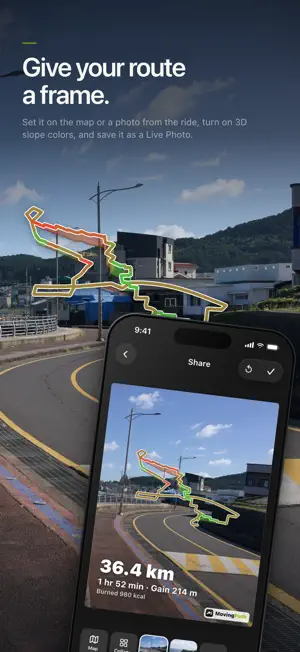
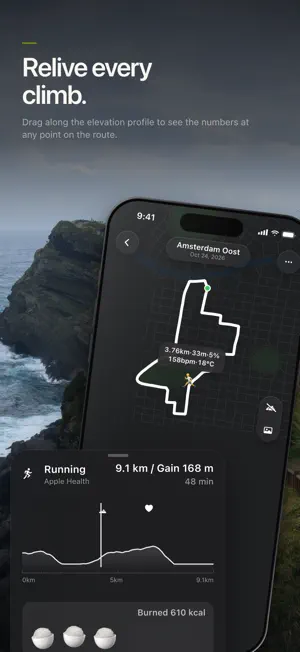
Every street you've run, every climb you've ridden, every trail you've hiked deserves to be seen. MovinPath reads your runs, rides, walks and hikes straight from Apple Health, or connects to Strava for even more sports, and turns every workout into a route you'll want to look at again. Nothing new to record: open the app and your routes are already there. YOUR ROUTE WALL • Every workout becomes a clean line drawing of its route, tiled across your home screen • Pinch to switch between 2 and 6 columns; fresh workouts are marked "New" RELIVE EVERY OUTING • See the whole route on a full-screen map, with start, finish and direction of travel • Scrub the elevation profile to replay your route: distance, altitude and grade at every point, plus heart rate, power and temperature when recorded • Highest point, steepest climb and peak heart rate are marked, with a haptic tap as you pass them • Photos, videos and Live Photos shot along the way are pinned back where you took them • Calories burned turn into bowls of rice that tumble when you tilt your phone • Dark, Satellite and Standard map styles, and one tap to open the start or finish in Maps EPIC MODE An island loop by bike, a multi-day trek, a week of runs and walks on holiday: bring it all together as one journey. • Routes from different days and different sports, together on one map • Total distance, elevation gain and time, added up for you • Select any leg to bring back the photos you took along it • Name your journey, finish it, and keep it in your journey history • Share the whole journey as a single image SHARE IMAGES WORTH POSTING • Use the map, a photo, or a collage of 2 to 9 photos in 24 layouts as your background • Match the photo, or pick 3:4, 4:3, 16:9 or 9:16, and tint the canvas any color • Route, stats and a "calories as food" pile are stickers you can drag, pinch and rotate • 3D routes rise with the terrain, slowly spin and can be colored by slope, then export as a moving Live Photo • Save straight to Photos ROUTE BOOK & GPX • Import GPX routes from Files or from any app's share sheet • Use any route as a route book: see your live position and heading on the map, plus how far along the route you are and your altitude • Export any workout as a standard GPX file WIDGETS Weekly ring, weekly bar chart, monthly calendar, annual trace, and World and China maps of everywhere you've worked out. Your progress, right on your Home Screen. MovinPath PRO • Guidance: summaries, trends and advice from your sleep, steps, resting heart rate, HRV and workouts, for anything from 3 days to a year • Route Heatmap: every route layered on one map, so the roads you return to most stand out. Filter by sport and year, and share collections by week, month or year • Sports Career: weekly, monthly and yearly stats, totals for each sport, and the countries and cities you've worked out in, lit up on World and China maps • Slope colors: green is gentle, red is steep, so you can spot the hard parts at a glance • Merge split recordings back into one complete route • Sync imported routes with iCloud • Put more than one Live Photo in a single collage Choose monthly or yearly, or pay once and keep it forever. YOUR DATA STAYS WITH YOU • Health and workout data is read and processed on your device by default, and MovinPath never writes to Apple Health • Guidance is generated entirely on device; nothing is uploaded or shared • Built-in country and city databases draw your workout maps on device, with no network needed • Imported routes go to your own iCloud Drive only if you turn on iCloud sync • Optional usage analytics never include health values, routes or photos, and can be turned off anytime Available in English, Simplified Chinese, Japanese and Korean, on iPhone and iPad, in light and dark mode. No workouts yet? Explore Demo Mode first. Get out there. Then open MovinPath and see what you drew today. Terms of Use (EULA): https://www.apple.com/legal/internet-services/itunes/dev/stdeula/
What’s new
Version 1.1.1 · Updated October 27, 2026
- watchOS support - Add location marking during track recording - Support segmented track recording
App privacy
The developer, 培钧 翁, reported these privacy practices to Apple.
Data Not Collected
The developer does not collect any data from this app.
Alternatives to MovingPath
Looking for apps like MovingPath? Here are 6 similar apps on the App Store. The highest rated is Mipa - Proxy Remote Controller (5.0/5), and 4 of the 6 are free to download.
-
 Weather-Professional Forecast
-
 Mipa - Proxy Remote Controller
5.0
Mipa - Proxy Remote Controller
5.0
-
 山海轻行
山海轻行
-
 Crosslate
5.0
Crosslate
5.0
-
 速度检测工具
-
 Whisper - Text Encryption
| App | Rating | Price | Last updated | Compare |
|---|---|---|---|---|
| MovingPath | 5.0 / 5 (1 rating) | Free | October 27, 2026 | |
| Weather-Professional Forecast | – | Free | Jun 16, 2025 | Compare |
| Mipa - Proxy Remote Controller | 5.0 / 5 (2) | 1.99 USD | Jun 13, 2026 | Compare |
| 山海轻行 | – | 1.99 USD | Sep 8, 2026 | Compare |
| Crosslate | 5.0 / 5 (1) | Free | Aug 31, 2026 | Compare |
| 速度检测工具 | – | Free | Jul 1, 2024 | Compare |
| Whisper - Text Encryption | – | Free | Nov 1, 2024 | Compare |
Compare MovingPath with the top alternatives: ratings, updates, ASO score and keyword gaps →