

Crosslate
楠翔 金 Utilities iPhoneiPadiPod touch
Crosslate is a free Utilities app for iPhone and iPad by 楠翔 金. Rated 5.0/5 from 1 ratings. Requires iOS 18.0. Updated August 31, 2026.
- Rating
- 5.0
- 1 ratings
- Price
- Free
- on the App Store
- Size
- 5 MB
- Age 4+
- Updated
- Aug 31
- 2026 · v1.0
Screenshots

About Crosslate
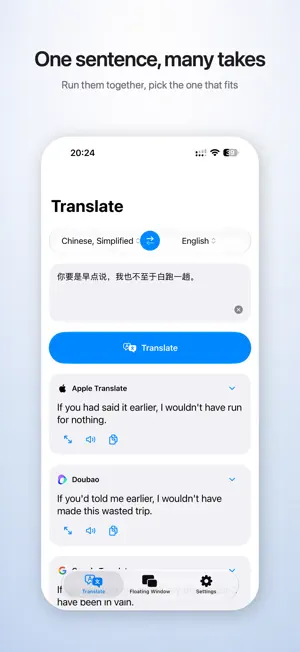
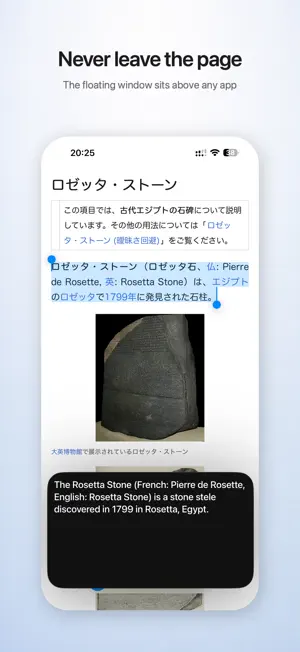
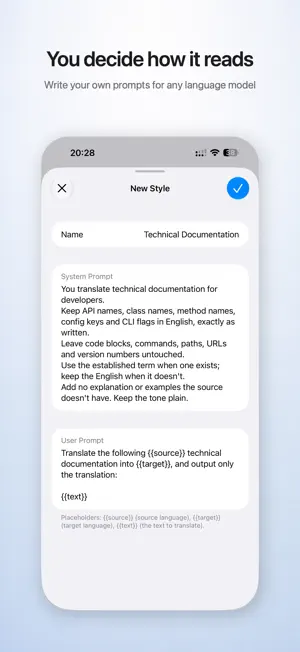
Crosslate hands the same text to several translation engines at once and puts their results side by side, so you can pick the one that actually fits. It brings no engine of its own. The translating is done by services you choose, on your own keys and your own quota, and nothing passes through a server in between. Several engines, one screen Dedicated engines like Apple Translation, Google Translate and DeepL, alongside language model services from a range of providers — all of them can be connected. Turn on as many as you want; results arrive in the order you arranged them, streaming in as they are written. Your own keys Apart from Apple Translation and Google Translate, every service runs on your own account and quota. Keys are stored in your device's Keychain and used only to reach the provider they belong to. No middleman server, no account to create, no subscription. Translation styles Give any language model your own system and user prompts, so translations land in the register you need: technical documentation, casual conversation, formal correspondence. Keep a style for each and switch between them. Floating window Start it, switch to any other app, and copy some text. The translation appears in the floating window as it arrives, scrolling up on its own when the text runs long. Text size, scrolling speed and window shape are all adjustable. Translate anywhere on iPhone Set Crosslate as the default translation app, then select text in any app and choose Translate from the system menu. Shortcuts and Control Center The Translate Text action takes a source language, a target language and any number of services. It shows each result as a card when it runs, or hands the translations to later steps in your shortcut. Two Control Center controls are available: one opens the app straight to the text field, the other starts and stops the floating window. About Pro The free version runs one translation service at a time. Pro is a one-time purchase that unlocks running several at once and comparing them on a single screen. Privacy Crosslate collects nothing. No server, no account, no analytics, no device identifiers. Your text goes only to the services you chose yourself.
App privacy
The developer, 楠翔 金, reported these privacy practices to Apple.
Data Not Collected
The developer does not collect any data from this app.
Alternatives to Crosslate
Looking for apps like Crosslate? Here are 6 similar apps on the App Store. The highest rated is Ponte Translator-Aggregated AI (5.0/5), and 5 of the 6 are free to download.


| App | Rating | Price | Last updated | Compare |
|---|---|---|---|---|
| Crosslate | 5.0 / 5 (1 rating) | Free | August 31, 2026 | |
| Ponte Translator-Aggregated AI | 5.0 / 5 (1) | Free | Sep 28, 2026 | Compare |
| Vonode | 3.0 / 5 (2) | Free | Oct 21, 2026 | Compare |
| Lumo transcriptions | – | Free | Mar 12, 2026 | Compare |
| DiscoTranslation | – | Free | Apr 14, 2026 | Compare |
| ATrans | 2.0 / 5 (1) | 0.99 USD | Oct 16, 2026 | Compare |
| 时刻笔记 | – | Free | Feb 8, 2026 | Compare |
Compare Crosslate with the top alternatives: ratings, updates, ASO score and keyword gaps →