

Universal TV Remote: Wand
Orbiva Ltd Utilities iPhoneiPadiPod touch
Universal TV Remote: Wand is a free Utilities app for iPhone and iPad by Orbiva Ltd. Requires iOS 18.0. Updated November 27, 2026.
- Price
- Free
- on the App Store
- Size
- 33 MB
- Age 4+
- Updated
- Nov 27
- 2026 · v1.0.4
Screenshots
Save to Pinterest

About Universal TV Remote: Wand
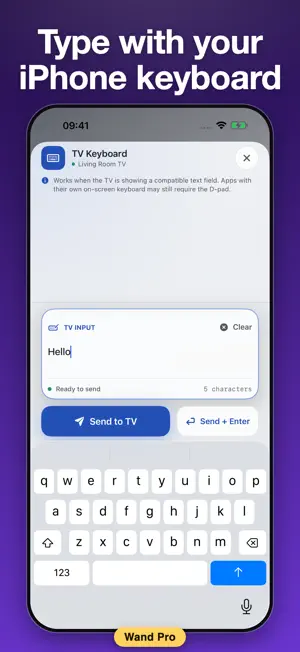
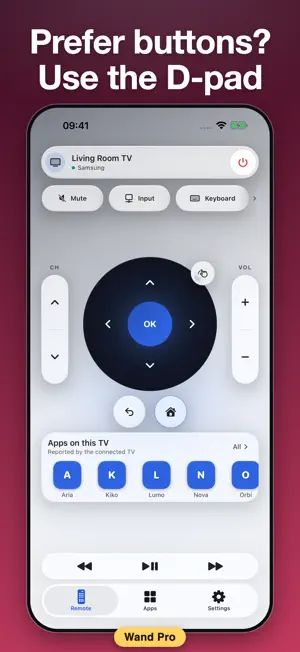
Wand turns your iPhone into a TV remote for supported Roku, Vizio, LG, Samsung and other smart TVs on your Wi-Fi. Swipe to move, tap for OK, type with the iPhone keyboard and open your TV's apps where your TV allows it, all without hunting for the clicker. WHAT YOU CAN DO • Swipe the touchpad to move and tap for OK, or switch to a classic D-pad • Use the keys you know: OK, Back, Home and volume, plus mute, channel, input, menu, guide, info and exit when your TV supports them • Type with the iPhone keyboard on Samsung, LG, Roku and Fire TV, when the TV shows a compatible text field • Open the TV's apps with app shortcuts on Samsung, LG, Roku, Fire TV and Google TV • Save several TVs and switch between them quickly • Turn on Easy Mode for bigger buttons and a simpler screen • Light and dark appearance, haptic feedback and VoiceOver labels The full key set, keyboard, app shortcuts and multiple TVs need Wand Pro (see below). GETTING CONNECTED Wand finds TVs on your Wi-Fi automatically. If your TV shows a code, enter it to pair. If discovery can't see your TV, add it by IP address. Built-in help shows how to turn on remote control from a phone in your TV's own settings. WORKS WITH Wand works with Roku, Vizio SmartCast, LG (webOS), Samsung (Tizen), Hisense (VIDAA), Amazon Fire TV (including Fire TV Stick models with Fire OS) and Google TV. The keys and features you get depend on your TV's model, firmware, network and settings. Your TV must be on and connected to the same Wi-Fi as your iPhone; a TV in deep sleep can't be reached. Brand names belong to their owners; Wand is independent and not affiliated with them. WAND PRO Wand is free to download. Using the remote needs Wand Pro: the full remote with every key, the keyboard and app shortcuts where your TV supports them, and multiple saved TVs. Wand Pro is an auto-renewing subscription or a one-time lifetime purchase; the plans on offer, their prices and any free trial are shown in the app before you pay. Payment is charged to your Apple Account. A subscription renews automatically until you cancel it in Settings. Terms of Use: https://www.apple.com/legal/internet-services/itunes/dev/stdeula/ PRIVACY No ads in the app. Your saved TVs and pairing stay on your iPhone, with pairing tokens kept in the iOS Keychain. Wand asks for Local Network permission so it can find and control TVs on your Wi-Fi. Purchases go through Apple, so Wand never sees your payment details. To learn which App Store search ad an install came from and which plan screen was shown, Wand sends purchase records and plan-screen views, without your name or email, to its purchase service. To fix TV connection problems and crashes, Wand also sends connection diagnostics (how connecting went, crash reports, the TV's maker and model, your iPhone model) without your TV's name, network addresses or what you watch; you can turn this off in Settings.
What’s new
Version 1.0.4 · Updated November 27, 2026
New: Philips, Sony Bravia and Panasonic Viera TVs. Wand finds more TVs, and faster. A Samsung TV in standby is switched on for pairing, a TV added by its address is recognised whatever its make, and there is help for when your TV's remote is lost. Bug fixes and improvements.
App privacy
The developer, Orbiva Ltd, reported these privacy practices to Apple.
Data Used to Track You
The following data may be used to track you across apps and websites owned by other companies:
- Purchases: Purchase History
- Identifiers: Device ID
- Usage Data: Product Interaction
Data Linked to You
The following data, which may be collected and linked to your identity, may be used for the following purposes:
- Identifiers: Device ID
- Purchases: Purchase History
- Usage Data: Product Interaction
Used for: Third-Party Advertising, Developer’s Advertising or Marketing, Analytics, App Functionality
Data Not Linked to You
The following data, which may be collected but is not linked to your identity, may be used for the following purposes:
- Usage Data: Advertising Data
- Diagnostics: Crash Data, Other Diagnostic Data
Used for: Analytics, App Functionality
Alternatives to Universal TV Remote: Wand
Looking for apps like Universal TV Remote: Wand? Here are 6 similar apps on the App Store. The highest rated is Remote Control (TV) (5.0/5), and all 6 are free to download.
-
 Smart Remote for TV: Universal
-
 Smart TV Remote – Universal
3.7
-
 TV Remote Control for TV APP
4.6
-
 Remote Control (TV)
5.0
-
 TV Remote Control | Universal
5.0
-
 Universal: TV Remote Control
| App | Rating | Price | Last updated | Compare |
|---|---|---|---|---|
| Universal TV Remote: Wand | – | Free | November 27, 2026 | |
| Smart Remote for TV: Universal | – | Free | Nov 16, 2026 | Compare |
| Smart TV Remote – Universal | 3.7 / 5 (3) | Free | Oct 31, 2026 | Compare |
| TV Remote Control for TV APP | 4.6 / 5 (5) | Free | Sep 23, 2026 | Compare |
| Remote Control (TV) | 5.0 / 5 (1) | Free | Nov 27, 2026 | Compare |
| TV Remote Control | Universal | 5.0 / 5 (1) | Free | Aug 30, 2026 | Compare |
| Universal: TV Remote Control | – | Free | Nov 7, 2026 | Compare |