

Hinata
Rebar Ahmad Productivity iPhoneiPadiPod touchMac
Hinata is a free Productivity app for iPhone and iPad by Rebar Ahmad. Requires iOS 15.0. Updated October 22, 2026.
- Price
- Free
- on the App Store
- Size
- 52 MB
- Age 4+
- Updated
- Oct 22
- 2026 · v10.8.0
Screenshots


About Hinata
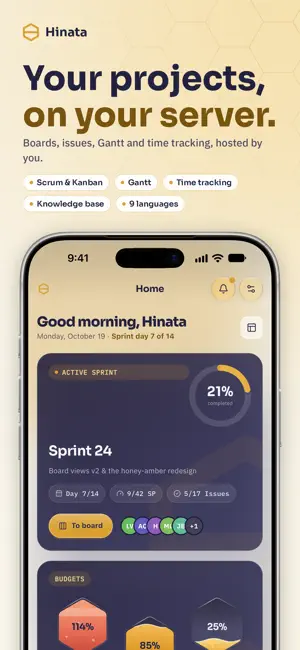
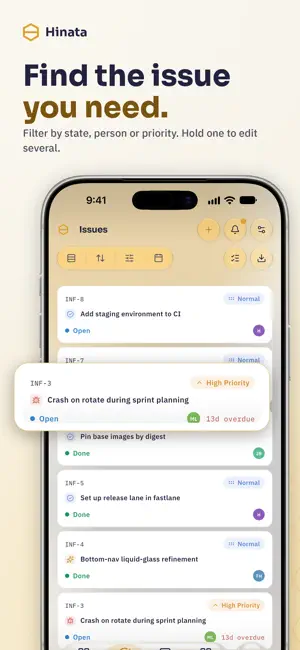
Hinata is an open-source app for planning projects and tracking issues. It connects to a Hinata Server that you or your organization run, so your team's work stays on your own infrastructure. There is no per-user price and no limit on boards. The same app runs on phones, tablets and computers, fits its layout to the screen and has a light and a dark theme. It speaks English, German, Chinese, Hindi, Spanish, Japanese, French, Russian and Arabic, and lays out right to left in Arabic. PLANNING AND BOARDS • Scrum and Kanban boards: drag cards between columns, set WIP limits, group the board by epic, assignee or project • Board, backlog and timeline views of the same work • Sprints with capacity, story points, burndown and velocity • Issues in a hierarchy from epic to story to sub-task, with dependencies and labels. You can watch, clone, archive or move them to another project • Print an issue, or export it as PDF, Excel, Word or XML • Gantt chart with dependencies, milestones and the critical path • Project templates: copy a project and set deadlines relative to the project's date, in calendar or working days TIME AND ABSENCES • A timer that works as a stopwatch, a countdown or a Pomodoro • Log time in a list, a calendar or a weekly timesheet, and hand in your timesheet for approval • Request time off, have it approved and see who is away in a shared team calendar • Working hours, public holidays and leave balances in one place • Time reports with a summary, single entries and workload, plus CSV import and export WORKING TOGETHER • Comments with replies, emoji reactions and voice messages • Attach files, photos and videos and open them in a full-screen viewer • A knowledge base with spaces, sub-pages and Markdown articles. Type @ to link an issue, an article or a colleague • Project reports with burndown and breakdowns by state, priority and assignee, exported as PDF, CSV or JSON • A dashboard you arrange yourself, and a weekly summary of what your team finished • A command palette that searches projects, issues, people and articles • Notifications in the app, by e-mail and as push for assignments, @mentions and due dates. You choose the days and hours when e-mail and push may reach you • Git integration with GitHub, GitLab and Bitbucket FOR ORGANIZATIONS • Projects and teams with their own workflows, keys and members • An organization admin role for working hours, approvals, absences, holidays and billing • Sign in with a password and optional two-factor authentication (TOTP), or through SSO with OpenID Connect, OAuth 2.0, SAML or LDAP • Self-registration with e-mail verification, and password reset • Save several servers and switch between them. Each one keeps its own secure session ACCESSIBILITY Text colors meet WCAG contrast, touch targets are large and controls have labels for screen readers. Nothing gets cut off at twice the normal text size. YOUR DATA STAYS ON YOUR SERVER Hinata collects nothing for itself. Everything you create is stored on the Hinata Server you connect to. Push notifications go through Firebase Cloud Messaging and use only a device token. The app has no tracking and no analytics. You need a Hinata Server to sign in. hinata.ahmadre.com explains how to host one yourself. PERMISSIONS AND WHY HINATA ASKS FOR THEM • Notifications: assignments, @mentions, replies to your comments and due dates • Microphone: voice comments, and sound in videos you attach • Camera and photos: take or pick photos and videos to attach to issues Hinata asks for each permission the first time you use the feature that needs it.
What’s new
Version 10.8.0 · Updated October 22, 2026
• Shift planning: plan events and shifts, sign up yourself, with a waiting list and a calendar • Subscribe to your shifts in your own calendar and export plans • Search across every part of the app and open a person's profile • Budgets in hours and a billable switch per project • Many smaller fixes and improvements
App privacy
The developer, Rebar Ahmad, reported these privacy practices to Apple.
Data Not Collected
The developer does not collect any data from this app.
Alternatives to Hinata
Looking for apps like Hinata? Here are 6 similar apps on the App Store. The highest rated is Bamboo: AI Markdown Notes (5.0/5), and 5 of the 6 are free to download.
-
 Bamboo: AI Markdown Notes
5.0
-
 Routine Tracker : Habit OS
3.0
-
 Spike: Fokus & Bildschirmzeit
-
 Trio: Mindful Todo List
4.7
-
 PhotoSync-Backup your photos
4.9
-
 Project Planner: Milestones
4.9
| App | Rating | Price | Last updated | Compare |
|---|---|---|---|---|
| Hinata | – | Free | October 22, 2026 | |
| Bamboo: AI Markdown Notes | 5.0 / 5 (1) | Free | Aug 7, 2026 | Compare |
| Routine Tracker : Habit OS | 3.0 / 5 (2) | Free | Oct 21, 2026 | Compare |
| Spike: Fokus & Bildschirmzeit | – | Free | Oct 15, 2026 | Compare |
| Trio: Mindful Todo List | 4.7 / 5 (21) | Free | Dec 15, 2024 | Compare |
| PhotoSync-Backup your photos | 4.9 / 5 (45) | 0.99 USD | Dec 14, 2023 | Compare |
| Project Planner: Milestones | 4.9 / 5 (18) | Free | Sep 19, 2026 | Compare |
Compare Hinata with the top alternatives: ratings, updates, ASO score and keyword gaps →