

RDV — Appointments by Voice
Martin Bouvrette Productivity iPhoneiPadiPod touch
RDV — Appointments by Voice is a free Productivity app for iPhone and iPad by Martin Bouvrette. Requires iOS 17.0. Updated October 11, 2026.
- Price
- Free
- on the App Store
- Size
- 27 MB
- Age 4+
- Updated
- Oct 11
- 2026 · v2.2
Screenshots


About RDV — Appointments by Voice
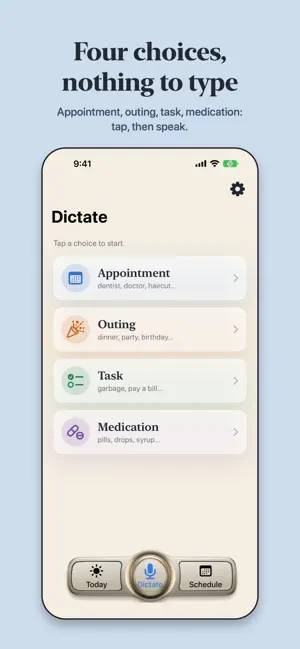
One calendar for the whole family, and nothing to type: you speak, RDV understands, and it's noted. Appointments, medications, outings, chores — for you, your parents, your spouse, the people you care for. "Andre at the dentist Wednesday at 2 pm in Verdun." That's it. WHAT RDV DOES • Several people in one calendar, one color per person • Appointments, medications, outings and chores, dictated by voice • RDV sorts out the who, the what, the when and the where • Everything goes into the Apple Calendar • Reminders at the times you choose, even with the app closed • "Taken", "Done": check off each pill and each task, right from the notification • Voice notes under each appointment • Large type, everyday words: made for seniors EASY, TRULY No fields to fill in, no menus, no keyboard. Three tabs: Today, Dictate, Schedule. Open the app, see the day. Tap the mic and speak the way you speak: "my blue pill every morning at 8 for ten days", "dancing with my friends Friday at 7 pm", "call the pharmacy back Tuesday at 11". Got it wrong? Tap Fix and say only what changes. RDV UNDERSTANDS, AND CHECKS RDV understands the whole sentence and checks it: if you say "Wednesday the 14th" and the 14th is a Thursday, it tells you instead of saving a mistake. If something is missing, it asks. A missed doctor's appointment is serious: the app is built so it doesn't happen. "DID I TAKE MY PILL?" Every pill and every task can be checked off, one dose at a time: the 8 am one, then the 8 pm one. On the Today page, or right in the reminder, with one tap on "Taken". The schedule shows what's done, and today's date pulses gently while something is left to do. ONE CALENDAR FOR THE WHOLE HOUSEHOLD Your appointments, your spouse's, your parents', those of the people you care for. Three ways to look: Today (the day, for each person), the schedule (one day at a time, in the order of the hours), and columns (one column per person — who has what, and when, at a glance). CONNECTED TO THE APPLE CALENDAR, REMINDERS THAT ARRIVE Every appointment goes into the Apple Calendar. RDV reminds you at the times you choose — even with the app closed. A medication is reminded at the time of the dose, not two days ahead. And if RDV's notifications are turned off, the app shows you: the gear turns red. WHAT STAYS WITH YOU Your appointments and your people are kept on your device. When you dictate, the text is sent to our service just long enough to understand the appointment; we keep no copy, and the model provider deletes it within 30 days and never uses it to train its models. Your voice is transcribed by Apple's speech recognition. No ads. No tracking. No account to create. RDV speaks French, English, Spanish, Hindi and Chinese. THE SUBSCRIPTION The first person is free, forever. To follow several people, a family subscription: monthly, every six months, or yearly. The price, in your currency, is shown in the app before you subscribe. The subscription renews automatically at the same price unless you cancel it at least 24 hours before the end of the period. Payment is charged to your Apple Account. You manage and cancel it in your Apple Account settings. Privacy policy: https://rdv.wominute.com/privacy Terms of use: https://www.apple.com/legal/internet-services/itunes/dev/stdeula/ Made in Brossard, Quebec, by someone who supports people every day.
What’s new
Version 2.2 · Updated October 11, 2026
Your devices talk to each other. • iCloud: what you dictate on your iPhone appears on your iPad, and the other way around, with the same Apple Account. "Taken" check marks follow too. Nothing goes through us: everything stays in your private iCloud. • A new bar at the bottom of the screen: Today, Schedule, and in the middle the big round microphone button. On the dictation page, it starts dictation, and it pulses gently to invite you to speak. • Reminders for each kind: choose them separately for appointments, outings, tasks and medications (gear, then Reminders). These choices are made on each device. • No reminder lost: a 1 p.m. pill dictated at 12:50 rings at 1 p.m. instead of staying silent. • A widget on your Home Screen: touch and hold the Home Screen, tap "Edit", "Add Widget", then RDV. Your day stays in view, and you check "Taken" without opening the app. • What's new appears once after the update, and can be seen again under the gear.
App privacy
The developer, Martin Bouvrette, reported these privacy practices to Apple.
Data Not Linked to You
The following data, which may be collected but is not linked to your identity, may be used for the following purposes:
- Contact Info: Name
- User Content: Other User Content
- Identifiers: Device ID
Used for: App Functionality
Alternatives to RDV — Appointments by Voice
Looking for apps like RDV — Appointments by Voice? Here are 6 similar apps on the App Store. The highest rated is Calendar+ (4.0/5), and all 6 are free to download.
-
 尚书阁-藏书看书阅读记录神器
-
 ReadyList - Daily Checklist
-
 Bound: Minimal Calendar
-
 Calendar+ 2: Planner Widget
-
 Calendar+
4.0
Calendar+
4.0
-
 FW BPack By InfinityBook
| App | Rating | Price | Last updated | Compare |
|---|---|---|---|---|
| RDV — Appointments by Voice | – | Free | October 11, 2026 | |
| 尚书阁-藏书看书阅读记录神器 | – | Free | Oct 22, 2026 | Compare |
| ReadyList - Daily Checklist | – | Free | Sep 21, 2026 | Compare |
| Bound: Minimal Calendar | – | Free | May 12, 2026 | Compare |
| Calendar+ 2: Planner Widget | – | Free | Oct 23, 2026 | Compare |
| Calendar+ | 4.0 / 5 (61) | Free | Oct 23, 2026 | Compare |
| FW BPack By InfinityBook | – | Free | Mar 20, 2026 | Compare |