

Calendar+
Alien Toes AB Productivity iPhoneiPadiPod touch
Calendar+ is a free Productivity app for iPhone and iPad by Alien Toes AB. Rated 4.0/5 from 61 ratings. Requires iOS 17.6. Updated October 1, 2026.
- Rating
- 4.0
- 61 ratings
- Price
- Free
- on the App Store
- Size
- 55 MB
- Age 4+
- Updated
- Oct 1
- 2026 · v8.2
Screenshots

About Calendar+
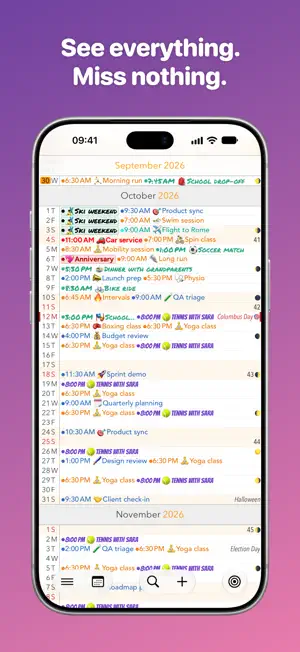
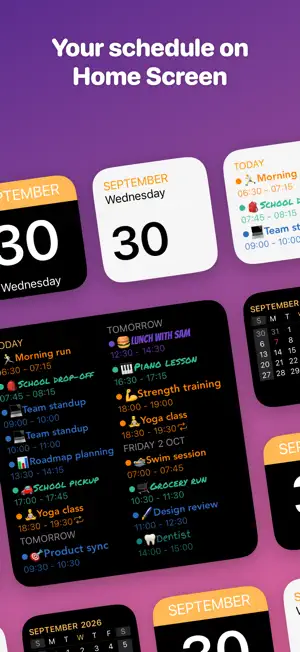
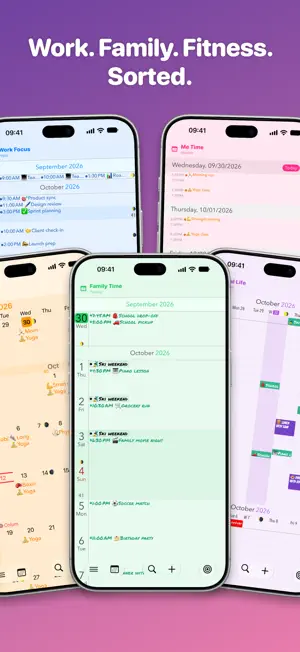
Scroll through your schedule like it’s a timeline — fast, fluid, and always in context. Calendar+ is built for people who want a clean overview, quick edits, and better-looking calendars without fighting the default app. Why Calendar+? • Seamless scrolling through days, weeks, and months • Day / Week / Month views with great overview • Add, edit, and delete events quickly • Syncs with your existing calendars (iCloud, Google, Outlook/Exchange, CalDAV, ICS subscriptions, and more) • Jump to any date instantly • Week numbers • Built-in holidays for many countries • Built-in flag days for selected countries • Built-in name days for many countries • Calendar selection & filtering – show only what you want • Dedicated “Scroll to Today” button • Portrait + landscape support Personalize Everything (Pro) • Calendar groups – put your calendars in groups like Work or Family and switch focus with one tap • Custom views – build your own views with their own layout, theme and calendar group, then reorder or hide views to suit you • Make calendars stand out with unique colors and fonts across all views • App theme colors • All widgets • Moon phases for the full year • Birthday + name day countdowns • Support an indie developer (me) Settings You’ll Actually Use • Text size control (month/week independently) • Toggle holidays + name days on/off • App icon badge options (day in month, day in year, or week number) • Default event settings (reminders, calendar, etc.) • Fine-grained event display options (dots, times, titles, weekend shading, contrast, truncation behavior) Gestures • Swipe left/right to switch views • Pinch to zoom between month and week • Tap & hold on a day to create an event • Swipe to delete in day view Support & Feedback I’d genuinely love to hear from you. • In Calendar+ → Ideas (submit and vote) • In Calendar+ → Support/Feedback • Email: [email protected] • Website: https://www.alientoes.se/en/support Terms: https://www.alientoes.se/en/terms Privacy: https://www.alientoes.se/en/privacy-policy
Ratings & reviews
4.0
61 ratings
What’s new
Version 8.2 · Updated October 1, 2026
• Calendar groups (Pro) – Add your calendars to groups such as work or family and switch focus in one tap from the toolbar. • Custom views (Pro) – Build your own views: pick a layout, name, theme and calendar group. • Reorder and hide views (Pro) – Drag the built-in and custom views into the swipe order you want, and switch off the ones you don't use, under Customize Views in the menu. • Theme colors (Pro) – Four new theme colors to choose from: Teal, Indigo, Brown and Ink. • View at a glance – A brief banner now appears when you swipe between views or switch calendar group, showing the view's name, which calendar group is in use and how many calendars are showing. • Event countdown – The event popover now shows exactly how long until an event starts, how much time is left once it's under way, and how long ago it ended. • Improved layouts – Calendar views now adapt to any window size on iPad and are optimized for iPhone Duo. Today is also highlighted the same way in every view. • Bug fixes – Fixed event reminders and the app icon badge sometimes going missing, Sunday showing in red where it isn't a weekend day, scrolling to the wrong place in search results and the font picker, and jumping to today with the Buddhist or Japanese calendar.
App privacy
The developer, Alien Toes AB, reported these privacy practices to Apple.
Data Not Linked to You
The following data, which may be collected but is not linked to your identity, may be used for the following purposes:
- Purchases: Purchase History
- Usage Data: Product Interaction
Used for: Analytics, App Functionality
Alternatives to Calendar+
Looking for apps like Calendar+? Here are 6 similar apps on the App Store. The highest rated is Still: simple lists (5.0/5), and 5 of the 6 are free to download.
-
 Still: simple lists
5.0
Still: simple lists
5.0
-
 Calvetica Calendar
3.7
Calvetica Calendar
3.7
-
 SumNote - Notes with Sums
4.6
SumNote - Notes with Sums
4.6
-
 Sticky Tasks: Snap it, Do it
5.0
Sticky Tasks: Snap it, Do it
5.0
-
 ScrollBump: Reduce Screen Time
5.0
ScrollBump: Reduce Screen Time
5.0
-
 SwipeNote: Organize your notes
4.7
SwipeNote: Organize your notes
4.7
| App | Rating | Price | Last updated | Compare |
|---|---|---|---|---|
| Calendar+ | 4.0 / 5 (61 ratings) | Free | October 1, 2026 | |
| Still: simple lists | 5.0 / 5 (4) | 1.99 USD | Jun 12, 2026 | Compare |
| Calvetica Calendar | 3.7 / 5 (171) | Free | Sep 22, 2026 | Compare |
| SumNote - Notes with Sums | 4.6 / 5 (8) | Free | Feb 10, 2026 | Compare |
| Sticky Tasks: Snap it, Do it | 5.0 / 5 (5) | Free | Dec 17, 2025 | Compare |
| ScrollBump: Reduce Screen Time | 5.0 / 5 (9) | Free | Jun 21, 2026 | Compare |
| SwipeNote: Organize your notes | 4.7 / 5 (12) | Free | Dec 3, 2025 | Compare |
Compare Calendar+ with the top alternatives: ratings, updates, ASO score and keyword gaps →