

ScrollBump: Reduce Screen Time
Ondrej Veres Productivity iPhoneiPadiPod touch
ScrollBump: Reduce Screen Time is a free Productivity app for iPhone and iPad by Ondrej Veres. Rated 5.0/5 from 9 ratings. Requires iOS 18.0.
- Rating
- 5.0
- 9 ratings
- Price
- Free
- on the App Store
- Size
- 34 MB
- Age 4+
- Updated
- Jun 21
- 2026 · v1.8.0
Screenshots

About ScrollBump: Reduce Screen Time
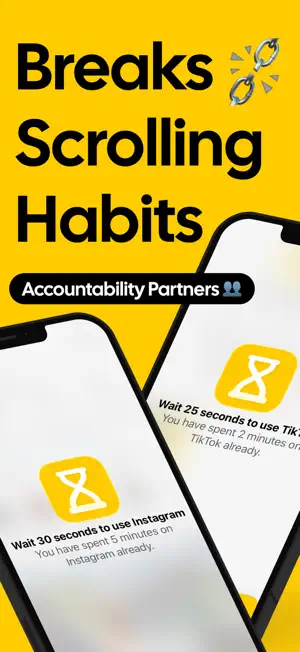
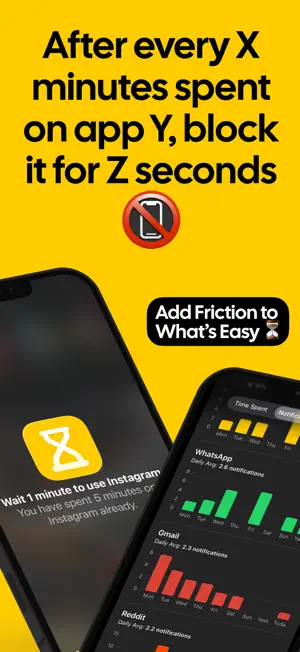
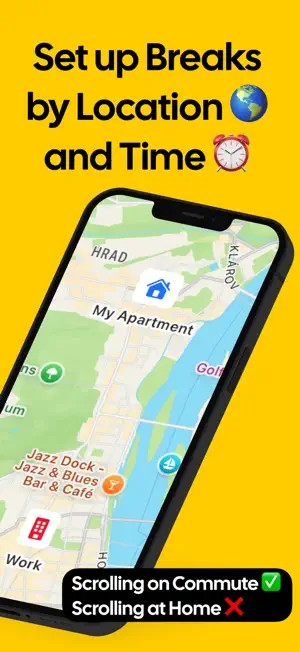
ScrollBump – Stop Doomscrolling, Take Control of Your Phone Do you find yourself endlessly scrolling through social media, news apps, or videos without realizing how much time has passed? Tired of relying on willpower alone to resist your phone? scrollBump is here to help. Unlike apps that just track usage or give reminders, scrollBump makes your phone doomscrollproof by adding short, intentional pauses that prevent mindless scrolling and help you reclaim focus. Reduce screen time, improve digital wellbeing, and build healthy phone habits—all without frustration or guilt. How ScrollBump Works ScrollBump inserts brief pauses that you can’t skip. These interruptions stop mindless scrolling and give your brain a chance to reset, helping you make conscious choices about your time. Over time, they retrain habits, reduce phone addiction, and encourage mindful, intentional usage. By turning habitual app use into a conscious choice, scrollBump helps you regain control over your time and mental clarity. Customizable Break Rules scrollBump adapts to your lifestyle. Create rules based on: • Time of day: Schedule breaks during work, study, or evening hours to stay focused and improve sleep. • Location: Reduce distractions in places like your office, bedroom, or during meals. • App-specific rules: Target the apps that take most of your attention while leaving essential apps accessible. Features for Digital Wellbeing • Flexible scheduling: Adjust break rules anytime to match your routines. • Minimalist interface: Non-intrusive design keeps the focus on intentional usage. Why ScrollBump Is Different Most social media detox apps block access entirely—but that often backfires, as people uninstall them when they need the app. scrollBump works differently: it gently slows scrolling, so your phone helps you make healthier choices without extreme restrictions. scrollBump changes the environment around your phone usage. By adding friction to automatic scrolling, prevention is consistent and reliable. You don’t have to rely on willpower—your phone itself helps you make healthier choices. The result: less doomscrolling, reduced digital fatigue, and a healthier relationship with your devices. Who Needs ScrollBump • Anyone struggling with phone addiction or social media fatigue • Students, professionals, or creators who want distraction-free focus • People looking to reclaim attention and productivity • Anyone seeking mindful scrolling habits, digital balance, or a sustainable social media detox Benefits You’ll Notice • Reduced doomscrolling and excessive app usage • Improved focus, productivity, and attention span • Lower stress, anxiety, and digital fatigue • Healthier phone habits without extreme restrictions or guilt • Reliable prevention of habitual scrolling • Greater awareness of how you spend time on your phone Take Control of Your Digital Life scrollBump is your personal digital coach, helping you make your phone doomscrollproof and your usage intentional. With friction-based breaks, location- and time-specific rules, and flexible scheduling, you can enjoy a balanced relationship with your phone. Over time, scrollBump trains your brain to pause, reflect, and make intentional decisions about your attention. Reclaim hours previously lost to endless feeds and feel more present, productive, and focused every day. Make Your Phone Work for You Stop scrolling automatically. Start using your time intentionally. With ScrollBump, every tap becomes a conscious choice, every session more mindful, and every break a step toward digital freedom. Download ScrollBump today and reclaim focus, attention, and peace of mind—one intentional break at a time. Perfect for screen time control, digital detox, phone addiction recovery, productivity, focus, mental health, and digital wellbeing. Terms of Use (EULA): https://www.apple.com/legal/internet-services/itunes/dev/stdeula/ Privacy Policy: https://www.scrollbump.com/privacy-policy.html
Ratings & reviews
5.0
9 ratings
What’s new
Version 1.8.0 · Updated June 21, 2026
• Block & Hide: distracting apps can now disappear from your Home Screen entirely, not just show a block screen. Tap "Block" in any rule to switch it to "Block & Hide" — apps vanish when the rule kicks in and come back automatically when your break ends. • Time-of-day scheduling is now free for everyone — set exactly when your rules turn on and off, no upgrade needed.
App privacy
The developer, Ondrej Veres, reported these privacy practices to Apple.
Data Linked to You
The following data, which may be collected and linked to your identity, may be used for the following purposes:
- Identifiers: User ID, Device ID
- Usage Data: Product Interaction
Used for: Analytics
Data Not Linked to You
The following data, which may be collected but is not linked to your identity, may be used for the following purposes:
- Diagnostics: Crash Data
Used for: App Functionality
Alternatives to ScrollBump: Reduce Screen Time
Looking for apps like ScrollBump: Reduce Screen Time? Here are 6 similar apps on the App Store. The highest rated is Still: simple lists (5.0/5), and 4 of the 6 are free to download.
-
 Still: simple lists
5.0
Still: simple lists
5.0
-
 SumNote - Notes with Sums
4.6
SumNote - Notes with Sums
4.6
-
 Just20Minutes
-
 Popt Notes
5.0
Popt Notes
5.0
-
 HabitBook - Habit Tracker
4.2
HabitBook - Habit Tracker
4.2
-
 SwipeNote: Organize your notes
4.7
SwipeNote: Organize your notes
4.7
| App | Rating | Price | Last updated | Compare |
|---|---|---|---|---|
| ScrollBump: Reduce Screen Time | 5.0 / 5 (9 ratings) | Free | June 21, 2026 | |
| Still: simple lists | 5.0 / 5 (4) | 1.99 USD | Jun 12, 2026 | Compare |
| SumNote - Notes with Sums | 4.6 / 5 (8) | Free | Feb 10, 2026 | Compare |
| Just20Minutes | – | 0.99 USD | Dec 21, 2025 | Compare |
| Popt Notes | 5.0 / 5 (5) | Free | Feb 14, 2026 | Compare |
| HabitBook - Habit Tracker | 4.2 / 5 (5) | Free | Aug 18, 2025 | Compare |
| SwipeNote: Organize your notes | 4.7 / 5 (12) | Free | Dec 3, 2025 | Compare |