

Snaviq: Screenshot Assistant
daejung youn Productivity iPhoneiPadiPod touch
Snaviq: Screenshot Assistant is a free Productivity app for iPhone and iPad by daejung youn. Requires iOS 13.0. Updated June 22, 2026.
- Price
- Free
- on the App Store
- Size
- 52 MB
- Age 4+
- Updated
- Jun 22
- 2026 · v1.0.06
Screenshots


About Snaviq: Screenshot Assistant
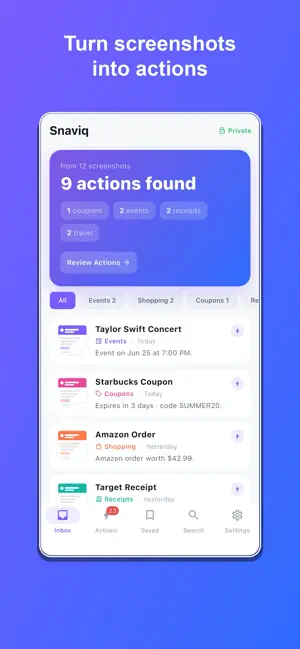
Snaviq is an AI screenshot assistant. It reads your screenshots on your device and turns them into things you can actually do — add an event to your calendar, get reminded before a coupon expires, save a product to your wishlist, file a receipt, and more. You take screenshots to remember something for later. Snaviq makes sure you don't forget — and acts on it for you. WHAT SNAVIQ DOES • Events → Add concerts, tickets and appointments straight to your calendar • Coupons → Get reminded before a code or warranty expires • Receipts → File them in a vault and export to PDF • Shopping → Save products to a wishlist and reopen the original link • Travel → Keep boarding passes and bookings organized • Links & QR → Open, copy or save in a tap • Contacts → Add a phone number or email from any screenshot AUTOMATIC & SMART Snaviq automatically reads each screenshot and pulls out the details that matter — dates, prices, coupon codes, order and tracking numbers, links and QR codes — then suggests exactly what to do next. No manual tagging required. SEARCH EVERYTHING Instantly search across the text inside all your screenshots. Find that order number, coupon, flight or receipt in seconds. 100% PRIVATE All analysis happens on your device using on-device text recognition. Your screenshots are never uploaded — not to us, not to anyone. What's in your camera roll stays on your iPhone. SNAVIQ PRO Upgrade to unlock unlimited analysis, unlimited search and saved items, calendar and reminder automation, the coupon and receipt vaults, travel assistant and wishlist. Available as a weekly or yearly subscription, or a one-time lifetime purchase. Turn screenshots into actions. Download Snaviq. Snaviq Pro is an auto-renewable subscription (weekly or yearly), or a one-time lifetime purchase. • Payment is charged to your Apple ID at purchase confirmation. • A subscription auto-renews unless turned off at least 24 hours before the end of the current period; your account is charged for renewal within 24 hours before the period ends. • Manage or cancel anytime in your Apple ID account settings. Privacy Policy: https://snaviq-7319c.web.app/privacy Terms of Use (EULA): https://snaviq-7319c.web.app/terms
What’s new
Version 1.0.06 · Updated June 22, 2026
Bug fixes and improvements - Sharper screenshot detection, structured detail cards, automatic new-screenshot scanning, and proactive reminders
App privacy
The developer, daejung youn, reported these privacy practices to Apple.
Data Not Linked to You
The following data, which may be collected but is not linked to your identity, may be used for the following purposes:
- Identifiers: User ID, Device ID
- Usage Data: Product Interaction
- Diagnostics: Crash Data, Other Diagnostic Data
Used for: Analytics
Alternatives to Snaviq: Screenshot Assistant
Looking for apps like Snaviq: Screenshot Assistant? Here are 6 similar apps on the App Store. The highest rated is Sense: Shared Family Calendar (4.8/5), and all 6 are free to download.
-
 Sanal Ajanda: Calendar Notes
-
 Optiqo Flow
-
 Room Planner 3D LiDAR Scanner
-
 Text2Cal: Calendar AI
3.6
-
 3D Scanner LiDAR
3.9
-
 Sense: Shared Family Calendar
4.8
| App | Rating | Price | Last updated | Compare |
|---|---|---|---|---|
| Snaviq: Screenshot Assistant | – | Free | June 22, 2026 | |
| Sanal Ajanda: Calendar Notes | – | Free | Aug 17, 2026 | Compare |
| Optiqo Flow | – | Free | Sep 24, 2026 | Compare |
| Room Planner 3D LiDAR Scanner | – | Free | Jul 23, 2026 | Compare |
| Text2Cal: Calendar AI | 3.6 / 5 (5) | Free | Sep 5, 2026 | Compare |
| 3D Scanner LiDAR | 3.9 / 5 (21) | Free | Sep 29, 2026 | Compare |
| Sense: Shared Family Calendar | 4.8 / 5 (42) | Free | Oct 26, 2026 | Compare |