

Text2Cal: Calendar AI
Yahav Fuchs Productivity iPhoneiPadiPod touch
Text2Cal: Calendar AI is a free Productivity app for iPhone and iPad by Yahav Fuchs. Rated 3.6/5 from 5 ratings. Requires iOS 15.1.
- Rating
- 3.6
- 5 ratings
- Price
- Free
- on the App Store
- Size
- 47 MB
- Age 4+
- Updated
- Sep 5
- 2026 · v0.0.30
Screenshots

About Text2Cal: Calendar AI
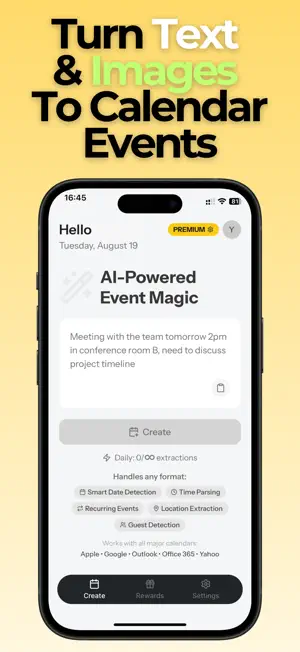
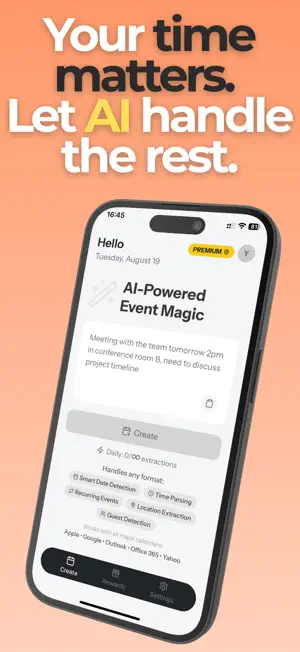
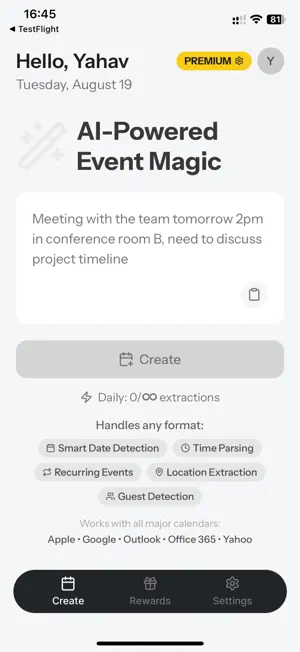
Extract multiple events from a single photo or text — not just one. Turn a business card into a saved contact with a follow-up meeting already scheduled. Send everything straight to Google Calendar, Apple Calendar, or Outlook. On any iPhone, and on Android too. Three Ways to Create Events Share from Any App Get a message with event details? Just tap Share → Text2Cal. Works with WhatsApp, Messages, Email, Safari, Slack, Notes — any app with a share button. No copy-paste needed. Snap a Photo Point your camera at flyers, posters, tickets, or invitations. Text2Cal's AI reads the details and creates calendar events — every event on the page, not just the first one. Scan Business Cards Just met someone at a conference? Scan their card to save the contact and schedule a follow-up meeting — all in one tap. Text2Cal is the only calendar app that turns a business card into both a contact and a meeting. Never lose a networking opportunity again. Why Text2Cal Basic calendar apps — and the screenshot shortcuts built into modern phones — handle one event at a time and save to a single calendar. Text2Cal understands context: it knows a 7 PM restaurant booking is dinner, not a meeting, and it extracts every event, location, and participant from one photo or message, then saves to whichever calendar you actually use. Real Time Savings - 2-3 events weekly: Save 13+ hours yearly - 1-2 events daily: Save 122+ hours yearly (5 full days) - Heavy users: Save 274+ hours yearly (11 full days) Perfect For Every Workflow Professionals Transform email meeting requests into calendar events instantly. Share from Outlook, Gmail, or Slack — done in two taps. Students Snap photos of class schedules, assignment deadlines, and exam dates. Never miss another deadline. Parents Capture school flyers, sports schedules, and doctor appointment slips with your camera — every date on the page. Networkers Batch-process business cards from conferences. Save contacts and book follow-ups faster than anyone else in the room. Key Features - AI-powered extraction from text, photos, and shares - Multiple events from one photo or text (Premium) - Business card scanner that creates a contact AND a follow-up meeting - Works with Google Calendar, Apple Calendar, and Outlook - Available in 9 languages - Works on any iPhone and Android Free to Start 5 extractions per month — free forever. Want more? Choose a weekly, monthly, yearly, or lifetime plan. Download now and stop typing events manually. Text2Cal — From text, photos, and cards to calendar. Instantly. Legal Terms: https://www.apple.com/legal/internet-services/itunes/appstore/dev/stdeula/ Privacy: https://text2cal.app/privacy
Ratings & reviews
3.6
5 ratings
What’s new
Version 0.0.30 · Updated September 5, 2026
What's New in 0.0.28 - New: Weekly plan — try Premium without a long commitment - Fairer regional pricing so costs better match your country - Fixed an issue where Lifetime unlock could fail to apply - Reliability improvements for saving events to Apple Calendar
App privacy
The developer, Yahav Fuchs, reported these privacy practices to Apple.
Data Used to Track You
The following data may be used to track you across apps and websites owned by other companies:
- Contact Info: Email Address, Name
- Usage Data: Product Interaction
Data Linked to You
The following data, which may be collected and linked to your identity, may be used for the following purposes:
- Purchases: Purchase History
- Contact Info: Email Address, Name
- Usage Data: Product Interaction
- Diagnostics: Crash Data, Performance Data, Other Diagnostic Data
- Other Data: Other Data Types
Used for: Analytics, App Functionality, Other Purposes
Data Not Linked to You
The following data, which may be collected but is not linked to your identity, may be used for the following purposes:
- Identifiers: User ID, Device ID
Used for: Analytics, App Functionality
Alternatives to Text2Cal: Calendar AI
Looking for apps like Text2Cal: Calendar AI? Here are 6 similar apps on the App Store. The highest rated is Sense: Shared Family Calendar (4.8/5), and all 6 are free to download.
-
 AI・Summary
4.0
AI・Summary
4.0
-
 Flight Focus
-
 Sense: Shared Family Calendar
4.8
Sense: Shared Family Calendar
4.8
-
 Interview AI - AI Copilot
1.0
Interview AI - AI Copilot
1.0
-
 Trace: AI Shared Calendar
4.2
Trace: AI Shared Calendar
4.2
-
 Morgen Calendar & Planner
4.4
Morgen Calendar & Planner
4.4
| App | Rating | Price | Last updated | Compare |
|---|---|---|---|---|
| Text2Cal: Calendar AI | 3.6 / 5 (5 ratings) | Free | September 5, 2026 | |
| AI・Summary | 4.0 / 5 (2) | Free | Oct 11, 2025 | Compare |
| Flight Focus | – | Free | Oct 27, 2026 | Compare |
| Sense: Shared Family Calendar | 4.8 / 5 (43) | Free | Oct 26, 2026 | Compare |
| Interview AI - AI Copilot | 1.0 / 5 (2) | Free | Aug 21, 2025 | Compare |
| Trace: AI Shared Calendar | 4.2 / 5 (18) | Free | Oct 28, 2026 | Compare |
| Morgen Calendar & Planner | 4.4 / 5 (213) | Free | Oct 5, 2026 | Compare |