

Clap to Find Phone & Whistle
heekyung moon Utilities iPhoneiPadiPod touch
Clap to Find Phone & Whistle is a free Utilities app for iPhone and iPad by heekyung moon. Rated 5.0/5 from 2 ratings. Requires iOS 16.4.
- Rating
- 5.0
- 2 ratings
- Price
- Free
- on the App Store
- Size
- 52 MB
- Age 17+
- Updated
- Oct 17
- 2026 · v1.0.15
Screenshots

About Clap to Find Phone & Whistle
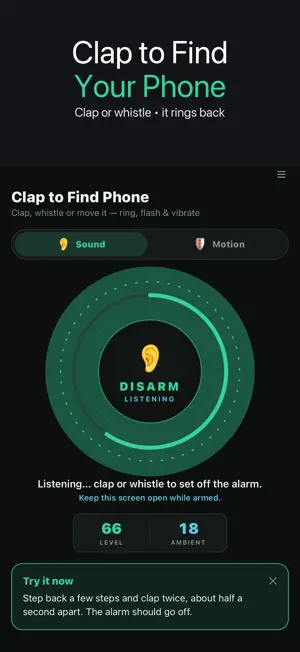
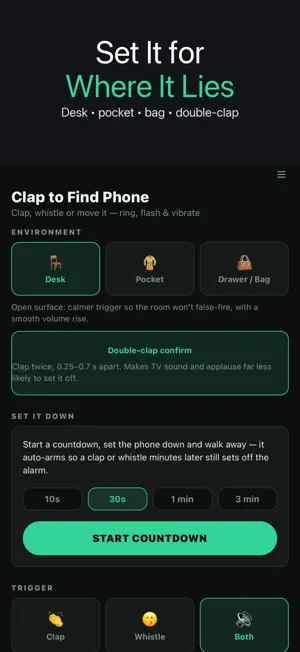
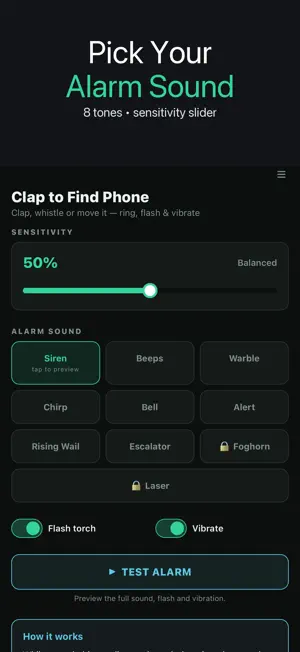
Clap to find your phone. Clap or whistle and your phone rings out loud, flashes its light and vibrates, even with the silent switch on, so you can hear it under a cushion, in a coat pocket or at the bottom of a bag. HOW IT WORKS 1. Tap the big button to arm it and leave the phone nearby. 2. Clap or whistle when you can't see it. 3. It sounds the alarm. Tap STOP when you have it. The phone listens only while this screen is open. iOS does not allow listening in the background, so the app keeps the screen awake while it is armed. CLAP & WHISTLE FINDER • Choose Clap, Whistle or Both • Rings over the silent switch, with SOS flashlight blinks and vibration • 8 alarm sounds, plus 2 more you can unlock by watching a short ad • Sensitivity slider, and Desk, Pocket and Drawer/Bag presets that set how easily it triggers and how fast the alarm gets loud • Double-clap confirm: only two claps about half a second apart set it off, so a single bang, TV sound or applause are much less likely to trigger it • Room check: for a moment after you arm it, the app measures the room's normal noise so it doesn't ring by itself in a busy room • Set It Down timer: start a countdown, put the phone down and walk away; it arms itself after 10 s, 30 s, 1 min or 3 min DON'T TOUCH MY PHONE ALARM • Switch to Motion, set the phone down and arm it • After a 5-second settle, a loud siren and flash go off if anyone picks it up or bumps it • Motion log shows each disturbance with the time and whether it was a bump or a pick-up • Intruder snapshot: when the motion alarm fires, the front camera quietly takes one photo of whoever moved your phone. The latest 5 are kept on this phone only and never uploaded PRIVATE BY DESIGN Sound and motion are analysed on the device and nothing is uploaded. To measure how loud the room is, the phone writes a temporary audio file while the app is armed. The app never plays it or sends it anywhere, and deletes it as soon as listening stops. GOOD TO KNOW • This is a local alarm for a phone that is near you. It does not locate a phone by GPS or track a phone somewhere else. • Keep the app open on screen while it is armed. • In a very loud place, use Double-clap confirm or the Desk preset. Try it now: arm it, step back a few steps and clap once. You will know in a second that it works in your room.
What’s new
Version 1.0.15 · Updated October 17, 2026
• The first time you open the app, “Turn on sound detection” now sits directly under “A loud alarm for your nearby phone”. The guide starts at the top and scrolls, keeping the button above the bottom banner; all steps and the nearby-phone local-alarm note remain below it. • Answering camera, microphone or motion permission prompts while arming no longer puts a full-screen ad before the armed screen. • An ad still pending after stopping an alarm or switching sound/motion modes is cancelled by any touch, arming/disarming, an alarm test, Back or leaving the app. It cannot cover your next action. Ad frequency limits and detection are unchanged.
App privacy
The developer, heekyung moon, reported these privacy practices to Apple.
Data Used to Track You
The following data may be used to track you across apps and websites owned by other companies:
- Identifiers: Device ID
- Usage Data: Advertising Data
Data Not Linked to You
The following data, which may be collected but is not linked to your identity, may be used for the following purposes:
- Identifiers: Device ID
- Usage Data: Advertising Data, Product Interaction
- Diagnostics: Crash Data, Performance Data
Used for: Third-Party Advertising, Analytics, App Functionality
Alternatives to Clap to Find Phone & Whistle
Looking for apps like Clap to Find Phone & Whistle? Here are 6 similar apps on the App Store. The highest rated is Double Clap to find my phone (5.0/5), and all 6 are free to download.
-
 Clap Find My Phone – Finder
-
 Clap to Find My Lost Phone
-
 Find Phone: Clap, Whistle
-
 Clap Detector - Find My Phone
4.4
Clap Detector - Find My Phone
4.4
-
 Double Clap to find my phone
5.0
Double Clap to find my phone
5.0
-
 Find My Phone & Device Finder
4.6
Find My Phone & Device Finder
4.6
| App | Rating | Price | Last updated | Compare |
|---|---|---|---|---|
| Clap to Find Phone & Whistle | 5.0 / 5 (2 ratings) | Free | October 17, 2026 | |
| Clap Find My Phone – Finder | – | Free | Oct 13, 2026 | Compare |
| Clap to Find My Lost Phone | – | Free | Jul 23, 2026 | Compare |
| Find Phone: Clap, Whistle | – | Free | Aug 15, 2026 | Compare |
| Clap Detector - Find My Phone | 4.4 / 5 (25) | Free | Feb 25, 2026 | Compare |
| Double Clap to find my phone | 5.0 / 5 (2) | Free | Oct 25, 2024 | Compare |
| Find My Phone & Device Finder | 4.6 / 5 (33) | Free | Jul 9, 2026 | Compare |