

Clap to Find My Lost Phone
Tarun Paliwal Utilities iPhoneiPadiPod touch
Clap to Find My Lost Phone is a free Utilities app for iPhone and iPad by Tarun Paliwal. Requires iOS 15.5. Updated July 23, 2026.
- Price
- Free
- on the App Store
- Size
- 47 MB
- Age 4+
- Updated
- Jul 23
- 2026 · v1.0
Screenshots

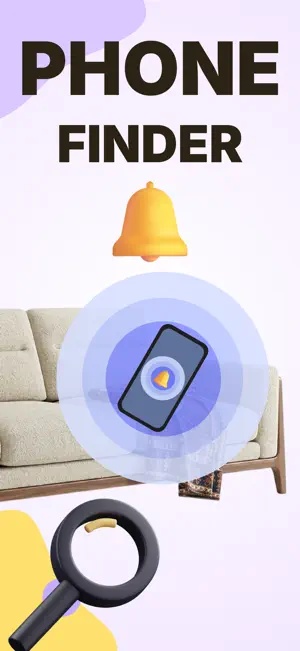
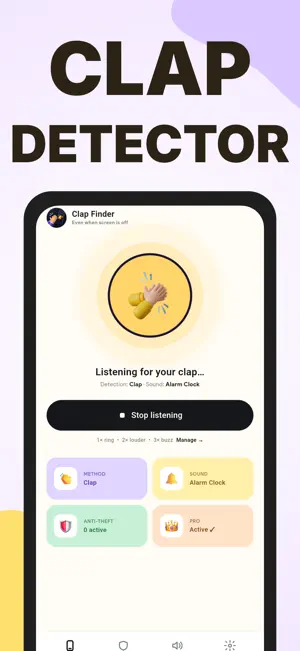

About Clap to Find My Lost Phone
Lost your phone in the couch cushions again? Just CLAP — and Clap Finder makes it ring loudly, even when the screen is off or the phone is on silent. No accounts. No internet. No tracking. Everything runs on your device. — HOW IT WORKS — 1. Open Clap Finder and tap "Start listening." 2. Set the phone down and go about your day. 3. Can't find it? Clap your hands — your phone rings instantly so you can follow the sound. Clap too quiet? Clap again and the alarm gets LOUDER. Keep clapping to crank it to full volume — perfect for a phone buried under a pile of laundry. — THREE WAYS TO FIND IT — • Clap detection — the classic. A double clap and it rings. • Whistle detection — hands full? Just whistle. • Snap detection — a quiet finger snap works too. Pick whichever cuts through your room. — RINGS WHEN IT MATTERS — • Works with the screen OFF and in the background. • Overrides silent mode so a muted phone still rings. • Adjustable sensitivity — tune it for a quiet bedroom or a noisy kitchen. • Choose your alarm sound and how long it rings (15s, 30s, 60s, or loop). • Vibration support. • Built-in "test my clap" meter so you can dial in detection before you rely on it. — ANTI-THEFT ALARMS — Clap Finder doubles as a pocket security guard: • Motion Alarm — set it down and it sounds a loud alarm the moment someone moves it. • Pocket Alarm — get alerted if your phone is lifted from your bag or pocket. • Charging Alarm — leaving it to charge in public? It screams if someone unplugs it. • Battery Full Alert — get a heads-up the moment charging completes so you can unplug and protect your battery. — GO PRO — Unlock the full experience: • 40+ premium alarm sounds — animals, classics, and more. • Premium app themes — dark mode and colorful palettes. • Zero ads, ever. • Payment is charged to your Apple Account at confirmation of purchase. • Your subscription automatically renews unless auto-renew is turned off at least 24 hours before the end of the current period. • Your account is charged for renewal within 24 hours prior to the end of the current period. • Manage or cancel your subscription anytime in your Apple Account settings after purchase. • Any unused portion of a free trial is forfeited when you purchase a subscription. Questions? Contact [email protected] Terms of Use: https://appenso.com/legal/terms Privacy Policy: https://appenso.com/legal/privacy
App privacy
The developer, Tarun Paliwal, reported these privacy practices to Apple.
Data Used to Track You
The following data may be used to track you across apps and websites owned by other companies:
- Identifiers: Device ID
- Usage Data: Advertising Data
- Diagnostics: Crash Data
Data Not Linked to You
The following data, which may be collected but is not linked to your identity, may be used for the following purposes:
- Identifiers: Device ID
- Usage Data: Advertising Data
- Diagnostics: Crash Data
Used for: Third-Party Advertising, App Functionality
Alternatives to Clap to Find My Lost Phone
Looking for apps like Clap to Find My Lost Phone? Here are 6 similar apps on the App Store. The highest rated is Clap Alarm to Find My Phone (5.0/5), and all 6 are free to download.
-
 Find Phone: Clap, Whistle
-
 Clap Alarm to Find My Phone
5.0
-
 Zappy - Clap to Find Phone
-
 Clap to Find Phone & Whistle
5.0
-
 Phone Finder By Clap Shortcut
4.5
-
 Find My Phone & Device Finder
4.6
| App | Rating | Price | Last updated | Compare |
|---|---|---|---|---|
| Clap to Find My Lost Phone | – | Free | July 23, 2026 | |
| Find Phone: Clap, Whistle | – | Free | Aug 15, 2026 | Compare |
| Clap Alarm to Find My Phone | 5.0 / 5 (1) | Free | Sep 14, 2026 | Compare |
| Zappy - Clap to Find Phone | – | Free | Feb 9, 2026 | Compare |
| Clap to Find Phone & Whistle | 5.0 / 5 (2) | Free | Oct 17, 2026 | Compare |
| Phone Finder By Clap Shortcut | 4.5 / 5 (35) | Free | Jan 2, 2026 | Compare |
| Find My Phone & Device Finder | 4.6 / 5 (33) | Free | Jul 9, 2026 | Compare |