

Narrata: Listen to Articles
The Lonely Unicorn GmbH Productivity iPhoneiPadiPod touch
Narrata: Listen to Articles is a free Productivity app for iPhone and iPad by The Lonely Unicorn GmbH. Requires iOS 26.0. Updated September 20, 2026.
- Price
- Free
- on the App Store
- Size
- 50 MB
- Age 4+
- Updated
- Sep 20
- 2026 · v1.1
Screenshots



About Narrata: Listen to Articles
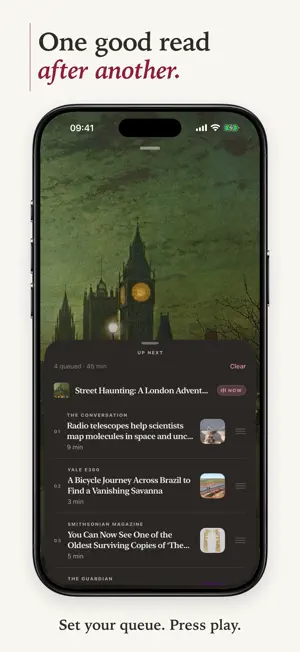
Good writing. Beautifully spoken. Narrata turns articles, EPUB books, and documents into your own listening library, with a calm reading view and natural voices generated entirely on your device. Save something for later, choose what plays next, and take your reading with you: on the train, in the kitchen, out along the lake. ONE GOOD READ AFTER ANOTHER Build an Up Next queue and choose your order. When one article finishes, the next begins automatically. Press play and let your reading list unfold. A REAL PLAYER FOR THE WRITTEN WORD A full-screen player gives your listening room to breathe, with cover artwork and the controls you need close at hand. • Choose your voice and listening speed • Set a sleep timer • Listen through AirPlay • Keep listening in the background, with Lock Screen controls • Pick up where you left off • Follow along with the spoken text Download a voice and save your reading ahead of time to listen offline. BOOKS BELONG HERE TOO Import EPUB books and listen continuously across chapters. Open Contents to find your way through a book, or settle into the Reader and keep going. Narrata also welcomes PDF, Word, Markdown, HTML, and plain-text documents. MAKE THE PAGE YOURS Choose from six paper styles, eight reading fonts, and seven text sizes. Find the combination that feels comfortable to you, from a light page to a darker evening read. Your reading preferences sync across your devices. KEEP THE STORY. LOSE THE CLUTTER. Narrata separates the writing from menus, ads, and newsletter prompts, creating a clean version for reading and listening. It tries additional ways to recover missing text from difficult pages and lets you know when a saved article appears incomplete. PDF imports recognise titles and headings, with chapter navigation when the document includes an outline. EVERYTHING YOU MEANT TO READ Save from Safari, add a link, or import a document. Keep your reading together in a library with favourites and archives. Search titles, highlights, or the full text, with matching passages shown in the results. READ THE WORLD. IN ITS OWN VOICE. Use Narrata in English, German, French, Polish, Ukrainian, or Spanish. Listen in 30 languages: English, German, French, Spanish, Italian, Portuguese, Dutch, Swedish, Danish, Finnish, Polish, Czech, Slovak, Slovenian, Croatian, Hungarian, Romanian, Bulgarian, Greek, Estonian, Latvian, Lithuanian, Ukrainian, Turkish, Arabic, Hindi, Indonesian, Vietnamese, Korean, and Japanese. PRIVATE BY DESIGN • No Narrata account • No ads or tracking • Article extraction and speech generation happen on your device • Your reading is not uploaded to a cloud AI service for narration • Automatic private iCloud sync for your library and preferences NARRATA PRO Narrata is free to download. Save as much as you like and listen to three articles free. Narrata Pro unlocks unlimited listening on iPhone and iPad with a monthly or yearly subscription. Eligible new subscribers can try the yearly plan free for 3 days. Cancel anytime in Settings. Crafted in Switzerland. Terms of Use: https://narrata.ch/terms.html Privacy Policy: https://narrata.ch/privacy.html Support: https://narrata.ch/support.html
What’s new
Version 1.1 · Updated September 20, 2026
More ways to listen. More ways to make reading yours. • Up Next queue. Line up articles in the order you want. When one finishes, the next begins automatically. • A new full-screen player. Redesigned around your listening, with cover artwork and easy access to your voice, speed, sleep timer, AirPlay, and queue. • EPUB books. Import a book, listen continuously across chapters, and navigate with Contents in the Reader. • Your page, your way. Choose from six paper styles, eight reading fonts, and seven text sizes. Your choices sync across devices. • Three new app languages. Polish, Ukrainian, and Spanish join English, German, and French. • Better article and PDF imports. More complete text from web links, less clutter, and better recognition of PDF titles, headings, and chapter outlines. Narrata now lets you know when an article appears incomplete. You can also search your library by title, highlights, or full text, and report an issue directly from the Reader or Settings. This update includes fixes for playback, saved listening positions, iCloud sync, downloads, and general stability.
App privacy
The developer, The Lonely Unicorn GmbH, reported these privacy practices to Apple.
Data Not Collected
The developer does not collect any data from this app.
Alternatives to Narrata: Listen to Articles
Looking for apps like Narrata: Listen to Articles? Here are 6 similar apps on the App Store. The highest rated is Widgeto5: Photo & Data Widgets (5.0/5), and all 6 are free to download.
-
 Widgeto5: Photo & Data Widgets
5.0
-
 PDF Text to Speech - DocuVoice
5.0
-
 Text to Speech - MonReader
5.0
-
 SOLOstudio
5.0
-
 ReadAloud: Text to Speech PDF
4.3
-
 Text to Speech․
4.2
| App | Rating | Price | Last updated | Compare |
|---|---|---|---|---|
| Narrata: Listen to Articles | – | Free | September 20, 2026 | |
| Widgeto5: Photo & Data Widgets | 5.0 / 5 (1) | Free | Jun 23, 2026 | Compare |
| PDF Text to Speech - DocuVoice | 5.0 / 5 (2) | Free | Jun 18, 2026 | Compare |
| Text to Speech - MonReader | 5.0 / 5 (2) | Free | Jan 5, 2026 | Compare |
| SOLOstudio | 5.0 / 5 (7) | Free | Oct 2, 2026 | Compare |
| ReadAloud: Text to Speech PDF | 4.3 / 5 (13) | Free | Oct 31, 2026 | Compare |
| Text to Speech․ | 4.2 / 5 (5) | Free | Sep 25, 2026 | Compare |