

Stickered
Jing Zhe Lim Graphics & Design iPhoneiPadiPod touch
Stickered is a free Graphics & Design app for iPhone and iPad by Jing Zhe Lim. Requires iOS 17.0. Updated July 16, 2026.
- Price
- Free
- on the App Store
- Size
- 69 MB
- Age 4+
- Updated
- Jul 16
- 2026 · v1.3.5
Screenshots


About Stickered
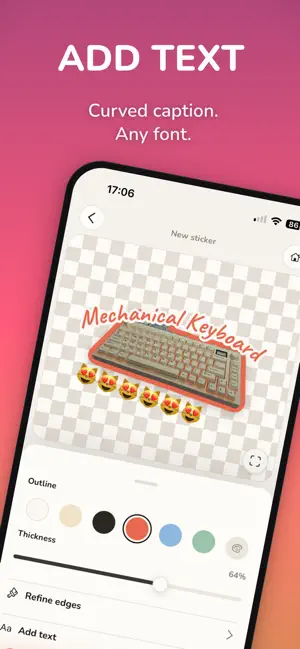
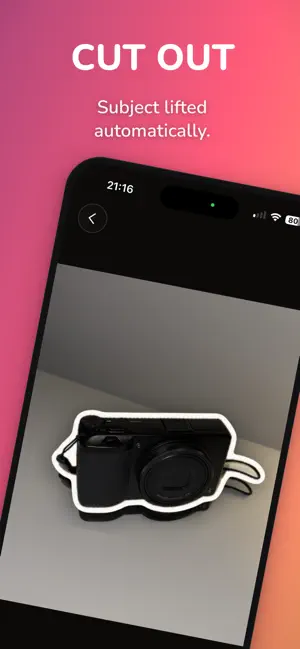
Turn any photo into a transparent-background sticker in a few taps — add your own text, then arrange your stickers into a Scene. All on your device. MAKE A STICKER 1. Capture a photo or import one from your library. 2. Auto-cutout lifts the subject — clean edges, no green screen, no fuss. 3. Add an Outline. Set the thickness and colour for that classic die-cut look. 4. Add text — straight or curved — in the font and colour you want. 5. Fine-tune edges by hand with the Refine brush. Pan, pinch to zoom, two-finger tap to undo. 6. Save to your on-device Library, or share to Messages, Instagram, AirDrop, or Files. BUILD A SCENE (new) Drop several stickers onto a background and arrange them into one image — a wallpaper, a collage, a layout. Add text, layer elements front to back, and pick a background: a solid colour, a gradient, or one of your own photos. Export the whole Scene as a single image. MADE FOR - Journalers and scrapbookers who want stickers from their own photos. - Anyone who's ever wanted a sticker of their dog, their plant, or their breakfast — with a caption. - People who care that their photos stay private. FREE, FOREVER - On-device subject detection — no cloud, no upload, no account. - Adjustable Outline: any thickness, any colour. - Refine brush for pixel-perfect edges. - One text element with our free font set. - On-device Library. No watermark. No usage cap. No ads. - Start building Scenes right away. STICKERED PRO — ONE-TIME UNLOCK, NO SUBSCRIPTION - Multiple text elements per sticker. - Curved / arc text (emoji included). - Per-element text outline. - The full premium font catalogue — 20+ fonts, including 9 Simplified Chinese styles. - Re-open and re-edit any sticker you've saved. - Scene extras: gradient and photo backgrounds. Buy once, keep every Pro feature we add in future updates. PRIVACY Your photos never leave your device. Stickered does not upload, transmit, or store your photos on any server. No accounts. No tracking. Privacy policy: https://jzlim.github.io/stickered-privacy/ REQUIREMENTS iPhone on iOS 17 or later. Subject detection uses Apple's on-device Vision framework.
What’s new
Version 1.3.5 · Updated July 16, 2026
Introducing Scenes — a new way to use your stickers. Arrange multiple stickers and text over a background, then export the whole thing as one image: a poster, a phone wallpaper, a card, something to send. • Compose on a canvas — pick a shape (square, portrait, or story), drop in stickers from your Library, then move, scale, rotate, and layer them freely. • Backgrounds — transparent, a solid colour, a gradient, or one of your own photos, with a "match photo" fit so nothing gets cropped. • Text, fully styled — colour, outline, curve, and the full font set, plus an eyedropper to grab any colour on screen. • Save it to Photos or share it anywhere. Your Scenes live on the Home screen and in your Library. As always, everything stays on your device — nothing is ever uploaded. Plus a handful of polish fixes.
App privacy
The developer, Jing Zhe Lim, reported these privacy practices to Apple.
Data Not Collected
The developer does not collect any data from this app.
Alternatives to Stickered
Looking for apps like Stickered? Here are 6 similar apps on the App Store. The highest rated is Cutout Sticker Maker (5.0/5), and all 6 are free to download.
-
 StickerCut Studio
-
 Cropcut: Sticker Maker
-
 Cutout Sticker Maker
5.0
Cutout Sticker Maker
5.0
-
 Filter Studio: Photo FX
-
 Pipday: Stickers & Scrapbook
5.0
Pipday: Stickers & Scrapbook
5.0
-
 Cutmoji: Sticker Maker
| App | Rating | Price | Last updated | Compare |
|---|---|---|---|---|
| Stickered | – | Free | July 16, 2026 | |
| StickerCut Studio | – | Free | Aug 10, 2026 | Compare |
| Cropcut: Sticker Maker | – | Free | Sep 28, 2026 | Compare |
| Cutout Sticker Maker | 5.0 / 5 (1) | Free | Oct 26, 2026 | Compare |
| Filter Studio: Photo FX | – | Free | May 21, 2026 | Compare |
| Pipday: Stickers & Scrapbook | 5.0 / 5 (1) | Free | Oct 27, 2026 | Compare |
| Cutmoji: Sticker Maker | – | Free | Aug 22, 2026 | Compare |
Compare Stickered with the top alternatives: ratings, updates, ASO score and keyword gaps →