

StickerCut Studio
Suleyman ER Graphics & Design iPhoneiPadiPod touch
StickerCut Studio is a free Graphics & Design app for iPhone and iPad by Suleyman ER. Requires iOS 16.0. Updated August 10, 2026.
- Price
- Free
- on the App Store
- Size
- 9 MB
- Age 4+
- Updated
- Aug 10
- 2026 · v1.0.3
Screenshots

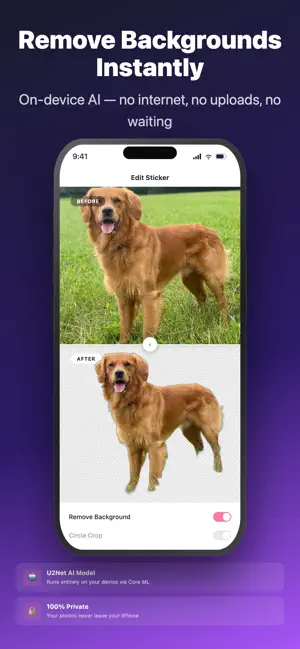


About StickerCut Studio
StickerCut turns any photo into a professional, print-ready sticker — right on your iPhone. No subscriptions, no cloud uploads, no account needed. HOW IT WORKS 1. Upload any photo from your library 2. Remove the background with AI, or crop into a circle 3. Add a colored outline, pick your sticker size 4. Export and print — or cut with Cricut ON-DEVICE AI BACKGROUND REMOVAL Powered by an on-device deep learning model (U2Net via Core ML). Your photos never leave your device — no internet connection required. Background removal is fast, accurate, and completely private. CIRCLE CROP WITH PRECISION POSITIONER Pan, zoom, and position your subject exactly where you want it inside the circle frame. Expand to full screen for pixel-perfect placement. Undo and reposition as many times as you need. CUSTOM OUTLINE Add a border to make your sticker pop. Choose any color from the color picker and adjust the thickness from 1 to 10 px. Works with both background removal and circle crop. PRINT-READY EXPORT Export at 300 DPI — the professional print standard. Choose from Small (38mm), Medium (51mm), or Large (70mm) sizes. Save directly to Photos or export PNG to any app via Files. COMPLETELY PRIVATE No account. No analytics. No cloud sync. Everything stays on your device. PREMIUM SVG Export and clean saves are available as a one-time in-app purchase — no subscription, ever. - SVG Export for Cricut and other cutting machines. Generate a cut file with the exact outline path and drag it straight into Cricut Design Space. No manual tracing needed. - Clean exports. Upgrade once to unlock ad-free, logo-free saves. StickerCut is perfect for: • Custom sticker printing at home or at a print shop • Cricut and Silhouette projects • Personalized gifts, labels, and packaging • Pet portraits, baby photos, logos, and more
What’s new
Version 1.0.3 · Updated August 10, 2026
A feature has been added to insert multiple copies of the same image onto the Sheet. Bug fixes and improvements
App privacy
The developer, Suleyman ER, reported these privacy practices to Apple.
Data Not Linked to You
The following data, which may be collected but is not linked to your identity, may be used for the following purposes:
- Usage Data: Product Interaction, Other Usage Data
- Diagnostics: Crash Data, Performance Data, Other Diagnostic Data
Used for: Analytics, App Functionality
Alternatives to StickerCut Studio
Looking for apps like StickerCut Studio? Here are 6 similar apps on the App Store. The highest rated is Cutout Sticker Maker (5.0/5), and all 6 are free to download.
-
 Stickered
-
 Cutline: Image to SVG
-
 Cutout Sticker Maker
5.0
Cutout Sticker Maker
5.0
-
 Cropcut: Sticker Maker
-
 Craft Space: SVG Design Maker
-
 Simple Create
| App | Rating | Price | Last updated | Compare |
|---|---|---|---|---|
| StickerCut Studio | – | Free | August 10, 2026 | |
| Stickered | – | Free | Jul 16, 2026 | Compare |
| Cutline: Image to SVG | – | Free | Sep 6, 2026 | Compare |
| Cutout Sticker Maker | 5.0 / 5 (1) | Free | Oct 26, 2026 | Compare |
| Cropcut: Sticker Maker | – | Free | Sep 28, 2026 | Compare |
| Craft Space: SVG Design Maker | – | Free | Oct 21, 2026 | Compare |
| Simple Create | – | Free | Apr 6, 2026 | Compare |
Compare StickerCut Studio with the top alternatives: ratings, updates, ASO score and keyword gaps →