

Pulse - System Toolkit
Marwan Aljasmi Utilities iPhoneiPadiPod touch
Pulse - System Toolkit is a free Utilities app for iPhone and iPad by Marwan Aljasmi. Rated 5.0/5 from 3 ratings. Requires iOS 17.0. Updated July 15, 2026.
- Rating
- 5.0
- 3 ratings
- Price
- Free
- on the App Store
- Size
- 100 MB
- Age 4+
- Updated
- Jul 15
- 2026 · v1.4.0
Screenshots

About Pulse - System Toolkit
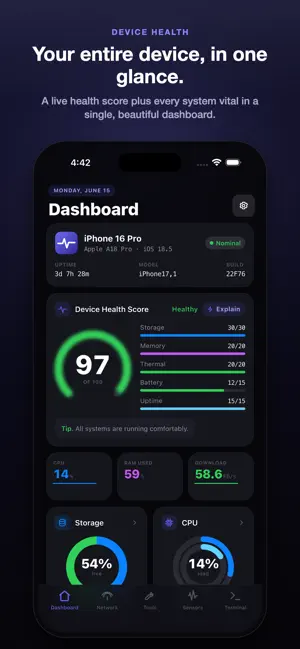
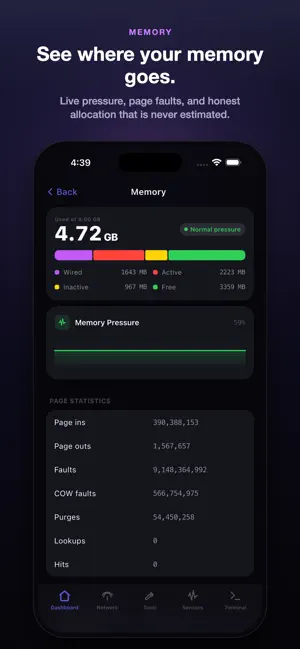
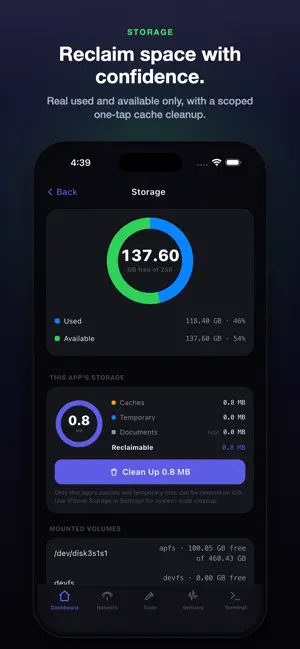
Pulse answers every question about your iPhone or iPad: how it performs, what your network is doing, who is watching your data, and whether your device and secrets are safe. No faked numbers. No ads. No account. No in-app purchases. Every feature on first launch. DEVICE MONITOR Live CPU with per-core breakdown across performance and efficiency cores. RAM in real time: wired, active, inactive, available. Battery level, charge state, and a live discharge graph. Storage with one-tap cache clear. Thermal state. Device Health Score: a 0 to 100 gauge across CPU, RAM, storage, battery, and uptime. NETWORK WORKBENCH (15 tools) Ping, traceroute with geo path, DNS across 9 record types, port scanner, LAN scanner, Bonjour, Whois, SSL inspector, TLS scanner, speed test, API Request, WebSocket tester, subnet calculator, Wake on LAN, QR codes, and a raw TCP, UDP, and TLS socket client. Live traffic by interface, the routing table, a Wi-Fi toolkit, and Wi-Fi sharing by QR and NFC. SECRETS VAULT AND AUTHENTICATOR A zero knowledge password vault with envelope encryption (AES-256-GCM). Unrecoverable by design: no server, no backdoor. Unlock with a PIN or Face ID. Organize logins, cards, and notes in nested folders. A built in TOTP authenticator and AES file and text encryption. Optional auto lock, clipboard auto clear, and erase after ten failed attempts. iOS AutoFill fills saved logins into other apps and Safari, gated behind Face ID. PRIVACY INSPECTOR Import your iOS App Privacy Report and Pulse parses it on your device. Nothing leaves your phone. See which apps used your location, camera, microphone, contacts, photos, and calendar over the last 7 days, with a heatmap of when. Every domain each app contacted is classified and risk scored against a bundled tracker list. SECURITY CENTER Nine on-device checks produce a 0 to 100 posture score: Passcode, Biometrics, Data Protection, Screen Privacy, Sandbox Integrity, Debugger detection, VPN, HTTP Proxy, and Low Power Mode. Each links to the right iOS Settings page, and an on-device AI advisor tells you what to fix. SSH, SFTP, AND FTP CLIENT Connect over SSH with password, key, or two factor auth, with ProxyJump. Generate Ed25519, RSA, and ECDSA keys on device. Upload, download, and manage files over SFTP. A separate FTP and FTPS manager, and an in app terminal with 59 commands. ON-DEVICE PYTHON IDE Run real Python on your phone, fully offline. Multi-file projects with working imports, a code editor, and a Run console. ADVANCED TOOLS NFC Toolkit: read, write, and inspect NDEF tags (MIFARE, NTAG, ISO14443, ISO15693). BLE Explorer: scan peripherals, browse the GATT tree, and read, write, and subscribe to characteristics. Storage Scanner: find duplicate photos, large videos, screenshots, and cache. Sizes come from system metadata, so iCloud originals are never downloaded. Dev Toolbox: SHA-256 and SHA-512 hashing, Base64, JWT decode, regex tester, UUID and password generators, and Unix epoch converter. SENSORS (23 hardware tests) Motion (accelerometer, gyroscope, magnetometer, barometer), GPS and compass, proximity, NFC, Bluetooth, UWB, Face ID, microphone, speaker, haptics, every camera, LiDAR, torch, multi-touch, and a display color test. Exportable as timestamped CSV. WIDGETS, AI, AND SHORTCUTS Home Screen and Lock Screen widgets plus a RAM Live Activity in the Dynamic Island. On iOS 26 with Apple Intelligence, an on-device AI explains your Health Score and security posture, with no API key and no network call, and all generated text is labelled. Ask Siri to check battery, storage, or network, and find SSH hosts in Spotlight. 10 LANGUAGES English, Arabic (RTL), Simplified Chinese, Spanish, Japanese, German, French, Portuguese, Russian, and Korean. DATA INTEGRITY Every value comes from a real iOS API or is clearly labelled. Values Apple does not expose, like battery cycle count and Wi-Fi signal strength, are never faked. What you see is what the device reports.
What’s new
Version 1.4.0 · Updated July 15, 2026
Version 1.4.0 includes bug fixes and overall improvements to enhance stability and performance.
App privacy
The developer, Marwan Aljasmi, reported these privacy practices to Apple.
Data Not Collected
The developer does not collect any data from this app.
Alternatives to Pulse - System Toolkit
Looking for apps like Pulse - System Toolkit? Here are 6 similar apps on the App Store. The highest rated is MainframeMonitor (5.0/5), and all 6 are free to download.
-
 Nexus Telemetry
-
 MainframeMonitor
5.0
MainframeMonitor
5.0
-
 Secrefier
-
 Snipt - Clip & Sync
-
 Offline Password Generator
-
 VoltLog: Battery Logs
| App | Rating | Price | Last updated | Compare |
|---|---|---|---|---|
| Pulse - System Toolkit | 5.0 / 5 (3 ratings) | Free | July 15, 2026 | |
| Nexus Telemetry | – | Free | Jun 14, 2026 | Compare |
| MainframeMonitor | 5.0 / 5 (1) | Free | Oct 14, 2026 | Compare |
| Secrefier | – | Free | Jun 19, 2026 | Compare |
| Snipt - Clip & Sync | – | Free | Sep 14, 2026 | Compare |
| Offline Password Generator | – | Free | Dec 1, 2025 | Compare |
| VoltLog: Battery Logs | – | Free | Jun 11, 2026 | Compare |