

MainframeMonitor
Ralf Langhoff Utilities iPhoneiPadiPod touch
MainframeMonitor is a free Utilities app for iPhone and iPad by Ralf Langhoff. Rated 5.0/5 from 1 ratings. Requires iOS 17.0. Updated October 14, 2026.
- Rating
- 5.0
- 1 ratings
- Price
- Free
- on the App Store
- Size
- 24 MB
- Age 4+
- Updated
- Oct 14
- 2026 · v2.0
Screenshots

About MainframeMonitor
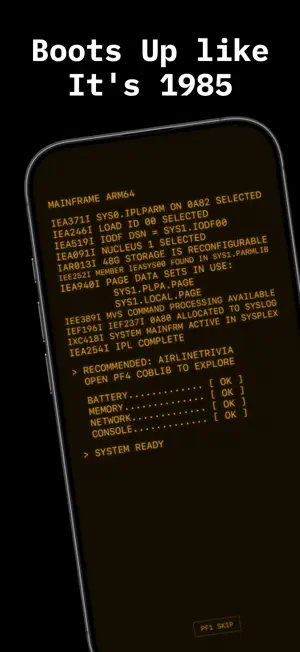
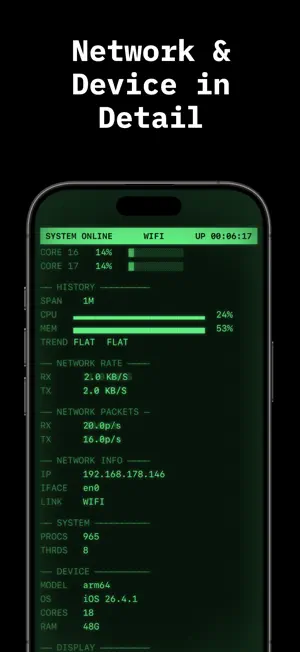
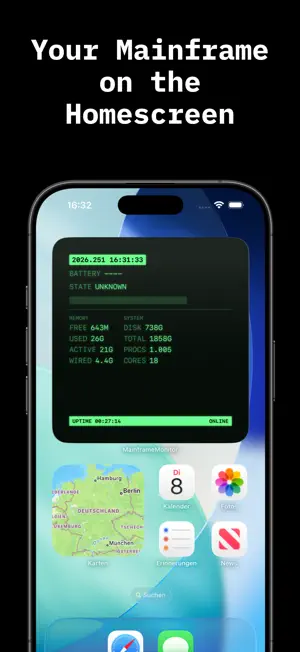
Turn your iPhone into a mainframe from the golden age of computing. MAINFRAME MONITOR shows your device's live stats wrapped in a nostalgic CRT console – complete with phosphor glow, scanlines, a boot sequence and satisfying key clicks. Choose between classic GREEN or warm AMBER, each with its own matching app icon. ■ LIVE SYSTEM MONITOR • Battery, CPU, memory and free storage • Uptime, network status and device info • All in real time, right on the glowing screen ■ HOME SCREEN WIDGET • Keep your key system stats always in view • In the same retro CRT style ■ REAL MAINFRAME FEELING • Authentic boot sequence on launch • Scanlines, glow and CRT effects • Terminal-style PF function-key controls ■ HIDDEN CLASSIC GAMES • Snake, Hamurabi, Void Patrol and Bagels • Text-based retro games, just like on the old terminals ■ FAIR & PRIVATE • Completely free • No ads, no trackers, no accounts • All data stays on your device Whether as a stylish system monitor, a home screen widget or a hands-on piece of computing history – MAINFRAME MONITOR brings back the charm of the old data centers. Made with attention to detail. Be sure to check out my other apps right inside the app.
What’s new
Version 2.0 · Updated October 14, 2026
What's New in Version 2.0 The biggest update to the console so far: New Displays • Seismograph: A paper strip chart records vibrations live and rates them from Light to Severe. Choose from three styles: Standard, Fine and Bars. • Front Panel Lamps: One lamp per CPU core, plus NET and MEM. The lamps flicker with actual system load. • Compass Panel with heading tape • Audio Panel: Output device and volume • Display: Brightness and refresh rate (ProMotion 120 Hz) • Network: Shows expensive connections and Low Data Mode • Capacity Planning: Battery and free storage forecast • Session Statistics (SMF): Average and peak CPU and memory usage, data received and sent Live Activity • 3270-style console on the Lock Screen and in the Dynamic Island IBM 1403 Line Printer • Press PF8 PRINT to print a system status report on green-bar continuous paper, complete with printer sounds. You can share the report. New Commands • D ENV: Compass, display, audio, network • D CAPACITY: Battery and storage forecast • D M=MIPS: CPU benchmark compared with historic IBM systems • D SMF: Session records • D IPLINFO: Date of the last restart Usability • PF1: New Operator Guide in English and German • System Control Panel: Configure the screensaver, seismograph style, Live Activity and lamp strip • The Syslog is now off by default, and the panels use the freed space. • Close the Syslog with X or enlarge it with MAX. Commands can be run directly from the full-screen view. • The Change Log now has its own full-screen view. • Minor improvements and bug fixes
App privacy
The developer, Ralf Langhoff, reported these privacy practices to Apple.
Data Not Collected
The developer does not collect any data from this app.
Alternatives to MainframeMonitor
Looking for apps like MainframeMonitor? Here are 6 similar apps on the App Store. The highest rated is Blip Stats (5.0/5), and all 6 are free to download.


| App | Rating | Price | Last updated | Compare |
|---|---|---|---|---|
| MainframeMonitor | 5.0 / 5 (1 rating) | Free | October 14, 2026 | |
| Ringsee | – | Free | Apr 8, 2026 | Compare |
| SoftLock | – | Free | Mar 9, 2026 | Compare |
| PhoneDiagnostix | – | Free | May 9, 2026 | Compare |
| The Last 5% | – | Free | Apr 9, 2026 | Compare |
| Sensor Data Pro | – | Free | Feb 21, 2026 | Compare |
| Blip Stats | 5.0 / 5 (1) | Free | Oct 16, 2026 | Compare |
Compare MainframeMonitor with the top alternatives: ratings, updates, ASO score and keyword gaps →