

Offline TTS Voice Reader: PDF
Romain Lefebvre Productivity iPhoneiPadiPod touch
Offline TTS Voice Reader: PDF is a free Productivity app for iPhone and iPad by Romain Lefebvre. Requires iOS 18.0. Updated October 7, 2026.
- Price
- Free
- on the App Store
- Size
- 39 MB
- Age 4+
- Updated
- Oct 7
- 2026 · v1.3
Screenshots

About Offline TTS Voice Reader: PDF
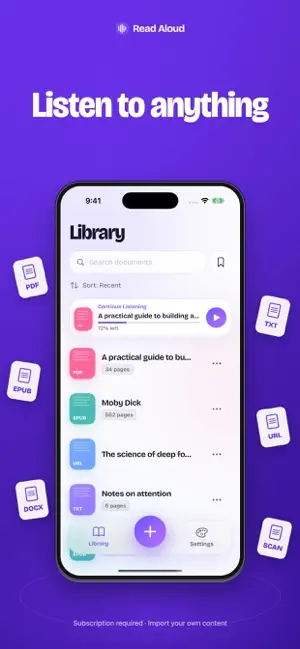
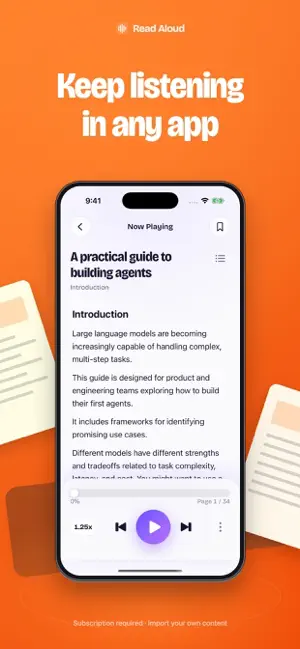
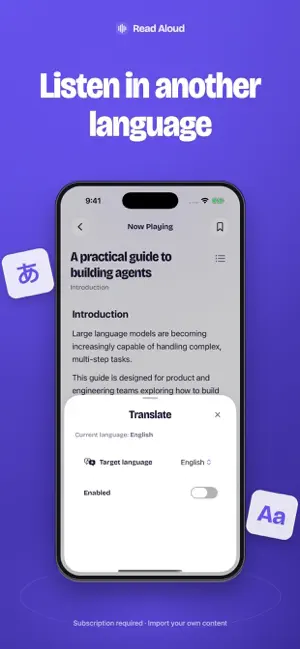
Turn your own text and documents into audio. SUBSCRIPTION REQUIRED Read Aloud is a subscription app. An active auto-renewable subscription is required to use the app and the features below. Before subscribing, Try It First lets you preview a bundled sample. Read Aloud is a text-to-speech reader for people who want to listen instead of staring at a screen. Import your own PDFs, EPUB ebooks, DOCX documents, TXT files, web articles, and scanned pages, then listen with natural voices, word-by-word highlighting, translation, offline playback, and a sleep timer. IMPORT YOUR OWN CONTENT Import and read aloud: • PDF files • EPUB ebooks • DOCX documents • TXT files • Web pages and articles • Scanned pages You can also import selected public-domain texts from Project Gutenberg into your library. LISTEN LIKE MUSIC Start a document, lock your iPhone, open another app, and keep listening in the background. Turn reports, books, notes, and articles into audio for your commute, walk, workout, chores, or bedtime. FOLLOW EVERY WORD Read along with real-time text highlighting. The current sentence and word stay visible, so it is easier to stay focused and continue exactly where you left off. NATURAL VOICES Choose clear, natural-sounding voices and adjust reading speed to match your pace. Natural voice playback requires a one-time 400 MB model download. The app shows the size and asks for confirmation before starting the download. LISTEN IN ANY LANGUAGE Translate text while you read and listen. Useful for language learning, travel, school, work, and understanding content in another language. OFFLINE MODE Prepare imported books and documents for offline listening. Perfect for flights, trains, commutes, and places with no internet. SLEEP TIMER Stop playback after 15, 30, 45 minutes, 1 hour, or at the end of a chapter. PERFECT FOR • Students • Busy professionals • Ebook readers • Language learners • People with long reading lists • Anyone who prefers listening over reading Read Aloud turns your PDFs, ebooks, articles, documents, and web pages into a calm listening experience. Privacy Policy: https://pagetovoice.com/privacy Terms of Use (EULA): https://www.apple.com/legal/internet-services/itunes/dev/stdeula/
What’s new
Version 1.3 · Updated October 7, 2026
• A redesigned library to find your documents more easily. • A refreshed reader with clearer playback controls. • A new look for voice, translation and sleep-timer settings.
App privacy
The developer, Romain Lefebvre, reported these privacy practices to Apple.
Data Not Collected
The developer does not collect any data from this app.
Alternatives to Offline TTS Voice Reader: PDF
Looking for apps like Offline TTS Voice Reader: PDF? Here are 6 similar apps on the App Store. The highest rated is WithAudio (5.0/5), and 5 of the 6 are free to download.


| App | Rating | Price | Last updated | Compare |
|---|---|---|---|---|
| Offline TTS Voice Reader: PDF | – | Free | October 7, 2026 | |
| Screen Time – Slackn't | – | Free | Sep 25, 2026 | Compare |
| WithAudio | 5.0 / 5 (1) | Free | Aug 28, 2026 | Compare |
| Speech It | – | Free | Aug 29, 2026 | Compare |
| Article TTS | – | Free | Nov 24, 2025 | Compare |
| Tmibao - File Redaction | – | Free | Aug 20, 2026 | Compare |
| Gengou | 3.8 / 5 (4) | 0.99 USD | Jul 4, 2026 | Compare |