

Dashlet: Custom Data Widgets
Ziga Dolar Utilities iPhoneiPadiPod touchApple Watch
Dashlet: Custom Data Widgets is a free Utilities app for iPhone and iPad by Ziga Dolar. Requires iOS 18.0. Updated October 12, 2026.
- Price
- Free
- on the App Store
- Size
- 18 MB
- Age 4+
- Updated
- Oct 12
- 2026 · v1.8
Screenshots


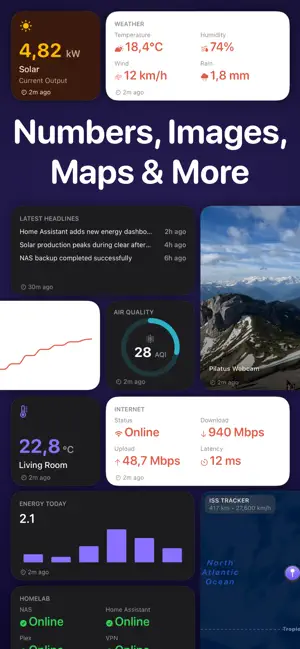
About Dashlet: Custom Data Widgets
# Put any data on your Home Screen. Dashlet lets you build beautiful widgets from almost any online data source. Display weather, scenic webcams, Home Assistant sensors, RSS feeds, server dashboards, solar production, package tracking, satellite positions, and much more; all on your Home Screen, Lock Screen, and Apple Watch. No coding. No accounts. No cloud. # Connect almost anything • HTTPS endpoints • JSON, XML/RSS and images • Bearer tokens, Basic Authentication and custom headers • Secure Keychain storage # Build widgets visually Browse your response, pick the fields you want, and map them into widgets with an intuitive visual editor. No JSON paths or scripting required. # Share a setup in a link Send someone a data source, or a whole widget with its rows, formatting and theme, as a link. It opens filled in on their device, ready to save, and nothing is created until they keep it. Your tokens and passwords never travel with it. # Multiple widget types • Value • Dashboard • List • Image • Image + Text • Carousel • Charts and Gauges • Maps # Designed for power users Perfect for: • Home Assistant • Scenic webcams • Photo feeds • Weather • Solar monitoring • Server monitoring • RSS feeds • Package tracking • Satellite tracking • Smart homes • Personal dashboards # Always available Dashlet caches your latest data so widgets continue working even when you're offline. # Know when something changes View request history, response times, success rates and endpoint health to quickly diagnose problems. ---- Terms of Service: https://getdashlet.app/terms Privacy Policy: https://getdashlet.app/privacy Terms of Use (Apple Standard EULA): https://www.apple.com/legal/internet-services/itunes/dev/stdeula/
What’s new
Version 1.8 · Updated October 12, 2026
Set up a widget from a link, and send your own setups to anyone. Set up a widget from a link: A link can now carry a whole setup: the endpoint, how it is read, and the widget that reads it. Tapping one opens Dashlet with everything filled in, and nothing is saved until you look it over and keep it. If you already have that endpoint, Dashlet offers to add the widget to the source you have instead of making a second copy. Share a source, or a whole widget: Share Setup Link turns anything you have already set up into a link you can send. A shared widget travels whole, with its rows, formatting and theme, so the other end gets the widget rather than a blank one to rebuild. You see the link before you send it. Your credentials stay with you: A link says what kind of sign-in an endpoint needs and nothing more. Your tokens, passwords and locked header values never leave your device, and whoever opens the link is asked for their own. Fixes: The freshness badges on the dashboard now keep time instead of showing whatever they said when the board was last drawn. Diagnostics shows the ten most recent entries in each log with the rest a tap away, and keeps twice as much widget refresh history.
App privacy
The developer, Ziga Dolar, reported these privacy practices to Apple.
Data Not Collected
The developer does not collect any data from this app.
Alternatives to Dashlet: Custom Data Widgets
Looking for apps like Dashlet: Custom Data Widgets? Here are 6 similar apps on the App Store. The highest rated is Hearthboard: Home Dashboard (4.5/5), and all 6 are free to download.
-
 xGridUp - Dashboard
-
 Hearthboard: Home Dashboard
4.5
Hearthboard: Home Dashboard
4.5
-
 CCountdown
-
 RecDual Link
-
 Priceful - Any Price Tracker
-
 Countdown Days · Widgets
| App | Rating | Price | Last updated | Compare |
|---|---|---|---|---|
| Dashlet: Custom Data Widgets | – | Free | October 12, 2026 | |
| xGridUp - Dashboard | – | Free | Jul 6, 2026 | Compare |
| Hearthboard: Home Dashboard | 4.5 / 5 (2) | Free | Oct 23, 2026 | Compare |
| CCountdown | – | Free | May 12, 2026 | Compare |
| RecDual Link | – | Free | Apr 17, 2026 | Compare |
| Priceful - Any Price Tracker | – | Free | Oct 2, 2026 | Compare |
| Countdown Days · Widgets | – | Free | Oct 21, 2026 | Compare |