

xGridUp - Dashboard
K2 Labs Utilities iPhoneiPadiPod touch
xGridUp - Dashboard is a free Utilities app for iPhone and iPad by K2 Labs. Requires iOS 18.6. Updated July 6, 2026.
- Price
- Free
- on the App Store
- Size
- 10 MB
- Age 17+
- Updated
- Jul 6
- 2026 · v1.0.2
Screenshots

About xGridUp - Dashboard
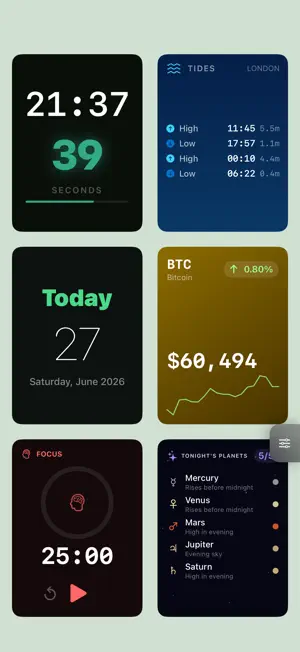
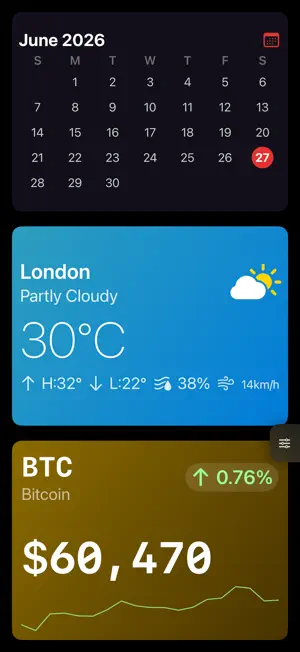
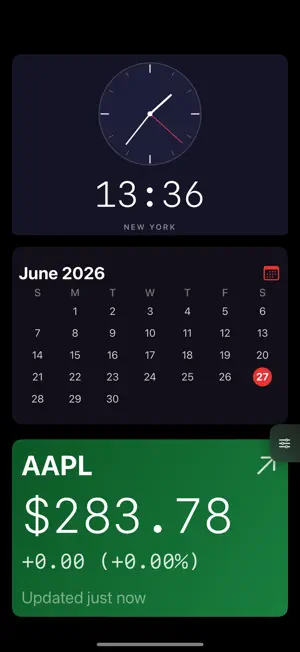
Your screen. Your information. Always on. xGridUp turns your iPad or iPhone into a dedicated ambient display - a beautiful, always-on dashboard showing exactly the information you care about. Build your screen from a grid of live widgets: the time, weather, stocks, calendar events, countdowns, moon phase, air quality, and dozens more. Arrange them exactly how you want using one of hundreds of unique grid layouts. Rotate your device and the grid rotates with it. MAKE IT YOURS Choose from 892 unique grid layouts on iPad, or 17 carefully selected layouts on iPhone. Every cell holds a live widget. Leave cells empty for breathing room. Flip layouts horizontally or vertically for even more combinations. LIVE WIDGETS Time: digital, analog, flip, word clock, binary, minimal, large number, dual timezone, seconds, world clock Date: calendar date, day name, month, week number, day of year, season, relative date Progress: day, hour, minute, week, month, year, workday rings and bars Weather: current conditions, 5-day forecast, sunrise/sunset, UV index, air quality, tide times Finance: live stock prices, crypto with sparkline, currency exchange rates Calendar: month view, today's agenda, next event countdown, reminders Astronomy: moon phase, golden hour, solar noon, planet visibility Media: YouTube, live streams, live news channels Device: battery level, screen brightness, volume Timers: countdown, stopwatch, Pomodoro, simple timer Decor: solid colour blocks, gradients, labels MULTIPLE SCREENS Create as many screens as you like and cycle between them automatically - every 15 seconds, 30 seconds, a minute, or longer. Swipe to switch manually anytime. BUILT FOR ALWAYS-ON xGridUp keeps your screen awake so it works as a permanent ambient display. Set it on your desk, prop it on a stand, and let it run. EACH SCREEN IS UNIQUE Every screen has its own background colour and cell spacing. Dark, light, or a custom hex colour - each screen can have a completely different look.
What’s new
Version 1.0.2 · Updated July 6, 2026
- bug fixes - cleaner iphone grid
App privacy
The developer, K2 Labs, reported these privacy practices to Apple.
Data Not Collected
The developer does not collect any data from this app.
Alternatives to xGridUp - Dashboard
Looking for apps like xGridUp - Dashboard? Here are 6 similar apps on the App Store. The highest rated is StandBy Hub: Nightstand & Home (5.0/5), and all 6 are free to download.
-
 Hearthboard: Home Dashboard
4.5
Hearthboard: Home Dashboard
4.5
-
 TXBoard
-
 WYN360Search
-
 DashKit: Home Dashboard
-
 StandBy Hub: Nightstand & Home
5.0
StandBy Hub: Nightstand & Home
5.0
-
 Dev Detect - CPU Master
| App | Rating | Price | Last updated | Compare |
|---|---|---|---|---|
| xGridUp - Dashboard | – | Free | July 6, 2026 | |
| Hearthboard: Home Dashboard | 4.5 / 5 (2) | Free | Oct 23, 2026 | Compare |
| TXBoard | – | Free | May 26, 2026 | Compare |
| WYN360Search | – | Free | Nov 21, 2024 | Compare |
| DashKit: Home Dashboard | – | Free | Jul 21, 2026 | Compare |
| StandBy Hub: Nightstand & Home | 5.0 / 5 (1) | Free | Oct 23, 2026 | Compare |
| Dev Detect - CPU Master | – | Free | Mar 18, 2026 | Compare |