

ScanOnce: PDF Doc Scanner
Andrii Zakharov Productivity iPhoneiPadiPod touch
ScanOnce: PDF Doc Scanner is a free Productivity app for iPhone and iPad by Andrii Zakharov. Rated 5.0/5 from 1 ratings. Requires iOS 17.0.
- Rating
- 5.0
- 1 ratings
- Price
- Free
- on the App Store
- Size
- 4 MB
- Age 4+
- Updated
- Sep 24
- 2026 · v4.2
Screenshots
About ScanOnce: PDF Doc Scanner
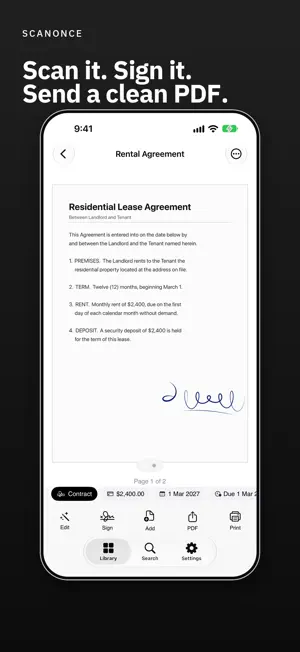
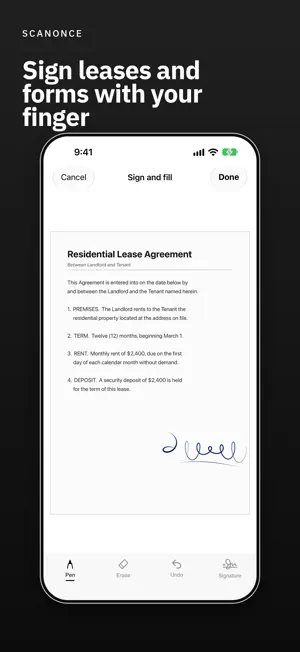
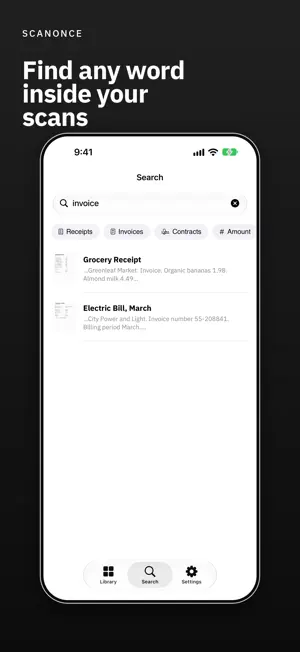
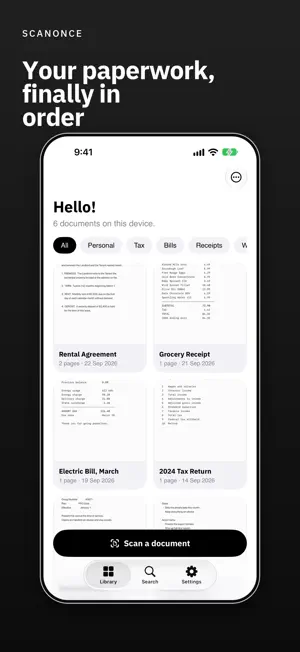
Scan a page, sign it and send a clean PDF. Your documents stay on your device, never on a server. No account. No ads. Point the camera and ScanOnce does the rest. Available in English, Spanish, French, German, Arabic, Russian, Hindi, Ukrainian, Korean, Portuguese, Simplified and Traditional Chinese, Japanese and Indonesian. WHAT IT DOES Sharp, automatic captures Point the camera at a page. Edges are detected, the page is straightened, and multi-page documents are captured in one go. Search inside every scan Text is recognized directly on your device, so you can search for a word you remember and land on the right page. Read, titled and filed for you ScanOnce reads each document on the device, gives it a clear title and files it with others of the same kind. Export the way you need Share as PDF, export pages as JPEG, or send straight to a printer. Tidy it up Switch between colour, greyscale, black and white and photo filters. Reorder pages, rename documents and keep them in folders. Business cards to Contacts Scan a card and save the details straight to Contacts. Locked if you want it locked Turn on Face ID and your documents stay sealed behind it. PRO The free library holds 3 documents. Pro adds: Sign and fill Draw your signature with your finger, place it on any page and write in dates and details by hand. It all goes into the PDF. Unlimited documents Keep every scan, however many there are. Receipts to a spreadsheet Turn your receipts and invoices into a CSV spreadsheet for expenses. Clean exports Free exports from 4.2 carry a small “Scanned with ScanOnce” line at the foot of each page. Pro removes it. If you had ScanOnce before 4.2, your exports stay clean and nothing changes for you. PRIVACY, PLAINLY Your documents, their text and your PDFs never leave this device unless you share them yourself. There is no account, no advertising and no tracking. ScanOnce goes online for two things only: purchases, which Apple handles, and, on installs from 4.2, sending anonymous usage counts such as “a scan was saved”. Those counts carry no identifier and nothing from your pages. If you delete the app, your documents go with it. PLANS AND TERMS Pro comes as an auto-renewing monthly or yearly subscription, each with a 7-day free trial, or as a one-time payment. Payment is charged to your Apple Account. A subscription renews automatically unless cancelled at least 24 hours before the end of the current period. Manage or cancel it anytime in your Apple Account settings. Terms of Use (EULA): https://www.apple.com/legal/internet-services/itunes/dev/stdeula/ Privacy Policy: https://legal.unreel.ae/privacy/scanonce.html
What’s new
Version 4.2 · Updated September 24, 2026
• Fixed a bug where the app could open to a blank white screen on iOS 27. • Onboarding now takes you straight to your first scan. • The Pro sheet now clearly shows the free trial and what the yearly plan costs per month. • Shared PDFs are now named after the document instead of a random code. • New installs: free exports carry a small “Scanned with ScanOnce” line at the foot of each page. Pro removes it. If you already had ScanOnce, nothing changes for you.
App privacy
The developer, Andrii Zakharov, reported these privacy practices to Apple.
Data Not Linked to You
The following data, which may be collected but is not linked to your identity, may be used for the following purposes:
- Usage Data: Product Interaction
Used for: Analytics
Alternatives to ScanOnce: PDF Doc Scanner
Looking for apps like ScanOnce: PDF Doc Scanner? Here are 6 similar apps on the App Store.
-
 Keepwell: Notes, Dates & Gifts
-
 Thought Relay: Fast Notes
-
 Teleprompter & Prompter Video
-
 Deadline Countdown: Stay Sharp
-
 Structured Flow
-
 Arise OS
| App | Rating | Price | Last updated | Compare |
|---|---|---|---|---|
| ScanOnce: PDF Doc Scanner | 5.0 / 5 (1 rating) | Free | September 24, 2026 | |
| Keepwell: Notes, Dates & Gifts | – | Free | Sep 25, 2026 | Compare |
| Thought Relay: Fast Notes | – | Free | Aug 11, 2026 | Compare |
| Teleprompter & Prompter Video | – | Free | Sep 3, 2026 | Compare |
| Deadline Countdown: Stay Sharp | – | Free | Jul 10, 2026 | Compare |
| Structured Flow | – | Free | Aug 19, 2026 | Compare |
| Arise OS | – | Free | Aug 9, 2026 | Compare |