

Egress Recon
Brian Reed Utilities iPhoneiPadiPod touchMac
Egress Recon is a free Utilities app for iPhone and iPad by Brian Reed. Requires iOS 17.0. Updated September 16, 2026.
- Price
- Free
- on the App Store
- Size
- 1 MB
- Age 4+
- Updated
- Sep 16
- 2026 · v1.0
Screenshots


About Egress Recon
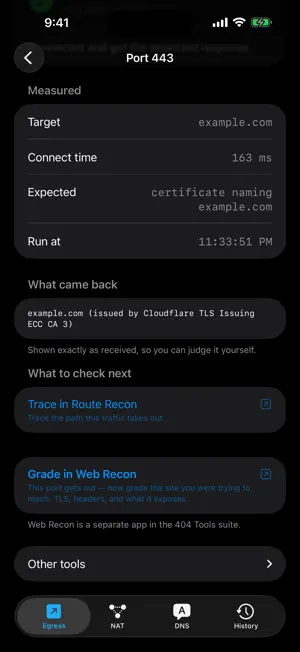
You are on a guest Wi-Fi you did not choose. Something will not connect and nobody can tell you why. Egress Recon answers that from your phone, in under a second. WHICH PORTS GET OUT Sixteen common outbound ports, tried against real public services. You get more than "open" or "closed": • Refused and timed out are different answers. One means something on the network actively rejected the connection; the other means it was dropped silently. • Intercepted is its own finding. The connection succeeded, but the thing that replied was not the service you asked for — a portal, a proxy, or a middlebox re-signing TLS. WHAT NAT YOU ARE BEHIND Your public address, and whether your NAT gives you a reusable mapping or a symmetric one — the reason a video call falls back to a relay. Carrier-grade NAT is reported with its confidence and the evidence behind it, never as a bare label. IPv6 and NAT64 state, and whether you can reach your own public address from inside. WHAT IT DOES TO DNS Whether plain DNS gets out. Whether the network's resolver agrees with a public one. Whether it invents answers for names that cannot exist. And whether DNS over HTTPS and DNS over TLS still work when plain DNS does not — each tested with a real query, not just a connection. WI-FI VERSUS CELLULAR The most useful thing a network tool can tell you is "this Wi-Fi blocks it, and your cellular connection does not." Egress Recon runs the same tests over both and shows the difference — attributing it correctly in both directions, because blaming the café for something your carrier blocks helps nobody. BEHIND A CAPTIVE PORTAL It tells you the portal is there, shows the URL it is pushing you to, and labels the results "before you sign in." Sign in, run again, and it shows you exactly what changed. IT SHOWS ITS WORK Every verdict comes with what was actually observed: the banner the server sent, the certificate it presented and who issued it, the exact response that came back. You can check the reasoning instead of trusting a colored label. Where something cannot be determined, it says so and why. Two ports in the standard set have no public server to test against, so they stay untested rather than showing a red cell that means nothing. Share any run as text, a web page, a PDF, or JSON. Saved runs are grouped by network. PRIVACY • No analytics, no telemetry, no accounts, no ads, no third-party SDKs. • It never scans your network. Every probe goes to a public internet service — never your router, never your other devices. That is why it never asks for local network permission. • It does not read your Wi-Fi name. That needs location permission, which it never requests. • Saved runs stay on your device. A report leaves only when you share it. Egress Recon for Mac and for iPhone and iPad are both free apps on one App Store record. Requires iOS 17 or iPadOS 17.
App privacy
The developer, Brian Reed, reported these privacy practices to Apple.
Data Not Collected
The developer does not collect any data from this app.
Alternatives to Egress Recon
Looking for apps like Egress Recon? Here are 6 similar apps on the App Store. The highest rated is WiFi Security: Network Scanner (5.0/5), and all 6 are free to download.
-
 NetMaster-X Network tools
-
 My TracerRoute
-
 WiFi Security: Network Scanner
5.0
WiFi Security: Network Scanner
5.0
-
 IP Checker - IP & Network Info
5.0
IP Checker - IP & Network Info
5.0
-
 MergeKey
5.0
MergeKey
5.0
-
 DNS Quick: DNS Settings
5.0
DNS Quick: DNS Settings
5.0
| App | Rating | Price | Last updated | Compare |
|---|---|---|---|---|
| Egress Recon | – | Free | September 16, 2026 | |
| NetMaster-X Network tools | – | Free | Aug 24, 2026 | Compare |
| My TracerRoute | – | Free | Jun 11, 2026 | Compare |
| WiFi Security: Network Scanner | 5.0 / 5 (2) | Free | Aug 10, 2026 | Compare |
| IP Checker - IP & Network Info | 5.0 / 5 (2) | Free | Sep 2, 2026 | Compare |
| MergeKey | 5.0 / 5 (3) | Free | Oct 22, 2026 | Compare |
| DNS Quick: DNS Settings | 5.0 / 5 (1) | Free | Oct 13, 2026 | Compare |
Compare Egress Recon with the top alternatives: ratings, updates, ASO score and keyword gaps →