

WiFi Security: Network Scanner
KOMY DIGITAL AGENCY OOD Utilities iPhoneiPadiPod touch
WiFi Security: Network Scanner is a free Utilities app for iPhone and iPad by KOMY DIGITAL AGENCY OOD. Rated 5.0/5 from 2 ratings. Requires iOS 18.0.
- Rating
- 5.0
- 2 ratings
- Price
- Free
- on the App Store
- Size
- 14 MB
- Age 4+
- Updated
- Aug 10
- 2026 · v2.6.0
Screenshots
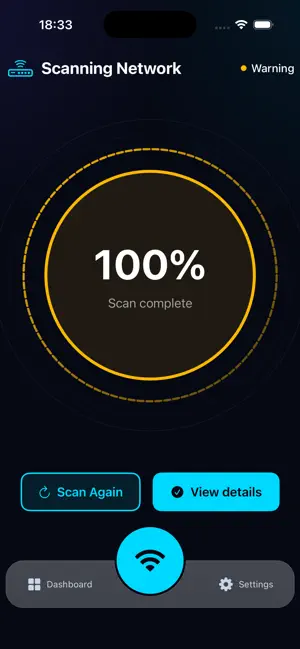


About WiFi Security: Network Scanner
Is your Wi-Fi safe? Get a professional security scan in seconds. Every time you connect to public Wi-Fi at a café, hotel, or airport, your personal data is at risk. Hackers use "Man-in-the-Middle" (MITM) attacks to quietly intercept your traffic, steal passwords, and access your bank accounts. WiFi Security & Privacy is your digital shield. Start scanning for threats immediately with FREE full-detail security scans. No trial signup, no accounts, and no hidden tracking. WHY CHOOSE WIFI SECURITY? • FREE Full Security Scans: Instantly reveal if your network is safe or compromised with complete detail. • Detect Hackers (MITM): Identify sophisticated "Man-in-the-Middle" attacks used by cybercriminals to spy on your data. • Network Device Discovery: See every device connected to your Wi-Fi and spot unauthorized intruders. • SSL & DNS Validation: Ensure your connection isn't being redirected to malicious or fake websites. • Privacy-First Design: We never collect your data. No accounts, no tracking, and no logs—ever. KEY FEATURES: • One-Tap Scan: Professional-grade network analysis in a single tap. • Real-Time Alerts: Get notified immediately if your security status changes. • Lightweight & Fast: Optimized to run in seconds without draining your battery. • Glassmorphic UI: A modern, beautiful interface designed for ease of use. PROTECT YOUR SENSITIVE DATA: Your passwords, banking details, and personal messages deserve the highest level of protection. Don’t leave your privacy to luck—verify your connection with the most trusted WiFi scanner. WiFi Security & Privacy — Because your data belongs to you. Terms of Use (EULA) This app uses the Apple Standard End User License Agreement: https://www.apple.com/legal/internet-services/itunes/dev/stdeula/
What’s new
Version 2.6.0 · Updated August 10, 2026
WiFiSec 2.6.0 introduces a smarter, more useful way to review and manage your Wi-Fi security checks. • New Protection Dashboard — quickly review your latest scan, understand the result, and see the recommended next step. • Scan History — revisit previous Wi-Fi scans, their results, and the recommendations provided at the time. • Remembered Networks — remember networks you recognize, see when they were last checked, and easily run another scan when needed. • Improved subscription experience — clearer trial eligibility, purchase, restore, cancellation, and recovery states. • Stronger privacy protections — reduced collection and storage of unnecessary network and diagnostic information. • Better accessibility and reliability — improved VoiceOver and Dynamic Type support, clearer messaging, smoother navigation, and stability improvements. Remembered networks are networks you recognize—not a guarantee that they will always remain secure. Running a new scan is recommended whenever something changes.
App privacy
The developer, KOMY DIGITAL AGENCY OOD, reported these privacy practices to Apple.
Data Used to Track You
The following data may be used to track you across apps and websites owned by other companies:
- Purchases: Purchase History
- Identifiers: Device ID
Data Linked to You
The following data, which may be collected and linked to your identity, may be used for the following purposes:
- Purchases: Purchase History
- Identifiers: Device ID, User ID
- Location: Coarse Location
- Usage Data: Product Interaction
Used for: Third-Party Advertising, Analytics, App Functionality
Data Not Linked to You
The following data, which may be collected but is not linked to your identity, may be used for the following purposes:
- Other Data: Other Data Types
- Diagnostics: Crash Data
Used for: Analytics, App Functionality
Alternatives to WiFi Security: Network Scanner
Looking for apps like WiFi Security: Network Scanner? Here are 6 similar apps on the App Store. The highest rated is mDNSShark (5.0/5), and all 6 are free to download.
-
 Secure Wi-Fi - Network Scanner
-
 mDNSShark
5.0
-
 My Network Scanner
4.7
-
 Network Scanner Pro
5.0
-
 Wi-Fi Jammer Detector
4.8
-
 WiFi Finder - Password Map
3.5
| App | Rating | Price | Last updated | Compare |
|---|---|---|---|---|
| WiFi Security: Network Scanner | 5.0 / 5 (2 ratings) | Free | August 10, 2026 | |
| Secure Wi-Fi - Network Scanner | – | Free | May 26, 2026 | Compare |
| mDNSShark | 5.0 / 5 (1) | Free | Oct 6, 2026 | Compare |
| My Network Scanner | 4.7 / 5 (3) | Free | Aug 11, 2026 | Compare |
| Network Scanner Pro | 5.0 / 5 (3) | Free | Dec 15, 2025 | Compare |
| Wi-Fi Jammer Detector | 4.8 / 5 (5) | Free | Oct 2, 2026 | Compare |
| WiFi Finder - Password Map | 3.5 / 5 (2) | Free | Sep 1, 2026 | Compare |