

SignBack: Sign PDF Documents
Silvergrove Labs LLC Productivity iPhoneiPadiPod touch
SignBack: Sign PDF Documents is a free Productivity app for iPhone and iPad by Silvergrove Labs LLC. Rated 5.0/5 from 1 ratings. Requires iOS 18.0.
- Rating
- 5.0
- 1 ratings
- Price
- Free
- on the App Store
- Size
- 8 MB
- Age 4+
- Updated
- Aug 20
- 2026 · v1.1.1
Screenshots


About SignBack: Sign PDF Documents
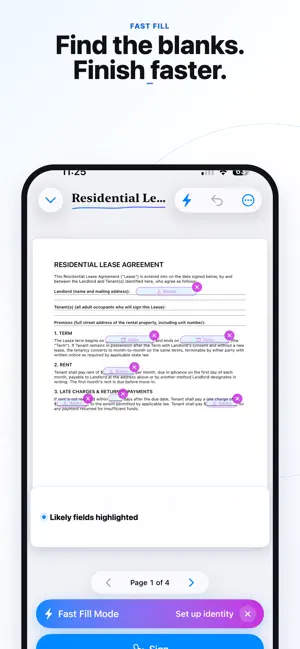
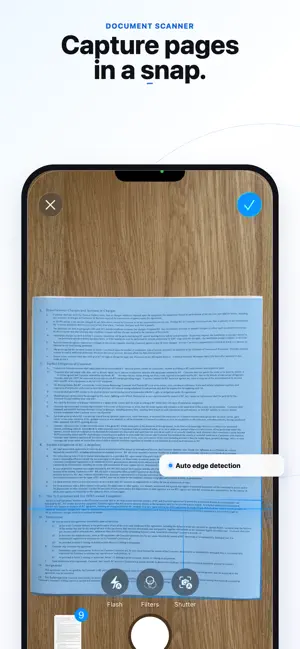
Stop printing. Stop scanning. Stop turning a simple signature into a whole project. SignBack turns paperwork into a clean signed PDF from your iPhone or iPad. Open a PDF, fill the blanks, sign, and send it back without a SignBack account, subscription, or watermark. Use it for contracts, leases, government forms, waivers, intake forms, vendor paperwork, and everyday PDFs. No account. No server upload for document processing. No watermark on exported PDFs. KEY FEATURES PRIVATE BY DESIGN • Your signing workflow happens on your device. Documents are not uploaded to a SignBack server for opening, filling, signing, converting, or exporting. Nothing leaves until you choose to share the finished file. OPTIONAL iCLOUD SYNC • Keep your Signature Wallet, Signing Identities, Templates, profile name, and folder structure in sync across your own devices through your private iCloud. Sync is off by default, there is no SignBack account, and everything is encrypted on-device before upload. First sync gives you merge, replace, and review options so you stay in control. SMARTER FAST FILL • Fast Fill highlights likely fields on many forms, including signature lines, printed names, dates, initials, emails, phone numbers, addresses, and checkboxes. It now adapts to document complexity with confidence guidance, helping find fields on dense forms like W-9s while avoiding instruction pages and false fill spots. TAP-TO-ADD EDITING • Tap anywhere on a document to quickly add signatures, dates, text, and checkmarks. The redesigned bottom sheet includes identity-aware Quick Fill, inline text editing, floating size controls, and a cleaner color palette so you can finish documents faster without switching screens. SCAN MULTI-PAGE DOCUMENTS • Use your camera to scan paper forms, contracts, notices, receipts, and multi-page documents. Turn pages into a clean PDF you can fill, sign, save, and send back. OPEN MORE THAN PDFs • Open PDFs, Word documents, Pages files, text files, photos, and scans. Supported files convert into clean PDFs on-device so you can finish the paperwork that actually arrives. SIGNING IDENTITIES FOR REAL ROLES • Create saved identities for personal, work, LLC manager, trustee, property manager, agent, and other signing roles. Each identity can fill the right contact details and signature block when needed, and Signing Identities can be protected with Face ID. SIGNATURE WALLET • Draw or type your signature and initials once, then reuse them across documents. Signatures render with natural pen-like ink, smooth strokes, and tapered ends. Optional device authentication can help protect your app and signature wallet. ORGANIZE YOUR PAPERWORK • Save reusable templates for forms you handle often • Organize documents into folders • Use Apartment, Rental, and custom folder categories • Keep separate signing roles and reusable details • Access SignBack from the share sheet, home-screen widget, and Siri Shortcuts SEND BACK A CLEAN PDF • When you are done, Send Back flattens your fields into the document and opens the share sheet. Large PDFs can be compressed while still letting you send the original with iCloud Mail Drop if you prefer. ON-DEVICE DOCUMENT SUMMARIES • On supported devices, SignBack can use Apple Intelligence to summarize a document and surface key points before you sign. Requires compatible hardware, supported system software, Apple Intelligence enabled, and the model available. Summaries may be incomplete and do not replace reading the original document or getting professional advice. ACCESSIBLE PAPERWORK TOOLS • SignBack includes improved VoiceOver support across sync settings, Fast Fill, the PDF editor, folder picker, and identity list. The next time someone says “just sign this and send it back,” do exactly that with SignBack. Free and private by design. Apple Intelligence, Face ID, iCloud, iCloud Drive, iPad, iPhone, and Siri Shortcuts are trademarks of Apple Inc.
What’s new
Version 1.1.1 · Updated August 20, 2026
Faster document signing with an improved Fast Fill. Long-press Copy now places the actual PDF on your clipboard, ready to paste into Mail or Messages. Document status now updates automatically when you sign, and you can tap the status pill to change it anytime.
App privacy
The developer, Silvergrove Labs LLC, reported these privacy practices to Apple.
Data Not Collected
The developer does not collect any data from this app.
Alternatives to SignBack: Sign PDF Documents
Looking for apps like SignBack: Sign PDF Documents? Here are 6 similar apps on the App Store. The highest rated is Trovy - Home Inventory (5.0/5), and all 6 are free to download.
-
 PDFin: PDF Viewer, Sign, Stamp
-
 Neuron AI: Private & Secure
1.0
Neuron AI: Private & Secure
1.0
-
 Trovy - Home Inventory
5.0
Trovy - Home Inventory
5.0
-
 REPS Time: Tax Hour Log
4.7
REPS Time: Tax Hour Log
4.7
-
 GR Leads
5.0
GR Leads
5.0
-
 Bodie
4.3
Bodie
4.3
| App | Rating | Price | Last updated | Compare |
|---|---|---|---|---|
| SignBack: Sign PDF Documents | 5.0 / 5 (1 rating) | Free | August 20, 2026 | |
| PDFin: PDF Viewer, Sign, Stamp | – | Free | Sep 17, 2026 | Compare |
| Neuron AI: Private & Secure | 1.0 / 5 (1) | Free | Mar 31, 2025 | Compare |
| Trovy - Home Inventory | 5.0 / 5 (2) | Free | Aug 19, 2026 | Compare |
| REPS Time: Tax Hour Log | 4.7 / 5 (26) | Free | Aug 31, 2026 | Compare |
| GR Leads | 5.0 / 5 (1) | Free | Feb 20, 2025 | Compare |
| Bodie | 4.3 / 5 (11) | Free | Sep 26, 2026 | Compare |