

Folio PDF Reader & Editor
Adel Hashemi Productivity iPadMac
Folio PDF Reader & Editor is a free Productivity app for iPad and Mac by Adel Hashemi. Requires iOS 15.0. Updated October 16, 2026.
- Price
- Free
- on the App Store
- Size
- 92 MB
- Age 4+
- Updated
- Oct 16
- 2026 · v2.8.5
Screenshots



About Folio PDF Reader & Editor
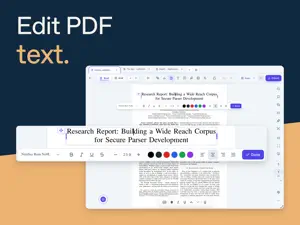
Folio is a free PDF reader and editor for iPad. Read and mark up documents, edit existing text and pictures, fill forms, place signatures and organize pages in one workspace. READ AND MARK UP Highlight, underline, comment and draw on PDFs. Use Book View, horizontal or vertical reading, Zen Mode, bookmarks and search for longer documents. EDIT TEXT AND PICTURES Correct PDF text in place. Move, resize, replace or delete pictures already in a PDF, and adjust their appearance with Auto and tone controls. Insert images, add shapes and place stamps. Crop inserted images and remove plain backgrounds. Add, edit or remove document links. FILL AND CREATE FORMS Fill interactive forms and place typed, drawn or image signatures, initials and dates. Create text fields, checkboxes, radio buttons and lists, with validation and calculations. Review suggested fields and add the ones you choose. Export form responses as CSV, JSON or XFDF. ORGANIZE PAGES Reorder, rotate, duplicate, delete and extract pages in Grid View. Merge PDFs and copy pages between documents. COMPARE AND MULTITASK Compare saved PDFs locally, review highlighted changes and export PDF or Word comparison reports. Read documents side by side in Split View. Open multiple Folio windows, move tabs between them and restore saved window drafts. WORK WITH SCANS Clean up scanned pages on your device and make English scans searchable with local OCR. Optional AI extracts and translates page text for reuse. EXPLORE WITH AI Optional AI helps you ask questions, create summaries and source-linked mind maps, extract tables and export generated reports to Word. Built-in AI needs an internet connection and no API key. You can also connect a compatible cloud service or local model; your provider may charge. AI receives the document content supplied for each action. Check answers against the original pages. SAVE AND SHARE Add watermarks, compress PDFs, apply password protection, export pages and print.
What’s new
Version 2.8.5 · Updated October 16, 2026
This update brings smarter forms, improved editing, and easier ways to build PDFs. • Drag and drop into Folio: Insert PDFs and images from your files or other apps directly into Grid view, where you drop them. • Images to PDF: Convert and combine images into a new PDF. • Smarter forms: Detect fields, review suggestions, and adjust their placement with preview zoom. • Better text editing: Improved font, spacing, color, and scanned-text fidelity, plus stronger right-to-left support. • Improved comments: Edit imported comments and keep comments and replies editable after reopening. • Clearer OCR: Find Searchable PDF first and see confirmation when recognition finishes. • Smoother reading: More stable scrolling and zooming, with improved dark pages. • Better printing: More reliable printing of text edits and automatic preview fitting. • More languages: Added Italian, Brazilian Portuguese, Turkish, and Korean, with refined translations. Additional refinements improve file opening, image adjustments, annotation menus, and form properties.
App privacy
The developer, Adel Hashemi, reported these privacy practices to Apple.
Data Not Collected
The developer does not collect any data from this app.
Alternatives to Folio PDF Reader & Editor
Looking for apps like Folio PDF Reader & Editor? Here are 6 similar apps on the App Store. The highest rated is InstaPDF Scanner (5.0/5), and all 6 are free to download.
-
 LoveSwap PDF
-
 InstaPDF Scanner
5.0
-
 SimpPDF Reader
-
 PDF Reader - PDF PRO Editor
-
 Kuvald – Discipline Tracker
-
 Penumi: Notes & Sketches
| App | Rating | Price | Last updated | Compare |
|---|---|---|---|---|
| Folio PDF Reader & Editor | – | Free | October 16, 2026 | |
| LoveSwap PDF | – | Free | Oct 13, 2026 | Compare |
| InstaPDF Scanner | 5.0 / 5 (1) | Free | Sep 24, 2025 | Compare |
| SimpPDF Reader | – | Free | Jun 30, 2026 | Compare |
| PDF Reader - PDF PRO Editor | – | Free | Feb 17, 2026 | Compare |
| Kuvald – Discipline Tracker | – | Free | Mar 23, 2026 | Compare |
| Penumi: Notes & Sketches | – | Free | Oct 6, 2026 | Compare |