

Halcyday: AI Daily Planner
Muharrem Ozkan Productivity iPhoneiPadiPod touch
Halcyday: AI Daily Planner is a free Productivity app for iPhone and iPad by Muharrem Ozkan. Requires iOS 17.0. Updated October 20, 2026.
- Price
- Free
- on the App Store
- Size
- 11 MB
- Age 4+
- Updated
- Oct 20
- 2026 · v1.1
Screenshots



About Halcyday: AI Daily Planner
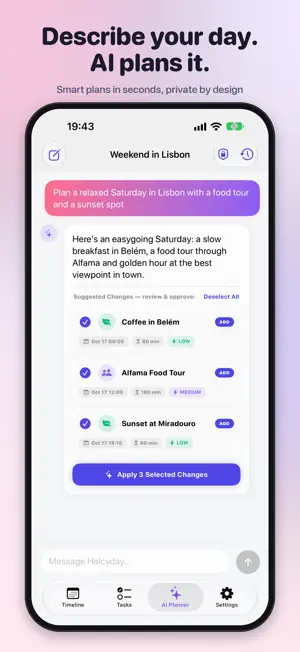
Halcyday is a calm, visual daily planner that organizes your day around your natural energy — not just the clock. See your whole day on one beautiful timeline, put deep work in your peak hours, and let the AI planner turn a single sentence into a ready-to-go schedule. Built for busy professionals, students and ADHD minds who think better when their time is something they can see. PLAN VISUALLY • One color-coded vertical timeline, from wake-up to wind-down • Drag and drop tasks on a 15-minute grid • Tap any free-time gap to fill it instantly • Week strip and month calendar with task-density dots • Timed blocks, quick milestones and checklists in one place RIDE YOUR ENERGY • A circadian energy curve built from your own sleep and wake times • See your two daily focus peaks and the afternoon slump at a glance • Every task shows how well it matches your energy at that hour • Separate weekday and weekend sleep schedules FOCUS MODE • A floating focus card with a live countdown ring for the current task • Pause, add 10 minutes or complete in one tap • Satisfying haptics and confetti when you check something off PLAN WITH AI — POWERED BY APPLE INTELLIGENCE • Describe your day in plain language and get a full schedule • Build routines, checklists and trip itineraries in seconds • Review every suggestion, then add one or apply them all • Runs with Apple Intelligence — on device or with Private Cloud Compute. No third-party AI, no accounts, and your plans are never sent to us. ROUTINES THAT STICK • Recurring tasks: daily, weekly, monthly or fully custom • Edit one occurrence, all future ones or the whole series • Subtasks to break big goals into small wins • Gentle local reminders CAPTURE NOW, SCHEDULE LATER • A tidy backlog organized by category • Replan unfinished tasks to the next free slot or to tomorrow • Import from Calendar and Reminders MADE YOURS • Four themes — Aurora Morning, Noon Vitality, Twilight Calm and Midnight Forest • Light, Dark and System appearance • Home Screen and Lock Screen widgets • Optional iCloud sync across your iPhone and iPad PRIVATE BY DESIGN Your plans live on your device and, if you turn on sync, in your own private iCloud account. No sign-up required. HALCYDAY PRO Start free with the visual timeline, energy curve, focus mode and backlog. Halcyday Pro unlocks the AI Planner, recurring tasks, Calendar & Reminders integration and iCloud sync. Halcyday Pro is available as a monthly or yearly auto-renewing subscription. Payment is charged to your Apple Account at confirmation of purchase. The subscription renews automatically unless canceled at least 24 hours before the end of the current period. Manage or cancel anytime in your App Store account settings. Privacy Policy: https://halcyday.mozkan.com/privacy.html Terms of Use: https://halcyday.mozkan.com/terms.html Plan your day. Find your flow. Meet Halcyday.
What’s new
Version 1.1 · Updated October 20, 2026
Meet Halcyday — a fresh new name and a calmer way to plan your day. • The AI Planner now runs on Apple Intelligence. By default it uses Private Cloud Compute for smarter plans (iOS 27); prefer to keep everything on your iPhone? Switch to On-Device in AI privacy settings. • No third-party AI and no servers of ours: your planner data is never sent to us. • Purchases and restores are verified on device — faster and more reliable. • Our new home: halcyday.mozkan.com • Fixes and performance improvements.
App privacy
The developer, Muharrem Ozkan, reported these privacy practices to Apple.
Data Not Linked to You
The following data, which may be collected but is not linked to your identity, may be used for the following purposes:
- Identifiers: User ID
Used for: Analytics
Alternatives to Halcyday: AI Daily Planner
Looking for apps like Halcyday: AI Daily Planner? Here are 6 similar apps on the App Store. The highest rated is BlockIt - Pushups Screen Time (4.7/5), and all 6 are free to download.
-
 ONALA: Daily Lifestyle Planner
3.9
-
 BlockIt - Pushups Screen Time
4.7
-
 Reminder Widget by Mindr
4.6
-
 2027 Vision Board Maker Vizzy
4.4
-
 Stay Focused App/Site Blocker
4.4
-
 AWS Wickr
4.7
| App | Rating | Price | Last updated | Compare |
|---|---|---|---|---|
| Halcyday: AI Daily Planner | – | Free | October 20, 2026 | |
| ONALA: Daily Lifestyle Planner | 3.9 / 5 (7) | Free | Oct 22, 2026 | Compare |
| BlockIt - Pushups Screen Time | 4.7 / 5 (15) | Free | Oct 27, 2026 | Compare |
| Reminder Widget by Mindr | 4.6 / 5 (208) | Free | Jul 17, 2026 | Compare |
| 2027 Vision Board Maker Vizzy | 4.4 / 5 (610) | Free | Nov 4, 2026 | Compare |
| Stay Focused App/Site Blocker | 4.4 / 5 (997) | Free | Oct 1, 2026 | Compare |
| AWS Wickr | 4.7 / 5 (2,297) | Free | Oct 21, 2026 | Compare |