

NovaCal: Photo to Calendar
junhong li Productivity iPhoneiPadiPod touch
NovaCal: Photo to Calendar is a free Productivity app for iPhone and iPad by junhong li. Requires iOS 17.0. Updated October 25, 2026.
- Price
- Free
- on the App Store
- Size
- 27 MB
- Age 4+
- Updated
- Oct 25
- 2026 · v1.2.1
Screenshots


About NovaCal: Photo to Calendar
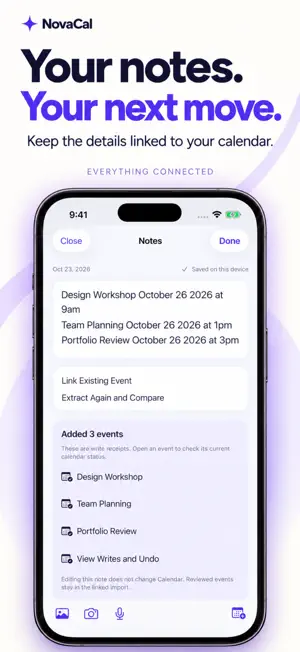
NovaCal brings your schedules and notes together. Turn screenshots, photos, PDFs and text into calendar events, capture everyday thoughts, and keep the details connected to your plans. TURN INFORMATION INTO EVENTS Import a screenshot, scan a paper schedule, choose a PDF, or paste a message. NovaCal helps identify event details so you can review dates, times, titles, locations and reminders before adding anything to your calendar. KEEP THE DETAILS CLOSE Save text, photos, short voice recordings and imported PDFs in Notes. Keep source material from an import, turn a note into events for review, or link a note to an existing calendar event. Open related notes from your events when you need the context. CAPTURE A THOUGHT Hold the central microphone to record a quick voice note. Recordings are saved locally, with on-device transcription after recording when supported by your device and selected language. Audio remains available if transcription cannot be completed. SEE YOUR DAY CLEARLY Browse your month, explore your week, and follow your day on a timeline. View related notes alongside your plans. Search your notes or browse them by date to find what you need. MAKE SENSE OF YOUR SHIFTS Use guided roster import to choose your name, check dates, define shift times and review your week before creating events. Save reusable shift templates for next time. Roster import requires Pro. STAY IN CONTROL Review events before they are written to Calendar. Resume saved import tasks, check possible conflicts when calendar read access is available, and undo events added by your import batch. Editing a note does not automatically change its linked calendar events. DESIGNED FOR ON-DEVICE PROCESSING Image text recognition and schedule parsing run on your device. NovaCal does not upload your screenshots, documents or note content to a developer server for recognition. Calendar access is requested when needed. MORE WAYS TO PLAN • Export events as an ICS file. • Keep track of important dates. • Explore optional Chinese lunar calendar, solar-term and traditional almanac information. • Use the app in English, Chinese, French or Spanish. NOVACAL PRO The free version includes a monthly screenshot/PDF recognition allowance. Pro unlocks unlimited screenshot and PDF recognition, multi-page PDF processing, guided roster import, the next-event widget, and solar-term card saving and sharing. Purchase options and local prices are shown in the app. Make room for your day—with your notes and plans together. Terms of Use (EULA): https://www.apple.com/legal/internet-services/itunes/dev/stdeula/
What’s new
Version 1.2.1 · Updated October 25, 2026
• Improved the capture and library experience with more intuitive controls. • Added support for iPhone Duo, with layouts that adapt when folding, unfolding, and rotating. • Improved responsiveness in selected scenarios. • Fixed known issues and enhanced stability.
App privacy
The developer, junhong li, reported these privacy practices to Apple.
Data Not Collected
The developer does not collect any data from this app.
Alternatives to NovaCal: Photo to Calendar
Looking for apps like NovaCal: Photo to Calendar? Here are 6 similar apps on the App Store. The highest rated is Notis: Screenshot to Calendar (5.0/5), and all 6 are free to download.
-
 ImageCal: Photo to Calendar
-
 Photo to Calendar
-
 Snap2Plan: Photo to Calendar
-
 Notis: Screenshot to Calendar
5.0
-
 iLibreta
-
 Calendar Planner: SnapJournal
5.0
| App | Rating | Price | Last updated | Compare |
|---|---|---|---|---|
| NovaCal: Photo to Calendar | – | Free | October 25, 2026 | |
| ImageCal: Photo to Calendar | – | Free | Sep 24, 2026 | Compare |
| Photo to Calendar | – | Free | Sep 27, 2026 | Compare |
| Snap2Plan: Photo to Calendar | – | Free | Aug 11, 2026 | Compare |
| Notis: Screenshot to Calendar | 5.0 / 5 (2) | Free | May 27, 2026 | Compare |
| iLibreta | – | Free | Dec 3, 2018 | Compare |
| Calendar Planner: SnapJournal | 5.0 / 5 (5) | Free | Sep 28, 2026 | Compare |