

Offprint: Web to PDF & EPUB
Nikolai Rodionov Productivity iPhoneiPadiPod touchMac
Offprint: Web to PDF & EPUB is a free Productivity app for iPhone and iPad by Nikolai Rodionov. Rated 5.0/5 from 3 ratings. Requires iOS 17.0.
- Rating
- 5.0
- 3 ratings
- Price
- Free
- on the App Store
- Size
- 20 MB
- Age 4+
- Updated
- Oct 6
- 2026 · v1.2
Screenshots
About Offprint: Web to PDF & EPUB
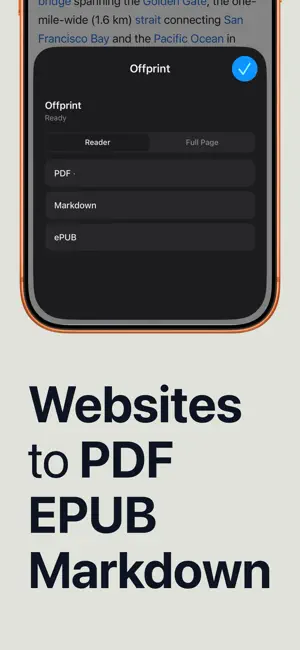
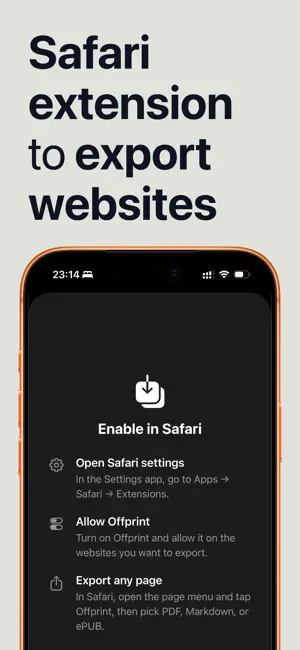
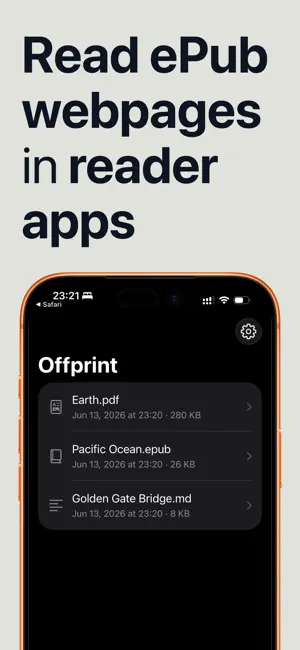
Offprint turns the web page you're reading into a file you can keep — a clean PDF, an EPUB for your e-reader, or a Markdown document for your notes. Open any article in Safari, tap the Offprint extension, pick a format, and share it anywhere. No copy-pasting, no cluttered printouts, no account. Offprint strips the ads, banners, and pop-ups and keeps what matters: the text, the images, and the structure of the article. THREE FORMATS, ONE TAP • PDF — a clean, paginated document for printing, annotating, or archiving • EPUB — a real e-book you can send to Kindle, Apple Books, or any e-reader • Markdown — plain-text formatting that drops straight into Obsidian, Notion, Bear, or any notes app MADE FOR READING • Reader mode extracts just the article — no ads, no navigation, no cookie banners • Page content mode captures more of the page — cleaned-up text and images, not the website's layout • Built-in preview shows exactly what you'll get before you share it FITS YOUR WORKFLOW • Works directly in Safari — no switching apps, no pasting URLs • Share sheet integration: AirDrop it, save to Files, send to Kindle, attach to mail • Conversion happens on your device — nothing is uploaded, nothing is tracked WHO IT'S FOR • Readers building an offline library of articles for flights and commutes • Students and researchers archiving sources as PDFs • Note-takers clipping articles into their Markdown knowledge base • E-reader owners who'd rather read long articles on a paper-like screen Save the page in front of you — in the format you actually use.
What’s new
Version 1.2 · Updated October 6, 2026
Paste a web address in the app and tap Convert a Link to save a page without opening Safari. It works best on public articles; pages that need a sign-in still go through the Safari extension. Share a link to Offprint from any app. Convert it right away, or choose Save Link for Offprint and finish later in the app. Import PDF as ePUB turns a text-based PDF from Files into a reflowable ebook, so you can change the font size on your e-reader. Offprint tells you what it could not carry over before anything is saved. Make PDFs for your e-reader: in Settings, set PDF page size to Custom for e-ink and enter your screen size in pixels. A new look for the library and the Safari popup. Offprint is free. If it saves you time, you can now leave a tip. Tips do not unlock anything.
App privacy
The developer, Nikolai Rodionov, reported these privacy practices to Apple.
Data Not Collected
The developer does not collect any data from this app.
Alternatives to Offprint: Web to PDF & EPUB
Looking for apps like Offprint: Web to PDF & EPUB? Here are 6 similar apps on the App Store. The highest rated is Papyrus: Research Library (5.0/5), and all 6 are free to download.
-
 Papyrus: Research Library
5.0
Papyrus: Research Library
5.0
-
 Tertiary Markdown
1.0
Tertiary Markdown
1.0
-
 Markdown My Words
-
 Wisen: AI Notes & Knowledge
3.0
Wisen: AI Notes & Knowledge
3.0
-
 Plotted: Planner & To Do List
3.0
Plotted: Planner & To Do List
3.0
-
 Paperbox – Document Manager
5.0
Paperbox – Document Manager
5.0
| App | Rating | Price | Last updated | Compare |
|---|---|---|---|---|
| Offprint: Web to PDF & EPUB | 5.0 / 5 (3 ratings) | Free | October 6, 2026 | |
| Papyrus: Research Library | 5.0 / 5 (2) | Free | Sep 26, 2026 | Compare |
| Tertiary Markdown | 1.0 / 5 (1) | Free | Jun 30, 2026 | Compare |
| Markdown My Words | – | Free | Sep 16, 2026 | Compare |
| Wisen: AI Notes & Knowledge | 3.0 / 5 (1) | Free | Jul 12, 2026 | Compare |
| Plotted: Planner & To Do List | 3.0 / 5 (1) | Free | Sep 11, 2026 | Compare |
| Paperbox – Document Manager | 5.0 / 5 (2) | Free | Jul 14, 2026 | Compare |