

ZMDX Player
CONEX, K.K. Music iPhoneiPadiPod touchMac
ZMDX Player is a free Music app for iPhone and iPad by CONEX, K.K. Requires iOS 17.0. Updated August 7, 2026.
- Price
- Free
- on the App Store
- Size
- 7 MB
- Age 4+
- Updated
- Aug 7
- 2026 · v3.0.1
Screenshots
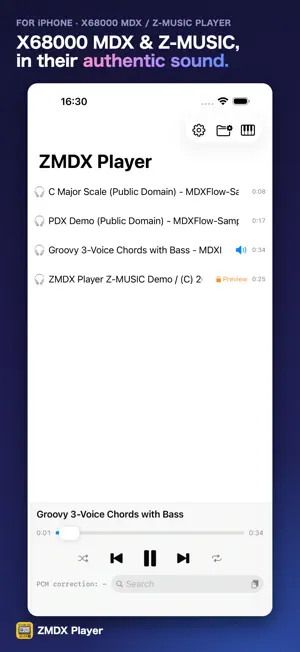


About ZMDX Player
ZMDX Player (formerly MDX Flow) is a lightweight, modern music player for X68000 MDX and Z-MUSIC songs, built for macOS and iOS. It synthesizes YM2151 (OPM) FM voices and ADPCM (PCM) samples from PDX (and Z-MUSIC ADPCM) banks using a product-owned driver/emulator. Features - Faithful playback through a product-owned driver/emulator - Z-MUSIC playback (.zmd / .z3s / .zms). Beyond compiled .zmd files, it plays MML source (.z3s / .zms) directly, with no separate compile step - Z-MUSIC playback is unlocked by an optional one-time add-on; locked Z-MUSIC songs play a 20-second preview - Loads songs directly from iCloud Drive and other Files storage providers (.mdx / .pdx, Z-MUSIC .zmd / .z3s / .zms / .zpd, plus the compressed .mdx.szip / .pdx.szip) - Folder and playlist views, looping marquee titles, a keyboard visualizer - Search by title or file name (AND, "phrases", and exclusion; full-width and half-width are treated the same) - In-song loop (a set number of times, or infinite) plus playlist repeat/shuffle - Optional loudness normalization (EBU R128, off by default) with a selectable target (-16 / -18 / -14 LUFS) to even out volume between songs - Optional aperture correction for PCM (restores up to −3.9 dB of treble lost in D/A conversion); off by default — the raw stepped output the original hardware emits - Now Playing integration (Control Center, Lock Screen, menu bar) - Adjustable text size (accessibility) and a Japanese/English switch Pricing and privacy - No ads, ever. MDX playback and every core feature are free — no purchase required. - Z-MUSIC playback is an optional one-time add-on (Family Sharing supported) — the only purchase that unlocks a feature. An optional Tip Jar also lets you support development; tips unlock nothing. - No tracking or analytics. An optional community feature (off by default) shares only an anonymous device ID and basic song info (title, length, loudness) when enabled — never your music files, file names, or playback history. Everything else stays on your device. Please play only MDX / PDX files that you own or are licensed to use.
What’s new
Version 3.0.1 · Updated August 7, 2026
Audio fixes, plus a new option for PCM quality. • Fixed a click heard at the start and end of PCM notes. • Added Aperture correction to PCM quality. It restores only the treble that D/A conversion loses. Off by default, so you hear the hardware as it was. • Fixed the app menus staying in English when the system language is Japanese. • Fixed the Lock Screen and CarPlay artwork still showing the old app icon. • Fixed the Open Folder button being unreachable on the empty library screen at the largest text size. • Rewrote the explanations in Settings in plainer language.
App privacy
The developer, CONEX, K.K., reported these privacy practices to Apple.
Data Not Linked to You
The following data, which may be collected but is not linked to your identity, may be used for the following purposes:
- User Content: Other User Content
- Identifiers: Device ID
- Other Data: Other Data Types
Used for: App Functionality
Alternatives to ZMDX Player
Looking for apps like ZMDX Player? Here are 6 similar apps on the App Store. The highest rated is Songkrate: Safe Music for Kids (5.0/5), and 5 of the 6 are free to download.
-
 Songkrate: Safe Music for Kids
5.0
-
 Retro Music Themes
-
 DAW Controller
-
 S98Player for iPhone
5.0
-
 Mixly
5.0
-
 KQ Tixie
5.0
| App | Rating | Price | Last updated | Compare |
|---|---|---|---|---|
| ZMDX Player | – | Free | August 7, 2026 | |
| Songkrate: Safe Music for Kids | 5.0 / 5 (3) | Free | Oct 6, 2026 | Compare |
| Retro Music Themes | – | Free | Jun 14, 2026 | Compare |
| DAW Controller | – | Free | Jul 5, 2026 | Compare |
| S98Player for iPhone | 5.0 / 5 (2) | Free | Aug 31, 2026 | Compare |
| Mixly | 5.0 / 5 (1) | Free | Apr 15, 2026 | Compare |
| KQ Tixie | 5.0 / 5 (6) | 8.99 USD | Sep 16, 2026 | Compare |
Compare ZMDX Player with the top alternatives: ratings, updates, ASO score and keyword gaps →