

Jukebox: Offline Music Player
Anton Popov Music iPhoneiPadiPod touchApple Watch
Jukebox: Offline Music Player is a free Music app for iPhone and iPad by Anton Popov. Requires iOS 16.0. Updated October 27, 2026.
- Price
- Free
- on the App Store
- Size
- 66 MB
- Age 4+
- Updated
- Oct 27
- 2026 · v1.2.4
Screenshots
Save to Pinterest

About Jukebox: Offline Music Player
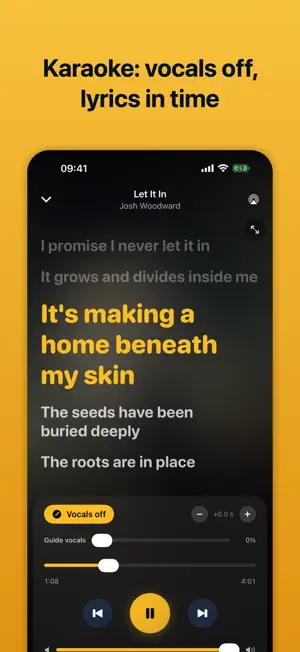
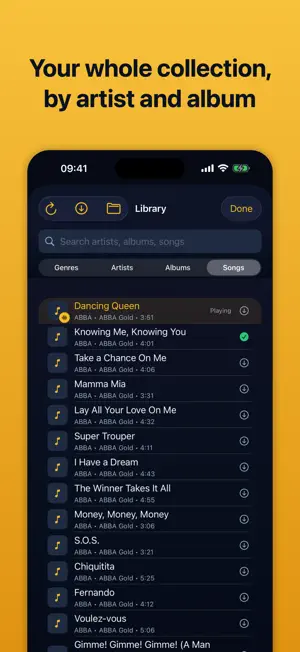
Jukebox plays the music you own — from your iPhone, iCloud Drive, or your own WebDAV, NAS or Jellyfin server. No subscription, no account, no ads. • Your files: MP3, AAC, FLAC, ALAC, WAV, AIFF and more • Your own server: WebDAV, Nextcloud, a NAS or Jellyfin • Karaoke: removes the vocals from your own songs, right on your device • Synced lyrics from your own .lrc files or the song's tags • Gapless playback, 5-band EQ, speed control and a live spectrum • CarPlay, Apple Watch, Siri, widgets and AirPlay • iPhone, iPad and Mac • No data collected YOUR LIBRARY • Add a folder from the Files app — On My iPhone, iCloud Drive, an external drive or an SMB share — or connect your own WebDAV or Jellyfin server, and Jukebox builds a fast index of your artists, albums and songs • Browse by genre, artist, album or song, or by folder; search finds all of them as you type • Cover art from the file, a cover.jpg in the album folder, or (optionally) looked up online • Download songs from your server to play offline • Playlists, synced between your devices with iCloud KARAOKE • Tap Karaoke under the song title, or add songs to the Karaoke playlist. Jukebox separates the vocals on your device in a minute or two per song — nothing is uploaded • Sing on a full-screen karaoke screen with the current line large and lyrics that follow the music • Switch the singer on and off without a gap, or blend them back in with Guide vocals • Nudge the lyrics timing, send it to the TV with AirPlay, or hide everything but the lyrics THE PLAYER • Gapless playback, so live albums and DJ mixes play straight through • A mixer with volume, a 5-band EQ with presets and speed from 0.5× to 3× • A large cover in portrait, a retro desktop-player view in landscape, and a real-time spectrum • Shuffle everything, one artist or one album; repeat; sleep timer; Up Next • Lock Screen, Control Center and Dynamic Island controls, and a Now Playing widget EVERYWHERE YOU LISTEN • CarPlay: your playlists, artists and albums on the car's screen • Apple Watch: see what's playing, control it, and play music synced to the watch • Siri and Shortcuts: "Play Deep Purple on Jukebox" • In English, German, French, Italian, Spanish, Japanese and Chinese PRIVACY Jukebox collects no data about you: no account, no analytics. It only talks to your own server and, if you allow it, looks up missing album art. Free for 1 hour of playback a day. One in-app purchase unlocks unlimited playback forever — no subscription.
What’s new
Version 1.2.4 · Updated October 27, 2026
Maintenance update: small behind-the-scenes improvements. Something not working, or missing? Tell us at apopov.de/feedback.
App privacy
The developer, Anton Popov, reported these privacy practices to Apple.
Data Not Linked to You
The following data, which may be collected but is not linked to your identity, may be used for the following purposes:
- Purchases: Purchase History
- Usage Data: Product Interaction
Used for: Analytics
Alternatives to Jukebox: Offline Music Player
Looking for apps like Jukebox: Offline Music Player? Here are 6 similar apps on the App Store. The highest rated is Rewind Music - Sound Party (5.0/5), and all 6 are free to download.
-
 PurePlayer Hi-Res
4.0
-
 LMPlayr PRO
-
 fidelplayer: Hi-Res Audio
-
 JH Music Player
4.0
-
 Echofy Music Player
-
 Rewind Music - Sound Party
5.0
| App | Rating | Price | Last updated | Compare |
|---|---|---|---|---|
| Jukebox: Offline Music Player | – | Free | October 27, 2026 | |
| PurePlayer Hi-Res | 4.0 / 5 (2) | Free | Oct 11, 2026 | Compare |
| LMPlayr PRO | – | Free | Oct 24, 2026 | Compare |
| fidelplayer: Hi-Res Audio | – | Free | Oct 11, 2026 | Compare |
| JH Music Player | 4.0 / 5 (3) | Free | Nov 1, 2026 | Compare |
| Echofy Music Player | – | Free | Apr 22, 2026 | Compare |
| Rewind Music - Sound Party | 5.0 / 5 (3) | Free | Oct 2, 2026 | Compare |