

Pixel Paint: Color by Number
Dang Nguyen Games iPhoneiPadiPod touch
Pixel Paint: Color by Number is a free Games app for iPhone and iPad by Dang Nguyen. Rated 5.0/5 from 1 ratings. Requires iOS 15.0. Updated October 16, 2026.
- Rating
- 5.0
- 1 ratings
- Price
- Free
- on the App Store
- Size
- 66 MB
- Age 4+
- Updated
- Oct 16
- 2026 · v1.4.2
Screenshots


About Pixel Paint: Color by Number
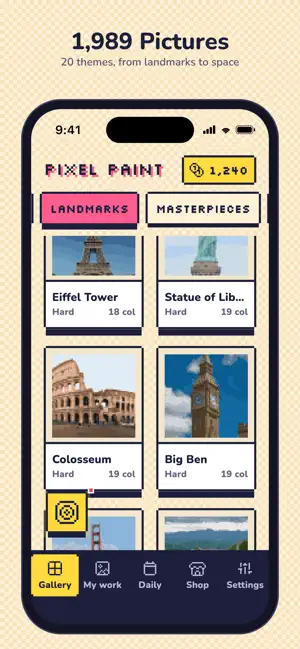
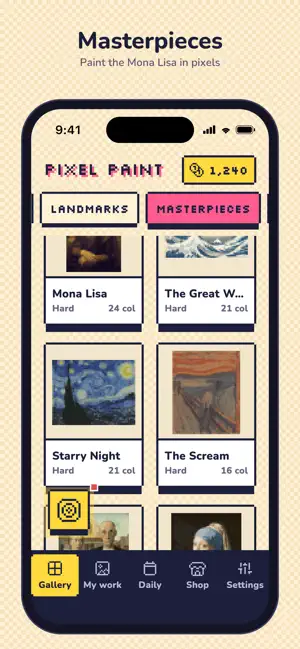
Pixel Paint is a relaxing color-by-number coloring book made of pixel art. Pick a picture, tap a color, and fill the numbered cells to bring it to life, one satisfying tap at a time. 1,989 PICTURES IN 20 THEMES Animals, food, fantasy creatures, famous masterpiece paintings, world landmarks, space and more. TURN YOUR PHOTOS INTO ART Take a photo or pick one from your library, and Pixel Paint turns it into your own color-by-number. It all happens on your device, and your photos are never uploaded. RELAX AND UNWIND No timers and no pressure. Color at your own pace. SATISFYING TO PLAY Smooth zoom, haptic feedback and small animations make every tap feel good. Drag the Bomb, Magic Wand or Flood Brush onto the canvas to fill big areas fast. DAILY QUESTS AND LUCKY SPIN Finish daily goals and spin the wheel for coins, then spend them on pictures, boosts and 8 app color skins. MADE FOR IPAD A layout built for the big screen, with wider galleries and a side panel for your colors in landscape. PIXEL PAINT PRO (optional subscription) Remove all ads and unlock every picture in the gallery. Fully offline. No account or sign-in needed. Terms of Use (EULA): https://www.apple.com/legal/internet-services/itunes/dev/stdeula/ Privacy Policy: https://dangnguyen.app/pixel-paint/privacy
What’s new
Version 1.4.2 · Updated October 16, 2026
Subscription and purchase fixes, a steadier tablet view, and small improvements.
Play today's Queens puzzle
One queen in every row, column and color. A free daily puzzle from Fiplay, same board for everyone. It plays right here, no download.
App privacy
The developer, Dang Nguyen, reported these privacy practices to Apple.
Data Used to Track You
The following data may be used to track you across apps and websites owned by other companies:
- Identifiers: Device ID
- Usage Data: Advertising Data
Data Not Linked to You
The following data, which may be collected but is not linked to your identity, may be used for the following purposes:
- Identifiers: Device ID
- Usage Data: Advertising Data
- Diagnostics: Crash Data
Used for: Third-Party Advertising, Analytics, App Functionality
Alternatives to Pixel Paint: Color by Number
Looking for apps like Pixel Paint: Color by Number? Here are 6 similar apps on the App Store. The highest rated is Stitch Studio - Pixel Art (5.0/5), and all 6 are free to download.
-
 Coloring Pixel - Paint by No.
-
 Stitch Studio - Pixel Art
5.0
Stitch Studio - Pixel Art
5.0
-
 Pixel Paint: Color & Create
5.0
Pixel Paint: Color & Create
5.0
-
 DotZen: Color by Number Game
4.2
DotZen: Color by Number Game
4.2
-
 NumiBloom: Color by Number
-
 Pixel Colors: Color by Number
4.8
Pixel Colors: Color by Number
4.8
| App | Rating | Price | Last updated | Compare |
|---|---|---|---|---|
| Pixel Paint: Color by Number | 5.0 / 5 (1 rating) | Free | October 16, 2026 | |
| Coloring Pixel - Paint by No. | – | Free | Jun 18, 2026 | Compare |
| Stitch Studio - Pixel Art | 5.0 / 5 (7) | Free | Aug 24, 2026 | Compare |
| Pixel Paint: Color & Create | 5.0 / 5 (2) | Free | Oct 25, 2026 | Compare |
| DotZen: Color by Number Game | 4.2 / 5 (5) | Free | Oct 14, 2026 | Compare |
| NumiBloom: Color by Number | – | Free | Aug 4, 2026 | Compare |
| Pixel Colors: Color by Number | 4.8 / 5 (4) | Free | Oct 12, 2026 | Compare |