

Tellytide - STEM Scrolling
AUGE XR AG Education iPhoneiPadiPod touch
Tellytide - STEM Scrolling is a free Education app for iPhone and iPad by AUGE XR AG. Requires iOS 18.0. Updated September 28, 2026.
- Price
- Free
- on the App Store
- Size
- 7 MB
- Age 4+
- Updated
- Sep 28
- 2026 · v1.0.6
Screenshots
About Tellytide - STEM Scrolling
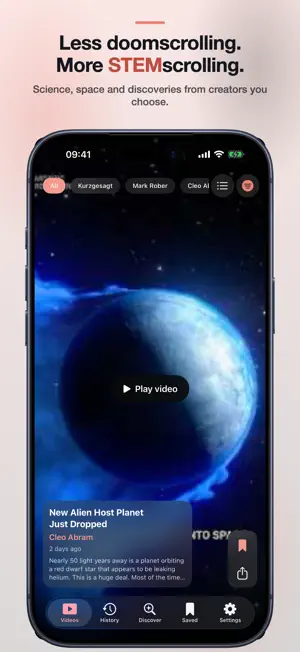
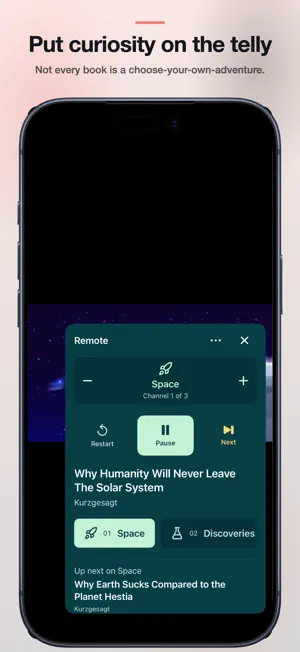
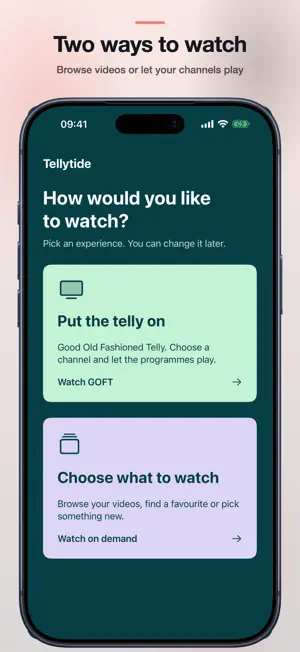
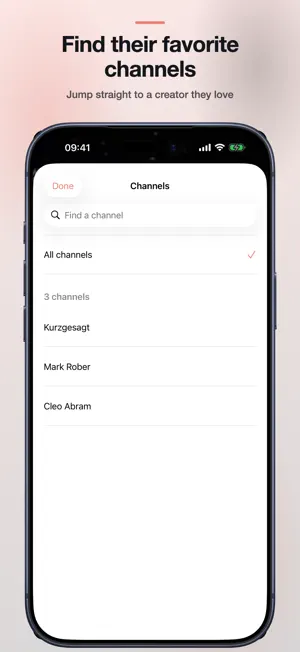
Turn “one more video” into “one more why.” Less doomscrolling. More STEMscrolling. Choose educational YouTube creators you trust. Tellytide brings their videos together for your child to explore science, technology, engineering and math, alongside space, history, nature and other interests. Two ways to watch In Videos mode, swipe through videos, browse your chosen creators, and save discoveries to watch again. Search the channel chooser to jump straight to a favorite creator, even in a large library. Find finished videos in History. When the selected videos run out, the feed ends. Put curiosity on the telly Not every book is a choose-your-own-adventure. Sometimes, you just want to turn the page. With GOFT (Good Old Fashioned Telly), parents choose the channels and programmes play back to back. There’s no need to choose a new video after each one. Open the remote control to change channels, pause or play, skip to the next video, or restart the current one. Clear channel icons help children recognize what they want to watch. Parents can choose an icon for each TV channel on the web. Parents choose Videos, GOFT, or both modes. When both are allowed, viewers can switch using Change viewing mode in Settings or the GOFT viewing options. Start with a preview Try the sample feed in the app before creating your own. Set up your family feed: - Choose creators and viewing settings at tellytide.com. - Pair an iPhone or iPad with a six-character code. - Watch videos from your chosen creators, with settings managed by a parent. Parents can set a daily limit, add limits to individual creators, and decide whether Shorts appear. The parent dashboard shows watch activity. Search, comments and links out to the rest of YouTube are blocked in the player. No behavioral advertising or analytics SDKs are included in the child-facing app. We store pairing and watch time so the feed, history and limits work. We do not sell your data. Videos play through YouTube's official embedded player, so YouTube ads may still play. Tellytide is independent and is not affiliated with YouTube.
What’s new
Version 1.0.6 · Updated September 28, 2026
Faster viewing and calmer channel time. - Get to the first ready video faster while the rest of the channel loads. - Return to Watch or Explore without reloading your recent results. - Browse a roomier iPad sidebar with clearer selection in light and dark mode. - Use easier Back and remote controls while keeping video full screen. - Parents can set separate daily limits for each telly channel. Your paired devices, selected channels, saved videos and watch history stay with you. Continue using tellytide.com to manage your family's feed.
App privacy
The developer, AUGE XR AG, reported these privacy practices to Apple.
Data Linked to You
The following data, which may be collected and linked to your identity, may be used for the following purposes:
- Identifiers: User ID
- Diagnostics: Other Diagnostic Data
Used for: App Functionality
Alternatives to Tellytide - STEM Scrolling
Looking for apps like Tellytide - STEM Scrolling? Here are 6 similar apps on the App Store. The highest rated is Constructor Tech (5.0/5), and all 6 are free to download.
-
 Goal Getters Hub
-
 Channel Timeline Viewer
4.0
Channel Timeline Viewer
4.0
-
 Lil Pro School
-
 Constructor Tech
5.0
Constructor Tech
5.0
-
 SCU+
5.0
SCU+
5.0
-
 LexWidget: Vocabulary
5.0
LexWidget: Vocabulary
5.0
| App | Rating | Price | Last updated |
|---|---|---|---|
| Tellytide - STEM Scrolling | – | Free | September 28, 2026 |
| Goal Getters Hub | – | Free | Oct 17, 2025 |
| Channel Timeline Viewer | 4.0 / 5 (1) | Free | Sep 27, 2026 |
| Lil Pro School | – | Free | Apr 27, 2024 |
| Constructor Tech | 5.0 / 5 (1) | Free | Sep 23, 2026 |
| SCU+ | 5.0 / 5 (2) | Free | Sep 15, 2026 |
| LexWidget: Vocabulary | 5.0 / 5 (2) | Free | Sep 16, 2026 |