

Channel Timeline Viewer
株式会社ジュエリーサンフラワー Education iPhoneiPadiPod touch
Channel Timeline Viewer is a free Education app for iPhone and iPad by 株式会社ジュエリーサンフラワー. Rated 4.0/5 from 1 ratings. Requires iOS 17.0.
- Rating
- 4.0
- 1 ratings
- Price
- Free
- on the App Store
- Size
- 3 MB
- Age 4+
- Updated
- Sep 27
- 2026 · v1.2.3
Screenshots


About Channel Timeline Viewer
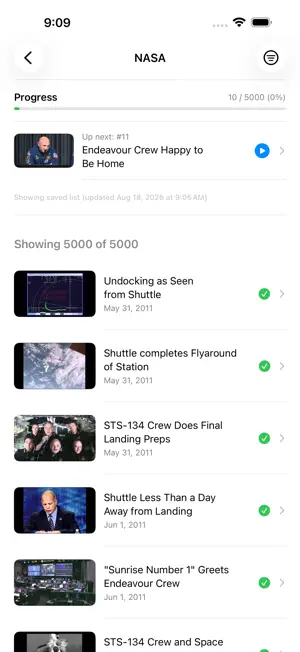
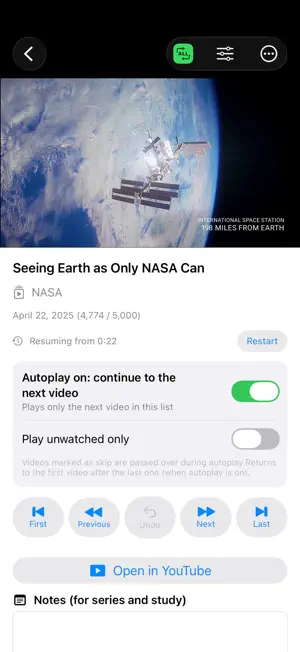
Channel Timeline Viewer helps you watch YouTube channels from the beginning without losing your place. Browse a channel from its oldest uploads, track what you have watched, resume from the exact playback position, and keep notes as you go. Archives, courses and long-running series stay in order. WHO IT'S FOR • People learning from YouTube tutorials, lectures, courses, educational channels and long-running series • Anyone catching up on a channel's back catalog • Viewers who want to know exactly how far they've watched • Channel operators who want viewers to work through their older uploads in order • Parents of young children who want a simpler way to stay inside one chosen channel MAIN FEATURES • Paste a channel URL, or share a video or channel from the YouTube app or Safari • Uploads listed oldest-first (or newest-first) • Per-channel progress: watched count, percentage, progress bar • "Up next / Continue" takes you straight back to where you stopped • Resume from the exact second you left off • Autoplay to the next video in the list (on by default, and you can turn it off at any time) • Repeat one or repeat all • Mark videos watched or skipped; play unwatched only • Filters: all / unwatched / watched • Notes for each video, for studying or series viewing • Playback speed and captions controlled outside the player • Position shown as "February 27, 2026 (1,034 / 3,500)" • Five navigation buttons — first, previous, undo, next, last — where undo restores both the video and the position you were at • Channels you have opened before load instantly from a saved list PLAYBACK Videos play in YouTube's official embedded player (IFrame Player). FREE AND PRO You can save one channel for free. Inside that channel everything works without limits: sorting, watched tracking, resume, jump buttons, notes, progress, and playback in the official player. You can swap in a different channel for free, but doing so deletes the watched history, progress, and notes of the previous one. To follow several channels side by side and keep every record, buy Pro. It is a one-time purchase, not a subscription. PLEASE NOTE • This app is not the official YouTube app. • It does not download videos, block ads, or play in the background. • Video lists are retrieved via the YouTube Data API v3. • Autoplay is on by default, but it only moves to the next video in the list you opened, and you can turn it off on the player screen at any time. • No ads. No subscriptions either — Pro is a one-time purchase. YouTube is a trademark of Google LLC.
What’s new
Version 1.2.3 · Updated September 27, 2026
• The app icon now uses the same green design as the Android app and our website. • The big button on the player screen is now “Comment on YouTube”. It opens the video on YouTube so you can leave a comment. “Open in YouTube” in the “…” menu is still there.
App privacy
The developer, 株式会社ジュエリーサンフラワー, reported these privacy practices to Apple.
Data Not Collected
The developer does not collect any data from this app.
Alternatives to Channel Timeline Viewer
Looking for apps like Channel Timeline Viewer? Here are 6 similar apps on the App Store. The highest rated is Math Middle & High School PRO (4.9/5), and 5 of the 6 are free to download.


| App | Rating | Price | Last updated | Compare |
|---|---|---|---|---|
| Channel Timeline Viewer | 4.0 / 5 (1 rating) | Free | September 27, 2026 | |
| 机器人大师软件 | – | Free | Jul 15, 2025 | Compare |
| 创想智能 | – | Free | Feb 10, 2026 | Compare |
| 中学受験 まるごと歴史帳660 広告あり版 | – | Free | Apr 14, 2026 | Compare |
| 中学受験 時事問題 重大ニュース | – | Free | Jun 7, 2026 | Compare |
| ASTC | 4.7 / 5 (36) | Free | Sep 4, 2026 | Compare |
| Math Middle & High School PRO | 4.9 / 5 (10) | 19.99 USD | Aug 23, 2026 | Compare |