

Redacted: Blur PDF & Photo
BRAVA LABS SOCIEDAD LIMITADA Productivity iPhoneiPadiPod touchMac
Redacted: Blur PDF & Photo is a free Productivity app for iPhone and iPad by BRAVA LABS SOCIEDAD LIMITADA. Rated 5.0/5 from 2 ratings. Requires iOS 18.0.
- Rating
- 5.0
- 2 ratings
- Price
- Free
- on the App Store
- Size
- 44 MB
- Age 4+
- Updated
- Sep 29
- 2026 · v1.0.3
Screenshots
About Redacted: Blur PDF & Photo
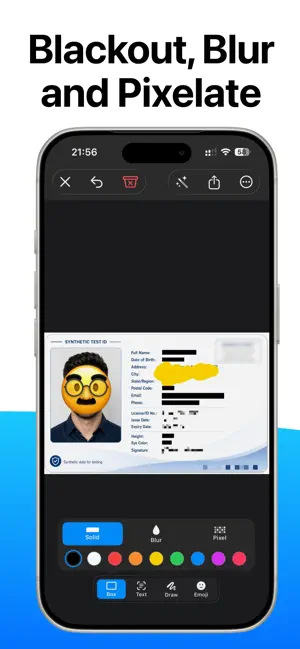
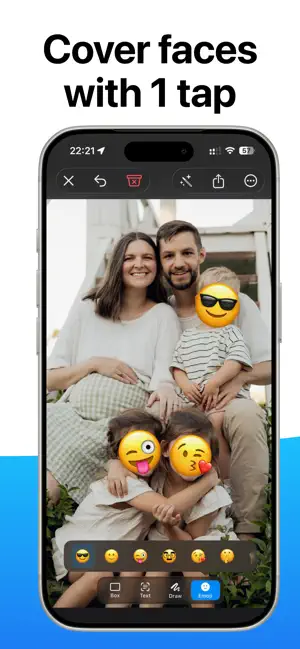
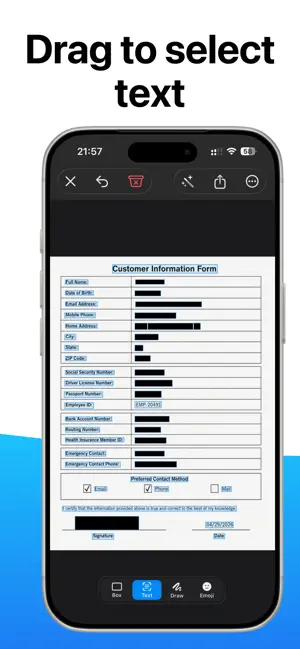
Hide names, faces, IDs, and other sensitive details in photos and PDFs in seconds. Drag over anything you want to conceal, choose a redaction style, and you're done. Everything happens on your iPhone and iPad. No account, no uploads, and no tracking. Your files never leave your device. WHAT YOU CAN DO • Drag over any area in an image or PDF and cover it with a solid color, pixelation, or blur • Place an emoji over a face or detail instead of a plain mask • Automatically detect names, faces, email addresses, phone numbers, postal addresses, and ID numbers for one-tap masking • Open and redact multi-page PDFs natively, keeping every page sharp at any zoom level • Import from Photos or Files, or redact straight from the Share sheet in any app • Work with JPG, PNG, and HEIC images • Move, resize, or remove masks whenever needed • Export finished files to Photos or Files as PNG, JPEG, or PDF • Remove hidden metadata such as location, camera model, and capture date from every exported file • Navigate smoothly with pinch-to-zoom and full undo and redo support FAST AND NATIVE Redacted is a native iPhone and iPad app built with Apple frameworks. It launches quickly, handles long PDFs efficiently, and stays smooth and responsive with large files. Panning and zooming feel natural by touch, with no web wrapper and no subscription nagging. PRIVATE BY DESIGN A redaction app should be trustworthy. With Redacted, your data goes nowhere. Detection runs entirely on your device using Apple's built-in image-analysis technology and a small on-device model. There is no processing server, and the app does not collect your data. Use Redacted to prepare medical records, legal documents, screenshots, forms, and other sensitive files before sharing them. WHO IT'S FOR • Anyone sharing a screenshot without exposing order numbers, email addresses, or personal details • Lawyers and paralegals removing client information from contracts and exhibits • Support teams cleaning up tickets before sharing them • Journalists protecting sources in sensitive documents • Healthcare and HR teams removing patient or employee information from forms • Parents blurring children's faces and license plates before posting photos
What’s new
Version 1.0.3 · Updated September 29, 2026
Bug fixes and improvements.
App privacy
The developer, BRAVA LABS SOCIEDAD LIMITADA, reported these privacy practices to Apple.
Data Not Collected
The developer does not collect any data from this app.
Alternatives to Redacted: Blur PDF & Photo
Looking for apps like Redacted: Blur PDF & Photo? Here are 6 similar apps on the App Store. The highest rated is Resecta: Redact PDFs (5.0/5), and all 6 are free to download.
-
 Redactly: Redact PDF
-
 Resecta: Redact PDFs
5.0
Resecta: Redact PDFs
5.0
-
 Redactify - Black Out PDF
1.0
Redactify - Black Out PDF
1.0
-
 Nullify - Redact & Blur Docs
-
 Blackout:Blur Redact Hide Info
5.0
Blackout:Blur Redact Hide Info
5.0
-
 Redact Zero
4.8
Redact Zero
4.8
| App | Rating | Price | Last updated | Compare |
|---|---|---|---|---|
| Redacted: Blur PDF & Photo | 5.0 / 5 (2 ratings) | Free | September 29, 2026 | |
| Redactly: Redact PDF | – | Free | Oct 17, 2026 | Compare |
| Resecta: Redact PDFs | 5.0 / 5 (3) | Free | Oct 27, 2026 | Compare |
| Redactify - Black Out PDF | 1.0 / 5 (1) | Free | Apr 17, 2026 | Compare |
| Nullify - Redact & Blur Docs | – | Free | Jul 25, 2026 | Compare |
| Blackout:Blur Redact Hide Info | 5.0 / 5 (1) | Free | Sep 11, 2026 | Compare |
| Redact Zero | 4.8 / 5 (5) | Free | Oct 21, 2026 | Compare |