

Taoxi Assistant
Bozhou Tongyu Xinsheng Information Technology Co., Ltd Utilities iPhoneiPadiPod touch
Taoxi Assistant is a free Utilities app for iPhone and iPad by Bozhou Tongyu Xinsheng Information Technology Co., Ltd. Requires iOS 15.0.
- Price
- Free
- on the App Store
- Size
- 11 MB
- Age 4+
- Updated
- Oct 19
- 2026 · v1.0.15
Screenshots



About Taoxi Assistant
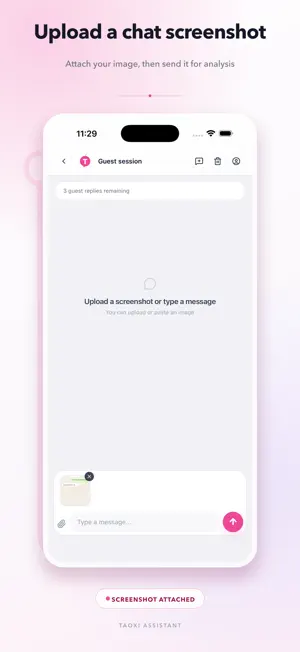
STOP GUESSING WHAT TO SAY NEXT. Taoxi Assistant turns a message or chat screenshot into a practical communication brief: what matters, how the tone is shifting, what the other person may be signaling, and which reply direction fits your goal. BUILT FOR CREATORS WHO LIVE IN THE DMs Your followers can tell the difference between a generic reply and one that feels personal. When conversations pile up, Taoxi helps streamers and creators: • Find the real point quickly • Spot tone, possible intent, and emotional signals • Keep fan conversations warm, consistent, and human • Compare different reply strategies before choosing one • Reply faster without sounding copied or robotic A CLEAR FRAMEWORK FOR MIXED SIGNALS When a conversation sits somewhere between friendship, flirting, and something more, overthinking takes over. Taoxi helps you: • Map the current relationship dynamic • Separate what was actually said from what you fear or hope it means • Notice momentum, ambiguity, boundaries, and potential red flags • Explore whether to warm things up, slow down, clarify, or step back • Prepare replies that are honest, confident, and appropriate to the context FROM SCREENSHOT TO NEXT MOVE 1. Type a message, upload a screenshot, or share an image to Taoxi from iPhone. 2. Review the key context, conversation signals, and suggested strategies. 3. Compare multiple reply options. 4. Edit, copy, and send only the reply that feels right to you. WHY TAOXI • Context-aware analysis instead of one-size-fits-all templates • Multiple reply directions for different goals and tones • Fast screenshot import with Share Extension and App Shortcuts • Standard Thai, English, Simplified Chinese, and Traditional Chinese output • Conversation history, account security, and usage management Taoxi Assistant is a communication and productivity tool. It does not read minds or guarantee relationship outcomes. AI analysis and reply suggestions are reference material; always review the content and make your own decision before sending. Content you choose to submit may be processed by the AI provider enabled for that feature to analyze context and prepare suggestions. It is not used for cross-app tracking. Digital memberships on iOS are available only through Apple In-App Purchase. Pricing, duration, and trial eligibility are shown by the App Store. Terms of Use (EULA): https://www.apple.com/legal/internet-services/itunes/dev/stdeula/ Privacy Policy: https://taoxizhuli.com/legal/privacy
What’s new
Version 1.0.15 · Updated October 19, 2026
Bug fixes.
App privacy
The developer, Bozhou Tongyu Xinsheng Information Technology Co., Ltd, reported these privacy practices to Apple.
Data Linked to You
The following data, which may be collected and linked to your identity, may be used for the following purposes:
- Usage Data: Product Interaction
- Purchases: Purchase History
- Contact Info: Email Address, Phone Number
- User Content: Photos or Videos, Customer Support, Other User Content
- Identifiers: User ID, Device ID
- Diagnostics: Other Diagnostic Data
Used for: Analytics, App Functionality
Alternatives to Taoxi Assistant
Looking for apps like Taoxi Assistant? Here are 6 similar apps on the App Store.


| App | Rating | Price | Last updated | Compare |
|---|---|---|---|---|
| Taoxi Assistant | – | Free | October 19, 2026 | |
| 青橙话术 - 主播直播话术库 | – | Free | Jun 6, 2026 | Compare |
| SnapInbox | – | Free | Jul 16, 2026 | Compare |
| SnapSort - Smart Screenshots | – | Free | Mar 24, 2026 | Compare |
| 谛听记 | – | Free | Sep 4, 2026 | Compare |
| SimulLink | – | Free | Jul 6, 2026 | Compare |
| 响铃 | – | Free | Jul 17, 2026 | Compare |
Compare Taoxi Assistant with the top alternatives: ratings, updates, ASO score and keyword gaps →