

Adinand Email Cleaner
Jyoti Burujpatte Productivity iPhoneiPadiPod touch
Adinand Email Cleaner is a free Productivity app for iPhone and iPad by Jyoti Burujpatte. Requires iOS 17.6. Updated October 29, 2026.
- Price
- Free
- on the App Store
- Size
- 14 MB
- Age 17+
- Updated
- Oct 29
- 2026 · v1.12
Screenshots


About Adinand Email Cleaner
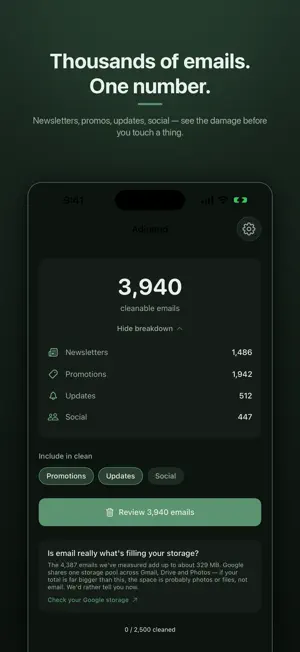
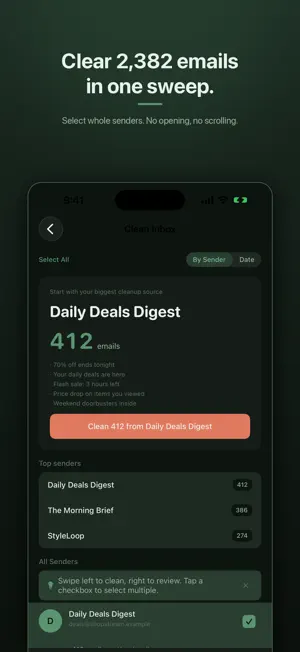
For a Gmail inbox too full to clean by hand, Adinand Email Cleaner clears the clutter sender by sender, on iPhone and iPad. It groups every email by sender, so you clear hundreds of one sender's emails in a single action instead of tapping them one at a time, and it shows how much space will free up after Trash clears — measured, not estimated. Is your Gmail inbox buried under newsletters, promotions, and bulk mail you never read? Finally see who is really filling it up — the shopping sites, the social networks, your bank, the newsletter you forgot you ever signed up for. Adinand Email Cleaner groups every email by sender, so you can spot the worst offenders and clear hundreds of unwanted emails at once — years of clutter gone in minutes instead of one message at a time. HOW IT WORKS Adinand Email Cleaner groups your Gmail by sender, instantly showing which newsletters and companies are taking up the most space. Pick the senders you no longer want and clean hundreds of emails with a single tap. You can also swipe a sender to clean or review them, or tap in to see their recent emails before you decide. UNSUBSCRIBE WHILE YOU CLEAN Spotted a newsletter you never signed up for? Tap Unsubscribe right from the sender row. Adinand Email Cleaner sends a standard one-click unsubscribe request (using the email's List-Unsubscribe header) so you stop getting future emails too. CLEANUP RULES After cleaning a sender, create a cleanup rule so their future emails are moved to Trash, archived, or labelled automatically. Or block a sender in one step. It's a real Gmail filter, set once — it keeps working even if you delete the app. PRIVACY FIRST — ALWAYS Adinand Email Cleaner never reads your email content. It only accesses email headers — sender addresses, subject lines, dates, and unsubscribe information — the minimum needed to show you who's sending what. No email body, no attachments, no message content — ever. There is no Adinand Email Cleaner server. Your phone talks to Gmail's servers over HTTPS, and — only when you tap Unsubscribe — to that sender's own unsubscribe link. Nothing else. No analytics, no tracking, no data collection. WHAT YOU CAN DO - Group emails by sender - Clean hundreds of emails with one tap - Unsubscribe from newsletters in one tap - Trash, archive, or label emails in bulk - Keep a sender's newest emails while you clean the rest - Create cleanup rules for repeat offenders - Block a sender so their future emails go to Trash - Search senders by name, email, or domain - Review a sender's recent emails before cleaning - Export your cleaning history, unsubscribe requests, and cleanup rules as CSV - Sign out and all local data is wiped instantly EMAILS GO TO TRASH — NOT DELETED PERMANENTLY Emails you trash are moved to Gmail Trash, where they stay for 30 days before Gmail removes them automatically. You can recover any email from Trash if you change your mind. FREE TO START Clean up to 2,500 emails at no cost, then 250 more every month — the free plan keeps working, it just goes at a slower pace. Unused monthly emails don't carry over. Unlock unlimited cleaning with Pro — monthly, annual, or a one-time lifetime purchase. WORKS WITH YOUR EXISTING GMAIL ACCOUNT Sign in with Google — no new account needed. Adinand Email Cleaner requests three Google OAuth scopes — to identify your account, read email metadata and move messages to Trash, archive them, or label them on your confirmation, and create cleanup filters on your behalf. Full details in the Privacy Policy. Gmail™ and Google™ are trademarks of Google LLC. Adinand Email Cleaner is an independent app and is not affiliated with, endorsed by, or sponsored by Google LLC. Privacy Policy: https://adinandemail.com/privacy-policy Terms of Use (EULA): https://adinandemail.com/terms-of-service
What’s new
Version 1.12 · Updated October 29, 2026
Adinand Email Cleaner now works with Outlook.com, Hotmail and work or school Microsoft accounts, as well as Gmail. Tap "Sign in with Microsoft" to connect one. Some organisations need an IT admin to approve it first. • Undo: for 30 seconds after you move emails to Trash or Archive, tap Undo to move them back. • Biggest emails (Gmail): see which emails use the most storage, largest first. • While you were away (Gmail): a card shows about how many emails from senders with cleanup rules went to Trash since your last visit. • On the free plan, you can get one quiet reminder when your monthly free emails are ready again. Turn it off in Settings.
App privacy
The developer, Jyoti Burujpatte, reported these privacy practices to Apple.
Data Linked to You
The following data, which may be collected and linked to your identity, may be used for the following purposes:
- Contact Info: Email Address, Name, Other User Contact Info
- User Content: Customer Support
- Identifiers: User ID, Device ID
- Diagnostics: Other Diagnostic Data
Used for: App Functionality
Data Not Linked to You
The following data, which may be collected but is not linked to your identity, may be used for the following purposes:
- Contact Info: Phone Number
Used for: App Functionality
Alternatives to Adinand Email Cleaner
Looking for apps like Adinand Email Cleaner? Here are 6 similar apps on the App Store. The highest rated is Email Cleaner: Clean Up Inbox (5.0/5), and all 6 are free to download.
-
 Swipe & Clean Mailbox - MailUp
-
 Houston Insider
4.7
-
 Inbox Zero: AI Mail Coach
-
 Email Cleaner: Clean Up Inbox
5.0
-
 MailBoom: Gmail Inbox Cleaner
5.0
-
 Princeton Point
| App | Rating | Price | Last updated | Compare |
|---|---|---|---|---|
| Adinand Email Cleaner | – | Free | October 29, 2026 | |
| Swipe & Clean Mailbox - MailUp | – | Free | Jan 15, 2026 | Compare |
| Houston Insider | 4.7 / 5 (15) | Free | Oct 19, 2026 | Compare |
| Inbox Zero: AI Mail Coach | – | Free | Jun 23, 2025 | Compare |
| Email Cleaner: Clean Up Inbox | 5.0 / 5 (1) | Free | Oct 5, 2026 | Compare |
| MailBoom: Gmail Inbox Cleaner | 5.0 / 5 (3) | Free | Oct 27, 2026 | Compare |
| Princeton Point | – | Free | Oct 29, 2026 | Compare |