

MailBoom: Gmail Inbox Cleaner
Eric Jorgensen LLC Productivity iPhoneiPadiPod touch
MailBoom: Gmail Inbox Cleaner is a free Productivity app for iPhone and iPad by Eric Jorgensen LLC. Rated 5.0/5 from 3 ratings. Requires iOS 26.0.
- Rating
- 5.0
- 3 ratings
- Price
- Free
- on the App Store
- Size
- 18 MB
- Age 4+
- Updated
- Sep 25
- 2026 · v4.13
Screenshots


About MailBoom: Gmail Inbox Cleaner
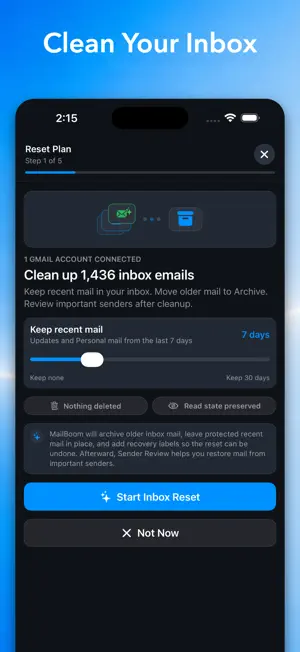
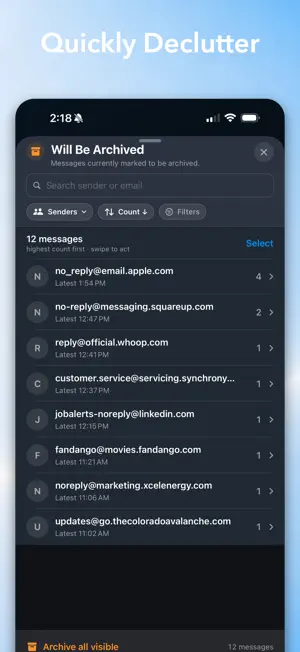
Clean up Gmail in minutes—without permanently deleting your email. MailBoom is a private Gmail inbox cleaner that groups messages by sender, helps you identify what matters, and lets you archive email in bulk. Clear years of inbox clutter while keeping every message searchable in Gmail. CLEAN EMAIL IN BULK See which senders are filling your inbox. Sort them into Keep or Archive, then process thousands of messages in batches instead of handling emails one at a time. NOTHING IS PERMANENTLY DELETED MailBoom safely removes archived messages from your inbox while keeping them available in Gmail. If you change your mind, undo your most recent cleanup and restore messages to your inbox. PRIVATE, ON-DEVICE PROCESSING Your email is processed directly on your device—not uploaded to MailBoom servers. We don’t collect, store, track, or sell your personal data. SMARTER INBOX ORGANIZATION On-device intelligence helps categorize senders, summarize inbox activity, and surface messages that may deserve your attention. Review individual emails whenever you want more context. BUILT FOR LARGE GMAIL INBOXES Whether you have hundreds or more than 100,000 emails, MailBoom helps you: - Group email by sender - Archive messages in bulk - Separate important email from clutter - Configure signals, never miss another important email - Search across senders and messages - Manage multiple Gmail accounts - Reach and maintain Inbox Zero - Keep archived email searchable TAKE BACK YOUR INBOX Stop scrolling through years of newsletters, notifications, promotions, and forgotten messages. MailBoom gives you a faster, safer way to organize Gmail while keeping you in control of every change. MailBoom requires a Gmail account and permission to read messages and manage labels. Changes are applied only when you approve them. AI-generated suggestions may occasionally be incorrect, so review important financial, legal, or deadline-related messages directly in Gmail. MailBoom is an independent application and is not affiliated with, endorsed by, or sponsored by Google LLC. Terms of Use: https://www.apple.com/legal/internet-services/itunes/dev/stdeula/ Privacy Policy: https://mailboom.io/privacy
What’s new
Version 4.13 · Updated September 25, 2026
A simpler start to a cleaner Gmail inbox. - Start large inbox cleanup before personalization, with fewer setup steps. - Explore email cleanup with a sample inbox, now easier to find on the welcome screen. - Keep your saved training, preferences, and cleanup progress when you sign out. Reconnect to continue where you left off. - Manage saved data from Settings, even while signed out.
App privacy
The developer, Eric Jorgensen LLC, reported these privacy practices to Apple.
Data Not Collected
The developer does not collect any data from this app.
Alternatives to MailBoom: Gmail Inbox Cleaner
Looking for apps like MailBoom: Gmail Inbox Cleaner? Here are 6 similar apps on the App Store. The highest rated is Calistra Viewer (5.0/5), and 5 of the 6 are free to download.
-
 MyMark – Sign PDF
-
 Vazian AI
-
 SmartFocus - App Blocker
-
 Calistra Viewer
5.0
-
 MyAdvo – Private AI Advisers
-
 TONT: Todo or Not Todo Groups
| App | Rating | Price | Last updated | Compare |
|---|---|---|---|---|
| MailBoom: Gmail Inbox Cleaner | 5.0 / 5 (3 ratings) | Free | September 25, 2026 | |
| MyMark – Sign PDF | – | Free | Jul 27, 2026 | Compare |
| Vazian AI | – | Free | Mar 6, 2026 | Compare |
| SmartFocus - App Blocker | – | Free | Mar 5, 2026 | Compare |
| Calistra Viewer | 5.0 / 5 (4) | Free | Aug 23, 2026 | Compare |
| MyAdvo – Private AI Advisers | – | Free | Apr 7, 2026 | Compare |
| TONT: Todo or Not Todo Groups | – | 6.99 USD | Oct 12, 2026 | Compare |