

Screenshot Organizer: ShotBox
MEHMET CANKER (TR) Productivity iPhoneiPadiPod touch
Screenshot Organizer: ShotBox is a free Productivity app for iPhone and iPad by MEHMET CANKER (TR). Requires iOS 15.0. Updated August 26, 2026.
- Price
- Free
- on the App Store
- Size
- 31 MB
- Age 4+
- Updated
- Aug 26
- 2026 · v1.8
Screenshots



About Screenshot Organizer: ShotBox
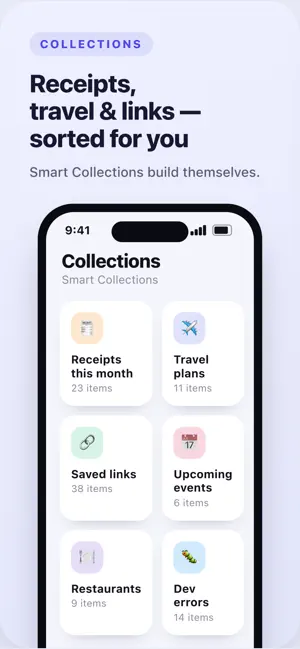
Screenshot Organizer turns the screenshots you already take into a clean, searchable library — automatically. Receipts, flights, links, ideas, error logs… find any of them in seconds. Everything runs on your device. No account, no sign-up, nothing uploaded. WHY YOU'LL LOVE IT • Instant text search — find any screenshot by the words inside it • On-device OCR — text is read locally with Apple's Vision engine • Smart categories — receipts, travel, shopping, work, links and more, sorted for you • Smart Collections — "Receipts this month", "Travel plans", "Saved links" build themselves • One-tap actions — add dates to your calendar, set reminders, copy details, open maps, call numbers • Reminders — set a reminder on any screenshot and get a notification right on time; tap to jump straight back to it • Detected details — prices, dates, addresses, order numbers and links pulled out automatically PRIVATE BY DESIGN • Your screenshots never leave your device • No cloud sync, no tracking, no ads • Delete everything indexed anytime • Works fully offline PREMIUM (optional) Unlock unlimited indexing and analysis, advanced actions, smart collections, data export & backup, and Smart AI summaries. Stop scrolling endlessly through your camera roll — Screenshot Organizer remembers everything for you. Subscriptions auto-renew unless cancelled at least 24 hours before the period ends; your Apple ID is charged for renewal. Manage or cancel anytime in your account settings. Terms of Use and Privacy Policy are available in the app.
What’s new
Version 1.8 · Updated August 26, 2026
• Labels — tag any screenshot, then filter your search by label • Create a label in one step, right from the screenshot • Star from the list and open the new Follow-ups collection • Fixed a crash that stopped screenshot details from opening As always, everything stays on your device — private.
App privacy
The developer, MEHMET CANKER (TR), reported these privacy practices to Apple.
Data Not Linked to You
The following data, which may be collected but is not linked to your identity, may be used for the following purposes:
- Diagnostics: Crash Data, Performance Data, Other Diagnostic Data
- User Content: Photos or Videos
Used for: Analytics, App Functionality, Other Purposes
Alternatives to Screenshot Organizer: ShotBox
Looking for apps like Screenshot Organizer: ShotBox? Here are 6 similar apps on the App Store. The highest rated is Stash: AI Screenshot Organizer (5.0/5), and all 6 are free to download.
-
 ScreenStack Screenshot Manager
-
 Stash: AI Screenshot Organizer
5.0
-
 Many+
4.7
-
 제이맘 - 우리 가족 육아 캘린더
-
 Screenshot Card Box
-
 ShotTidy
| App | Rating | Price | Last updated | Compare |
|---|---|---|---|---|
| Screenshot Organizer: ShotBox | – | Free | August 26, 2026 | |
| ScreenStack Screenshot Manager | – | Free | Oct 16, 2026 | Compare |
| Stash: AI Screenshot Organizer | 5.0 / 5 (6) | Free | Sep 12, 2026 | Compare |
| Many+ | 4.7 / 5 (3) | Free | Jul 8, 2026 | Compare |
| 제이맘 - 우리 가족 육아 캘린더 | – | Free | Jun 17, 2026 | Compare |
| Screenshot Card Box | – | Free | May 29, 2026 | Compare |
| ShotTidy | – | Free | Feb 9, 2026 | Compare |