

Timeline: Day Planner
Marlowe Emrys LLC Productivity iPhoneiPadiPod touch
Timeline: Day Planner is a free Productivity app for iPhone and iPad by Marlowe Emrys LLC. Rated 5.0/5 from 2 ratings. Requires iOS 15.0.
- Rating
- 5.0
- 2 ratings
- Price
- Free
- on the App Store
- Size
- 11 MB
- Age 4+
- Updated
- Oct 4
- 2026 · v1.0.11
Screenshots


About Timeline: Day Planner
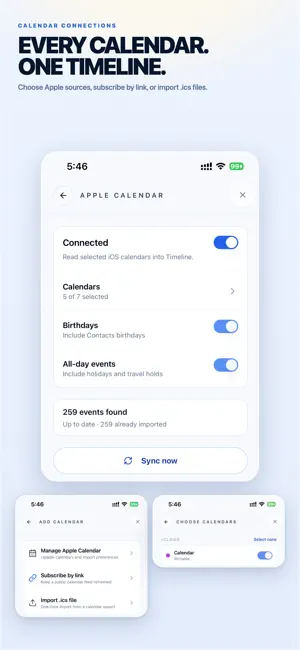
Timeline brings planning, availability sharing, and booking together in one private place. It syncs only when you choose to. Plan your day, your week, and your recurring routines in one calm view. Add Actions, Meetings, Events, and Reminders, then stay ahead with flexible notifications and a Home Screen widget that always shows what's next. DEVICE-FIRST & PRIVATE • Your events live on your device by default. No account is needed to get started. • Fully usable offline. Syncing is optional and only happens after you sign in. CALENDARS THAT WORK TOGETHER • Import selected Apple Calendars and keep imported events refreshed. • When allowed, mirror edits or deletions of Apple-origin imported events back to Apple Calendar. • Subscribe to .ics feeds or import .ics files. PLAN WITH CONFIDENCE • Recurring events with daily, weekly, monthly, and yearly patterns. • Multiple reminders per event, with per-event overrides. • Day, Week, and Month views built for quick scanning. • A Home Screen widget for your next event and the day ahead. OPTIONAL ACCOUNT FEATURES • Sign in for your public Time Signature, booking page, and booking requests. Members can also sync their full calendar across devices and Timeline web. • See event weather for confirmed physical venues without sharing your device location. • Turn on Sealed Sync to encrypt supported titles, notes, and details on your device before they leave it. Timeline keeps planning simple, private, and entirely in your control. Terms of Use (EULA): https://www.apple.com/legal/internet-services/itunes/dev/stdeula/ Privacy Policy: https://glassworkspace.com/timeline/privacy
What’s new
Version 1.0.11 · Updated October 4, 2026
Keep up to four Glass Workspace accounts on your iPhone, plus Local, and switch between them anytime. Each account keeps its own calendars, plan and sync. Plans are easier to compare, and Timeline shows which account you are subscribing for before Apple’s confirmation. You can move a subscription to another of your accounts after confirming your Apple Account. Repeating events are easier to manage: edit repeat counts, update the occurrences you choose, and mark items complete directly from your day. Saving a series now shows one clear progress notification. Notifications have a consistent appearance, and sync is more dependable for large calendars. Add Timeline opens Glass Workspace sign-in first. Removing a saved sign-in keeps that account’s events and calendars on this iPhone, ready when you sign in again.
App privacy
The developer, Marlowe Emrys LLC, reported these privacy practices to Apple.
Data Linked to You
The following data, which may be collected and linked to your identity, may be used for the following purposes:
- Contact Info: Name, Physical Address, Email Address, Phone Number
- User Content: Photos or Videos, Other User Content
- Purchases: Purchase History
- Identifiers: User ID, Device ID
- Diagnostics: Crash Data, Other Diagnostic Data
- Other Data: Other Data Types
Used for: Product Personalization, App Functionality
Alternatives to Timeline: Day Planner
Looking for apps like Timeline: Day Planner? Here are 6 similar apps on the App Store. The highest rated is MailWit: AI Email Assistant (5.0/5), and 5 of the 6 are free to download.
-
 WhatsNext task manager
-
 Scanner Pro: OCR & PDF Scanner
-
 MinTodo: Minimal To-Do List
-
 Calendar Work Pro
-
 MailWit: AI Email Assistant
5.0
-
 Simpli - write & clear
| App | Rating | Price | Last updated | Compare |
|---|---|---|---|---|
| Timeline: Day Planner | 5.0 / 5 (2 ratings) | Free | October 4, 2026 | |
| WhatsNext task manager | – | Free | Mar 15, 2026 | Compare |
| Scanner Pro: OCR & PDF Scanner | – | 19.99 USD | Dec 12, 2025 | Compare |
| MinTodo: Minimal To-Do List | – | Free | Oct 2, 2026 | Compare |
| Calendar Work Pro | – | Free | Sep 29, 2026 | Compare |
| MailWit: AI Email Assistant | 5.0 / 5 (2) | Free | Oct 21, 2026 | Compare |
| Simpli - write & clear | – | Free | Jun 25, 2026 | Compare |