

Bezant: Budget & Expense
Voon Bin Liew Finance iPhoneiPadiPod touchApple Watch
Bezant: Budget & Expense is a free Finance app for iPhone and iPad by Voon Bin Liew. Requires iOS 17.0. Updated September 18, 2026.
- Price
- Free
- on the App Store
- Size
- 7 MB
- Age 4+
- Updated
- Sep 18
- 2026 · v1.0
Screenshots

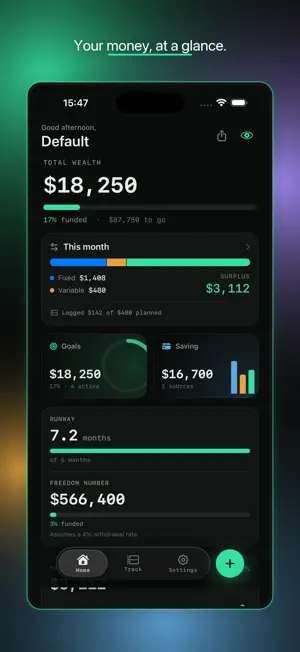


About Bezant: Budget & Expense
Bezant is a private, beautifully dark personal-finance app that does two things brilliantly: it helps you plan where your money should go — and makes logging where it actually went take a single tap. No account required. No bank linking. No ads. Every number stays on your device. — DESIGNED DARK — Bezant runs in a deep near-black palette by default, with monospaced numerals across every amount for a calm, precise, terminal-like feel. Pick one of five accent colors — Mint, Lime, Blue, Amber, Violet — and the entire app re-tints to match, right down to your Home Screen widgets and shared snapshots. — LOG SPENDING IN ONE TAP — The fastest journal you'll ever keep: • Home Screen widget — tap a chip ($5 / $10 / $20) to log instantly, without opening the app • Siri — "What's my net worth in Bezant?", "Log an expense…", "Quick log…" • In-app — tap the floating + (long-press for Quick Log); three taps on the number pad and you're done • Apple Watch — companion glance plus Digital Crown quick-log Captures from your widget, Siri, or Watch land in an Inbox so you can categorize them whenever it's convenient. — PLAN, DON'T JUST TRACK — Three tabs — Home, Track, Settings — plus a floating +. Goals and Saving are Home tiles, not extra tabs. There is no Home Coach and no Monday digest. • Set savings goals and give each a Top, Mid, or Low priority • Allocate your pool with Weighted, Strict priority, Equal split, or Manual; leftover from a funded goal spills to the rest • Plan recurring income and expenses, grouped by category; optional monthly budgets on Track ▸ Spending • Run "what-if" forecasts on Home to see when each goal lands • See your full picture on Home — total wealth, cash flow, goal funding, and money health — PRIVACY, BUILT IN — • Works with no account and no bank connection. Sign in with Apple is optional and stays on this device — it labels your local profile. It is not required to use the app, and it is not how restore works • Your data lives on your device, with optional sync through your own iCloud private database. End-to-end encryption of that CloudKit copy requires Advanced Data Protection on your Apple ID; without it, Apple can access that copy. We never can — we run no server • Tap the eye icon to hide all amounts ($••••). Face Unlock gates reveal and the app lock. The app switcher shows a blur of the live UI, not a readable snapshot — BUILT FOR REAL LIFE — • 4 display currencies (USD, MYR, EUR, SGD) with daily ECB reference rates — no hardcoded fallback. If a rate is missing, display and entry both use USD • Apple Watch companion: glance, Top Goal / Net Worth / Streak complications, and quick-log • Import past expenses from CSV • Export a monthly PDF: SURPLUS is that month's actuals; goal dates use your planning surplus • Back up and restore your whole setup as a single file • Keep separate profiles for different parts of your life Bezant is for people who want clarity without surrendering their financial data to a third party. Plan it, log it, own it. Requires iOS 17 or later.
App privacy
The developer, Voon Bin Liew, reported these privacy practices to Apple.
Data Not Collected
The developer does not collect any data from this app.
Alternatives to Bezant: Budget & Expense
Looking for apps like Bezant: Budget & Expense? Here are 6 similar apps on the App Store. The highest rated is Saldy: Budget & Expenses (5.0/5), and all 6 are free to download.
-
 Saldy: Budget & Expenses
5.0
Saldy: Budget & Expenses
5.0
-
 Wen Wallet
5.0
Wen Wallet
5.0
-
 Prism Pay
-
 Savebar – Savings Tracker
-
 Spent. — Spending Tracker
3.0
Spent. — Spending Tracker
3.0
-
 BudjetBuddy: 50/30/20 Budget
| App | Rating | Price | Last updated | Compare |
|---|---|---|---|---|
| Bezant: Budget & Expense | – | Free | September 18, 2026 | |
| Saldy: Budget & Expenses | 5.0 / 5 (4) | Free | Oct 22, 2026 | Compare |
| Wen Wallet | 5.0 / 5 (2) | Free | Oct 8, 2026 | Compare |
| Prism Pay | – | Free | Aug 13, 2026 | Compare |
| Savebar – Savings Tracker | – | Free | Oct 19, 2026 | Compare |
| Spent. — Spending Tracker | 3.0 / 5 (2) | Free | Oct 22, 2026 | Compare |
| BudjetBuddy: 50/30/20 Budget | – | Free | Sep 30, 2026 | Compare |