
SmartAlarm - Alarm Clock
SmartSense Inc. Utilities iPhoneiPadiPod touch
SmartAlarm - Alarm Clock is a free Utilities app for iPhone and iPad by SmartSense Inc. Requires iOS 26.1. Updated September 7, 2026.
- Price
- Free
- on the App Store
- Size
- 49 MB
- Age 4+
- Updated
- Sep 7
- 2026 · v1.0.7
Screenshots


About SmartAlarm - Alarm Clock
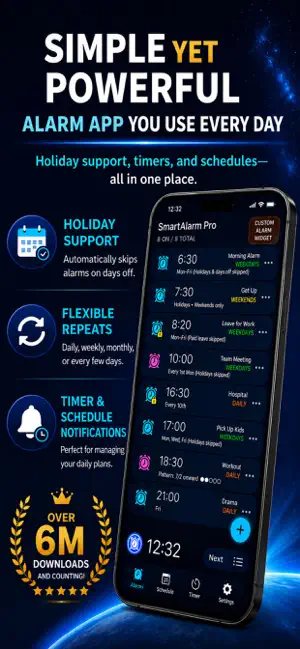
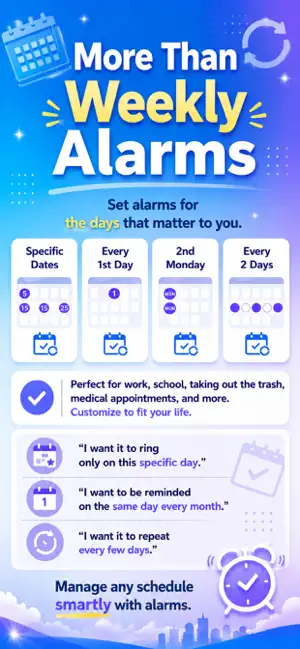
SmartAlarm, an alarm app with over 6 million downloads on Android, is now available on the App Store. SmartAlarm is a simple, easy-to-use, and feature-rich alarm clock app designed to support your daily wake-up routine and schedule management. In addition to standard alarms, SmartAlarm offers holiday-aware repeat settings, snooze, quick timers, stopwatch, schedule notifications, custom alarm sounds, and customizable backgrounds and theme colors. Main Features ■ US Holiday Support You can set repeating alarms to skip Japanese holidays and special days. This helps prevent alarms from ringing on holidays or long vacations, while also reducing the risk of forgetting to turn alarms back on after a break. ■ Date-Specific Alarms Set alarms for specific dates, including plans several days, weeks, or months ahead. SmartAlarm can also be used as a reminder for important events. ■ Flexible Repeat Settings In addition to weekly repeat settings, SmartAlarm supports practical scheduling options such as “every month on a specific day,” “the nth weekday of the month,” “every few days,” and custom repeat patterns. ■ Custom Alarm Sounds Use preset alarm sounds or select songs from your Music Library as custom alarm sounds. ■ Custom Alarm Screen When the app is open in the foreground and the device is not locked, SmartAlarm can show a custom alarm screen. You can adjust the size of the stop and snooze buttons to help prevent accidentally stopping an alarm. ■ Stop Challenges The custom alarm screen supports stop challenges such as number input, math problems, sequence tapping, and color/shape matching. These options can make alarms harder to stop too easily and help prevent oversleeping. ■ Alarm ON/OFF Lock Lock the ON/OFF switch for alarms you use regularly. This helps prevent accidentally disabling an important alarm. ■ Bulk Alarm Controls Turn multiple alarms ON or OFF, or change settings in bulk. This is useful when you need to quickly prevent alarms from ringing during meetings, classes, or other quiet situations. ■ Next Alarm Check Use the Next button on the alarm list to check the next alarm date and the time remaining until it rings. This helps you confirm that your alarms are set correctly. ■ Skip Next Alarm Skip only the next occurrence of a repeating alarm without turning the alarm OFF. This is useful when you wake up earlier than usual or your schedule changes. ■ Quick Timer Start timers quickly by selecting from preset timer durations. You can also add custom timer durations. ■ Schedule Notifications Use schedule notifications when you want to be reminded without playing an alarm sound. This is useful for appointments, outings, or situations where an alarm sound would not be appropriate. ■ Design Customization Customize the app with built-in background images, your own photos, and theme colors. About Custom Alarms Custom alarms work only when the app is open in the foreground and the device is not locked. To use a custom alarm, keep the app open until the alarm time. Because the device may be prevented from auto-locking while waiting for a custom alarm, please be careful when using this feature in public places. If the app is in the background or the device is locked when the alarm time arrives, SmartAlarm uses the standard iOS alarm presentation. In that case, the alarm volume follows the system “Ringtone and Alerts” volume, and vibration is enabled. Free Version and Pro Version The free version includes ads and supports up to 30 alarms. SmartAlarm Pro removes ads and increases the alarm limit. Permissions Some features may require the following permissions: • AlarmKit Used to schedule alarms. • Music Library Used to select songs as custom alarm sounds. • Tracking Permission May be requested to help show more relevant ads. SmartAlarm helps you manage daily alarms, timers, and schedules in a simple and practical way. Terms of Use: https://www.apple.com/legal/internet-services/itunes/dev/stdeula/
What’s new
Version 1.0.7 · Updated September 7, 2026
Fixed an issue where past dates remained in Special Day Settings.
App privacy
The developer, SmartSense Inc., reported these privacy practices to Apple.
Data Used to Track You
The following data may be used to track you across apps and websites owned by other companies:
- Identifiers: Device ID
- Usage Data: Product Interaction, Advertising Data
Data Linked to You
The following data, which may be collected and linked to your identity, may be used for the following purposes:
- Identifiers: Device ID
- Usage Data: Product Interaction, Advertising Data
Used for: Third-Party Advertising
Data Not Linked to You
The following data, which may be collected but is not linked to your identity, may be used for the following purposes:
- Diagnostics: Crash Data, Performance Data
Used for: App Functionality
Alternatives to SmartAlarm - Alarm Clock
Looking for apps like SmartAlarm - Alarm Clock? Here are 6 similar apps on the App Store. The highest rated is Repeating Alarm Clock: Weekly (4.8/5), and all 6 are free to download.
-
 Date Alarm & Shift Calendar
-
 AlarmSan: Voice Alarm
4.0
-
 Repeating Alarm Clock: Weekly
4.8
-
 Smart Alarm Clock - Alarmer
4.5
-
 Akaru: Alarm Clock & Calendar
-
 イヤホンアラーム目覚まし 電車・オフィス昼寝の寝過ごし防止
| App | Rating | Price | Last updated | Compare |
|---|---|---|---|---|
| SmartAlarm - Alarm Clock | – | Free | September 7, 2026 | |
| Date Alarm & Shift Calendar | – | Free | Oct 21, 2026 | Compare |
| AlarmSan: Voice Alarm | 4.0 / 5 (1) | Free | Jun 27, 2026 | Compare |
| Repeating Alarm Clock: Weekly | 4.8 / 5 (4) | Free | Oct 16, 2026 | Compare |
| Smart Alarm Clock - Alarmer | 4.5 / 5 (492) | Free | Sep 12, 2025 | Compare |
| Akaru: Alarm Clock & Calendar | – | Free | Oct 11, 2026 | Compare |
| イヤホンアラーム目覚まし 電車・オフィス昼寝の寝過ごし防止 | – | Free | Sep 17, 2026 | Compare |