

Akaru: Alarm Clock & Calendar
クリサク株式会社 Utilities iPhoneiPadiPod touch
Akaru: Alarm Clock & Calendar is a free Utilities app for iPhone and iPad by クリサク株式会社. Requires iOS 26.2. Updated October 11, 2026.
- Price
- Free
- on the App Store
- Size
- 40 MB
- Age 4+
- Updated
- Oct 11
- 2026 · v1.2.0
Screenshots
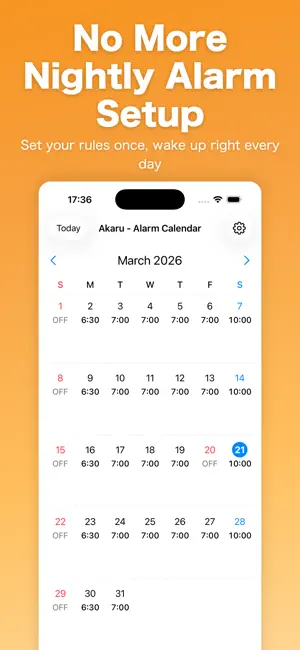


About Akaru: Alarm Clock & Calendar
No more setting alarms every night. Set your rules for days of the week and holidays once. Akaru wakes you at the right time each morning. For important mornings, use Serious Alarm. You have to walk to stop it: the alarm rings at intervals until you reach your step goal. --- Does this sound familiar? --- Checking tomorrow's shift before bed and resetting your alarm. Changing the time depending on whether you work at the office or at home. Occasionally forgetting, and oversleeping. If you wake at different times each day, ordinary alarm apps only offer weekly repeats. You still have to check every night or keep lots of alarms and switch them on and off. It's a hassle. Forget, and you're late. --- Set your rules once. Akaru takes care of the rest --- “Monday–Friday at 6:30, weekends at 8:00, holidays off.” Set that once, and each day's alarm is chosen automatically. Then just open the calendar. See exactly which days have alarms this month and at what time, displayed as numbers. Instead of colored dots or badges, you see the actual time: “6:30,” “8:00,” or “OFF.” Check at a glance, and rest easy. --- Key features --- [ Monthly alarm calendar ] • See each day's alarm time right on the calendar • Swipe to check the previous or next month • Holidays are automatically color-coded for easy recognition [ Set alarms with rules ] • Set different times for each day of the week in one place • Automatically turn alarms off on holidays or use a different time • Rule changes appear in the calendar immediately [ Walk to wake up with Serious Alarm ] • Set Serious Alarm for important days by date or day-of-week rule • Reach your step goal to complete your wake-up mission. As you walk, a dog pulls the sun along and the screen changes from night to morning • Alarms repeat at intervals until you reach your step goal and complete the mission • A notification the day before reminds you early that it's time to rest [ Rings in silent mode ] • Alarms sound even in silent mode • Customize snooze intervals and the number of snoozes for regular alarms --- Made for you --- • Shift workers with changing wake-up times: nurses, care workers, factory workers and restaurant staff • Hybrid workers who wake at different times for office and work-from-home days • Anyone who wants to sleep later on weekends and holidays • Parents whose drop-off and pick-up times for their children vary by weekday • Anyone tired of resetting alarms every night --- Premium --- Basic features are free. Serious Alarm includes 3 free trial uses plus 1 free use each month. All uses on the same date count as one. Unused monthly uses don't roll over. Premium (monthly, annual or one-time purchase) adds finer controls and Serious Alarm every morning: • Date overrides: tap a calendar date to change the time for that day only • Extra alarms: add as many alarms per day as you like, for mornings when getting up is hard • Nth-week rules: handle patterns like “early shift on the second and fourth Saturdays” • No ads: remove banner ads for a cleaner experience • Serious Alarm every morning: use it without a usage limit --- About subscriptions --- • Monthly and annual plans auto-renew. The one-time option requires a single purchase • Prices are as displayed in the App Store • Your Apple ID is charged after purchase confirmation • Subscriptions renew automatically unless auto-renewal is turned off at least 24 hours before the current period ends • Manage or cancel in your App Store account settings • Privacy Policy: https://kurisaku.com/privacypolicy • Terms of Use: https://sites.google.com/view/akaru-kurisaku/
What’s new
Version 1.2.0 · Updated October 11, 2026
Thank you for using Akaru. We've added Serious Alarm. • An alarm that repeats at regular intervals until you walk the required number of steps • A reminder on the day before you use Serious Alarm
App privacy
The developer, クリサク株式会社, reported these privacy practices to Apple.
Data Used to Track You
The following data may be used to track you across apps and websites owned by other companies:
- Identifiers: Device ID
- Usage Data: Product Interaction, Advertising Data
Data Not Linked to You
The following data, which may be collected but is not linked to your identity, may be used for the following purposes:
- Identifiers: Device ID
- Usage Data: Product Interaction, Advertising Data
- Diagnostics: Performance Data, Crash Data
Used for: Third-Party Advertising, Analytics, App Functionality
Alternatives to Akaru: Alarm Clock & Calendar
Looking for apps like Akaru: Alarm Clock & Calendar? Here are 6 similar apps on the App Store.
-
 Nestlist - Shopping List App
-
 Date Alarm & Shift Calendar
-
 Toki - Date & Time Alarm
-
 Forgotten Items Checker
-
 Post Drafts - SNS posting memo
-
 Tificat
| App | Rating | Price | Last updated | Compare |
|---|---|---|---|---|
| Akaru: Alarm Clock & Calendar | – | Free | October 11, 2026 | |
| Nestlist - Shopping List App | – | Free | Dec 11, 2025 | Compare |
| Date Alarm & Shift Calendar | – | Free | Oct 21, 2026 | Compare |
| Toki - Date & Time Alarm | – | Free | Oct 10, 2026 | Compare |
| Forgotten Items Checker | – | Free | Jul 14, 2026 | Compare |
| Post Drafts - SNS posting memo | – | Free | Aug 24, 2026 | Compare |
| Tificat | – | Free | May 31, 2026 | Compare |