

Pagecrisp: PDF Scanner
Robert Corbin Productivity iPhoneiPadiPod touch
Pagecrisp: PDF Scanner is a paid Productivity app for iPhone and iPad by Robert Corbin. Requires iOS 17.0. Updated September 29, 2026.
- Price
- 0.99 USD
- on the App Store
- Size
- 5 MB
- Age 4+
- Updated
- Sep 29
- 2026 · v3.0.1
Screenshots
About Pagecrisp: PDF Scanner
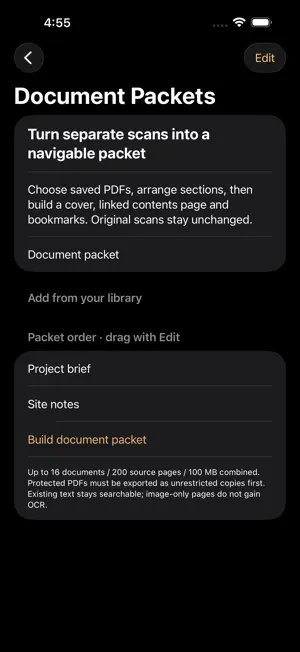
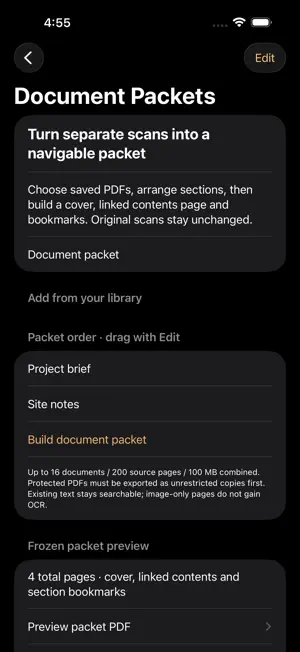
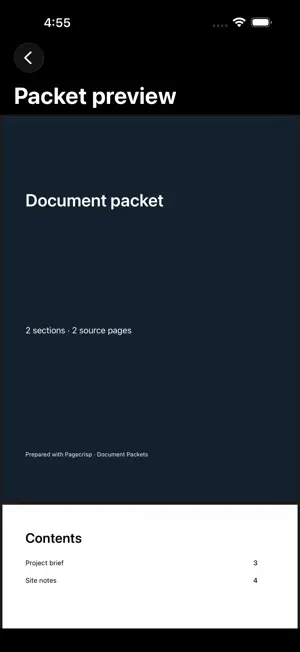
Turn separate scans into a navigable document packet. Choose saved PDFs, arrange sections and build a separate PDF with a cover, linked contents page and section bookmarks. HOW IT WORKS 1. Open the library → Build document packet. Enter a packet title and add saved PDFs. 2. Edit section titles and use Edit to reorder or remove sections. 3. Build the packet and review the total page count and PDF preview. 4. Export the packet PDF or share an assembly receipt with input and output hashes. The source scans remain unchanged. 5. Changing the title or sections clears the frozen result. Build again to refresh it. Use the existing camera, import, OCR and local PDF-library tools to prepare source documents, then assemble a packet for handoff without altering those originals. WHAT TO KNOW Up to 16 documents, 200 source pages, 50 MB per input and 100 MB combined. Encrypted or copying-restricted PDFs are rejected. Existing text and page orientation are preserved, but image-only pages do not gain OCR from packet assembly. Newly generated contents links and section bookmarks target the packet; verify pre-existing source links separately. The packet is exported as a separate file and is not automatically added to the scan library. Built for iPhone and iPad. No account required for this workflow.
What’s new
Version 3.0.1 · Updated September 29, 2026
A clearer App Store name and search details. No other changes in this update.
App privacy
The developer, Robert Corbin, reported these privacy practices to Apple.
Data Not Collected
The developer does not collect any data from this app.
Alternatives to Pagecrisp: PDF Scanner
Looking for apps like Pagecrisp: PDF Scanner? Here are 6 similar apps on the App Store.
-
 Bend Aid RT
-
 StudentFlow: Academic Planner
-
 Crisp Scan
-
 ScanLite: Scanner and OCR
-
 WarrantyFile
-
 VoicePad AI Dictation
| App | Rating | Price | Last updated | Compare |
|---|---|---|---|---|
| Pagecrisp: PDF Scanner | – | 0.99 USD | September 29, 2026 | |
| Bend Aid RT | – | Free | Sep 6, 2026 | Compare |
| StudentFlow: Academic Planner | – | Free | Aug 4, 2026 | Compare |
| Crisp Scan | – | Free | Sep 29, 2026 | Compare |
| ScanLite: Scanner and OCR | – | Free | Sep 17, 2026 | Compare |
| WarrantyFile | – | Free | Nov 18, 2025 | Compare |
| VoicePad AI Dictation | – | Free | May 14, 2026 | Compare |