

Font Wizard Pro: Font Manager
Samuel Stallin Kapembe Productivity iPhoneiPadiPod touch
Font Wizard Pro: Font Manager is a paid Productivity app for iPhone and iPad by Samuel Stallin Kapembe. Rated 1.0/5 from 1 ratings. Requires iOS 26.1.
- Rating
- 1.0
- 1 ratings
- Price
- 1.69 USD
- on the App Store
- Size
- 22 MB
- Age 17+
- Updated
- Jul 27
- 2026 · v4.14.0
Screenshots


About Font Wizard Pro: Font Manager
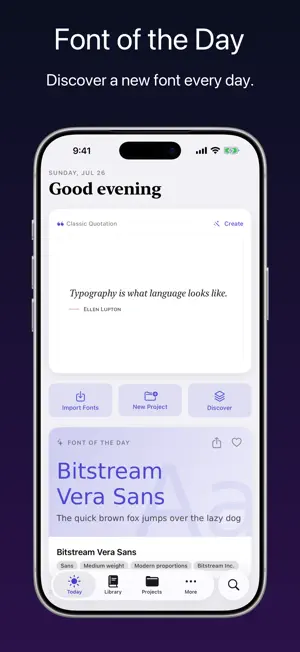
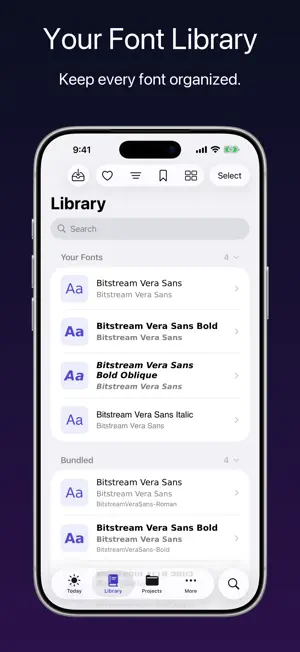
TAKE YOUR FONT LIBRARY EVERYWHERE. Font Wizard Pro turns your iPhone, iPad, or iPod touch into a clean, portable font workflow for real projects. Browse the web for fonts. Download OTF, TTF, OpenType, and TrueType files. Import your own font files. Preview each typeface, compare styles, build project sets, tag what matters, export ZIP files, and transfer fonts to your Mac or PC over Wi-Fi. Stop hunting through messy folders. Stop guessing from file names. Keep the right font ready. BUILT FOR - Designers building font sets for logos, posters, brand kits, apps, and websites. - Marketers managing typefaces for campaigns, ads, landing pages, and client work. - Developers keeping font files ready for apps, sites, prototypes, and interface tests. - Content creators comparing styles for thumbnails, videos, titles, and posts. - Students collecting fonts for projects, print work, and presentations. - Small business owners keeping brand fonts close without a folder hunt. - Writers and makers testing how words feel before choosing a style. FROM FONT CHAOS TO FONT CONTROL Font work slows down when files live everywhere: websites, downloads, email, Files, old folders, and past projects. You remember the look, but not the name. You saved it, but not where. You download the same font again. Then again. Font Wizard Pro gives every typeface a home. It helps you save, search, sort, preview, compare, export, and transfer your library from one clear place. PRO TOOLS FOR REAL FONT WORK BUILD A CLEAN FONT LIBRARY Import font files, preview styles, add tags, assign fonts to projects, repair missing items, and use install or activation options on compatible fonts and devices. On iOS, install fonts using a configuration profile. BROWSE, SAVE, AND DOWNLOAD Use the built-in browser to visit font sites and send useful files into downloads. Add font URLs by hand. Search your queue. Retry or resume failed items. Remove duplicates before they clutter. PREVIEW THE FONT, NOT JUST THE NAME A file name cannot show mood, shape, weight, spacing, or feel. A live preview can. See how each font looks before it reaches a design, deck, site, app, or client file. COMPARE WITH REAL WORDS Place typefaces side by side with your own sample text. Change size. Adjust alignment. Test a headline, label, sentence, or short note. Choose the font that reads best. ORGANIZE WITH TAGS AND PROJECTS Tag fonts by style, mood, client, brand, platform, or use case. Create project sets. Keep a logo set apart from a website set. Keep a campaign set apart from a client set. FIND THE RIGHT FONT FAST Search fonts and projects from one field. Open the match you need without scrolling through an endless list. EXPORT AND TRANSFER WITH WI-FI Export your library as a ZIP file. Use local Wi-Fi transfer with QR and link helpers to move font files to a nearby Mac or PC. Your mobile device becomes part of your workflow, not a storage trap. CONTROL YOUR SETUP Adjust appearance, haptics, reminders, download limits, telemetry, iCloud sync, storage cleanup, and Files sync in Settings. On compact screens, the More area keeps Browse, Transfer, Tags, Settings, and About easy to reach. WHY IT MATTERS The right font changes how words feel. It can make a message look calm, bold, warm, sharp, playful, serious, modern, or classic. But the right font cannot help if it is buried in a messy folder. Font Wizard Pro keeps your font library ready for action. Save it. Preview it. Tag it. Compare it. Put it in a project. Export it. Transfer it. Use it. USE AND TRADEMARK NOTES Font Wizard Pro ships with a redistributable font family for easy first use. The app works with font files you import or download from sources you choose. Only use fonts you have the right to copy, install, share, or use. Compatibility varies by font file, device, system version, and transfer setup. iPhone, iPad, iPod touch, Mac, and App Store are trademarks of Apple Inc., registered in the U.S. and other regions.
What’s new
Version 4.14.0 · Updated July 27, 2026
Daily inspiration and a smarter library. Added - A daily design quote on Today, cleaned up and credited, set in your font of the day. - A badge gallery showing every badge you can earn, including new streak, quiz, deck, and collection tiers. - Four quiz question types: classify the style, name the font, match the term, and spot the OpenType feature. - A browsable typography glossary with live samples from your own fonts, plus new entries. - "Aa" previews next to font names in the Library, project, and tag lists. - Collapsible font source sections and a one-tap loved-fonts filter in the Library. - Sort your fonts by Newest First or Oldest First. Improved - Your view, sorting, and filter choices are now remembered across launches. - OpenType features are grouped and properly named, including stylistic sets and character variants. - iPad and Mac layouts: multi-column browsing, readable column widths, and properly sized sheets. Fixed - Rotating your device no longer closes the font or project you were viewing. - Learn card samples render fully, without truncation or mismatched comparison sizes.
App privacy
The developer, Samuel Stallin Kapembe, reported these privacy practices to Apple.
Data Not Collected
The developer does not collect any data from this app.
Alternatives to Font Wizard Pro: Font Manager
Looking for apps like Font Wizard Pro: Font Manager? Here are 6 similar apps on the App Store. The highest rated is Inksightful: Journal archive (5.0/5), and 4 of the 6 are free to download.
-
 Subscription Bills : PAPERWORK
-
 Inksightful: Journal archive
5.0
Inksightful: Journal archive
5.0
-
 PomoPainter
-
 Thailand Holiday Year Calendar
5.0
Thailand Holiday Year Calendar
5.0
-
 WorkIntent - Time Tracker
-
 Markee: Read Later & Bookmarks
3.7
Markee: Read Later & Bookmarks
3.7
| App | Rating | Price | Last updated | Compare |
|---|---|---|---|---|
| Font Wizard Pro: Font Manager | 1.0 / 5 (1 rating) | 1.69 USD | July 27, 2026 | |
| Subscription Bills : PAPERWORK | – | 1.99 USD | Aug 19, 2026 | Compare |
| Inksightful: Journal archive | 5.0 / 5 (1) | Free | Jun 15, 2026 | Compare |
| PomoPainter | – | Free | Feb 11, 2026 | Compare |
| Thailand Holiday Year Calendar | 5.0 / 5 (2) | Free | Dec 26, 2025 | Compare |
| WorkIntent - Time Tracker | – | 12.99 USD | Sep 13, 2026 | Compare |
| Markee: Read Later & Bookmarks | 3.7 / 5 (3) | Free | Oct 13, 2026 | Compare |