

Musing Notes
RIPUL JAIN Productivity iPhoneiPadiPod touchMacApple Watch
Musing Notes is a free Productivity app for iPhone and iPad by RIPUL JAIN. Rated 4.9/5 from 8 ratings. Requires iOS 26.0. Updated August 26, 2026.
- Rating
- 4.9
- 8 ratings
- Price
- Free
- on the App Store
- Size
- 10 MB
- Age 4+
- Updated
- Aug 26
- 2026 · v4.0.5
Screenshots


About Musing Notes
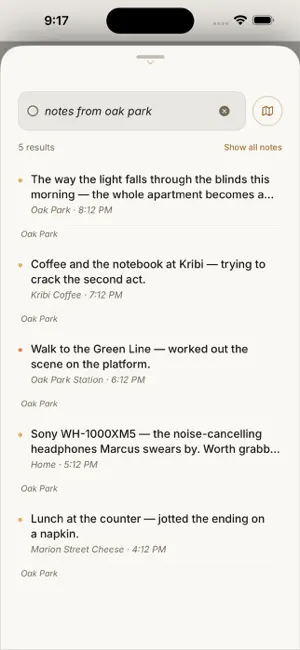
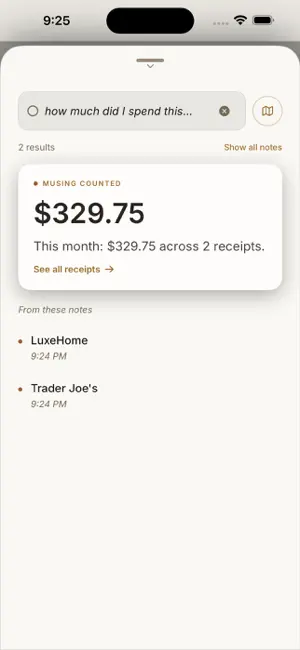
Some ideas arrive half-formed — at a café in the rain, on a walk, the moment before sleep. Musing is built to catch them, and to give them back to you exactly when you need them. You don't file. You don't sort. You don't tag. You just write — or speak — and move on. Later, you find any note the way you'd ask a friend: "What was that wine I liked?" "The café idea when it was raining." FREE · PRIVATE · ON YOUR DEVICE Musing is free — no ads, no account, no subscription, no credits. Capture, context, photos, and text search work on every supported device. Ask answers and semantic recall use Apple Intelligence on devices that support it — otherwise search stays useful without them. No server ever reads a note by default, nothing trains a model, and notes sync only through your own private iCloud — across iPhone, Apple Watch, and Mac. SEARCH BY THE MOMENT Every note quietly keeps its moment — neighborhood, weather, time of day, the kind of place. So you can ask by it: "coffee shop notes," "rainy day ideas," "notes from Traverse City," "late night notes" — or combined, "receipts from Oak Park last month." Instant, even offline. JUST ASK Search isn't a keyword box. Type what you're looking for in plain language and Musing surfaces the notes that match — even when you don't remember the exact words. Questions get answers grounded in your own notes, citing the notes they came from. CATCH IT HOWEVER IT ARRIVES Type a quick thought. On iPhone, speak a voice note — transcribed on-device; on Mac, dictate straight into the composer. Attach a photo and Musing reads what's there on your device — a receipt gets its total, a grocery list becomes a checklist. Check in to save a place. On iPhone: Home Screen widget, Siri, Shortcuts, Apple Watch, and the share sheet. On Mac: a menu-bar capture that never needs the main window, plus a Reading Room for asking and browsing. YOUR PLACES A quiet map of everywhere you've paused — most-visited spots and neighborhoods, on iPhone and in a dedicated Places window on Mac. WHEN YOU RETURN Walk back into a café you've written in and that note can meet you on Home — a quiet lock-screen banner too, if you ask. A year on, an echo: Time Recall brings the note back with the weather and the street still on it. Place Recall and Time Recall (Echoes) stay off until you turn them on. Hospitals, clinics, and places of worship stay unnamed, and never trigger. FIVE ROOMS TO WRITE IN Choose how Musing feels. Foolscap, Inkwell, Verdant, Dusk, or Harbor. Light and dark work in every theme. BRING YOUR OWN AI SERVICE Optional Pro Mode lets you paste your own OpenAI or Anthropic API key so Ask and web lookup can use GPT or Claude. You choose the provider, use your own account, and keep usage and costs under your control. Off by default — not a paid upgrade inside Musing. Capture, search, and tags stay on this device. Nothing trains a model. PRIVATE BY DESIGN Sensitive places — clinics, hospitals, places of worship — are never named. Every context signal has an off switch. NO FOLDERS. NO FEED. NO BUSYWORK. Capture a half-formed idea. Find it later. Free. Private. Yours.
Ratings & reviews
4.9
8 ratings
What’s new
Version 4.0.5 · Updated August 26, 2026
4.0.4 — Notes that return when you do • Place Recall — when you walk back into a café, park, bookstore, or anywhere you've written before, Home shows your past note. Optional lock-screen banner. Sensitive places (hospitals, clinics, places of worship) stay quiet and unnamed. • Time Recall (Echoes) — resurface notes on 1-, 2-, and 3-year anniversaries, half-year milestones, and past seasons — with the original weather and place. Optional quiet 9:00 AM banner, at most twice a week. • Both features are opt-in (Settings → Memory), computed entirely on-device, and off by default. • Pro Mode web search refinements and ambient search polish. Capture a thought. Find it later — or let it find you.
App privacy
The developer, RIPUL JAIN, reported these privacy practices to Apple.
Data Not Linked to You
The following data, which may be collected but is not linked to your identity, may be used for the following purposes:
- User Content: Photos or Videos, Other User Content
Used for: App Functionality
Alternatives to Musing Notes
Looking for apps like Musing Notes? Here are 6 similar apps on the App Store. The highest rated is FlatNote (5.0/5), and all 6 are free to download.
-
 FlatNote
5.0
FlatNote
5.0
-
 NoteWorthy: Smart Notes
-
 ProjectBoard: Projects & Tasks
-
 Differently: ADHD Productivity
5.0
Differently: ADHD Productivity
5.0
-
 Sift — Notes You Can Find
-
 Joeny Notes
5.0
Joeny Notes
5.0
| App | Rating | Price | Last updated | Compare |
|---|---|---|---|---|
| Musing Notes | 4.9 / 5 (8 ratings) | Free | August 26, 2026 | |
| FlatNote | 5.0 / 5 (1) | Free | Oct 8, 2026 | Compare |
| NoteWorthy: Smart Notes | – | Free | Sep 29, 2026 | Compare |
| ProjectBoard: Projects & Tasks | – | Free | Aug 8, 2026 | Compare |
| Differently: ADHD Productivity | 5.0 / 5 (1) | Free | Oct 21, 2026 | Compare |
| Sift — Notes You Can Find | – | Free | Oct 1, 2026 | Compare |
| Joeny Notes | 5.0 / 5 (1) | Free | Oct 5, 2026 | Compare |
Compare Musing Notes with the top alternatives: ratings, updates, ASO score and keyword gaps →